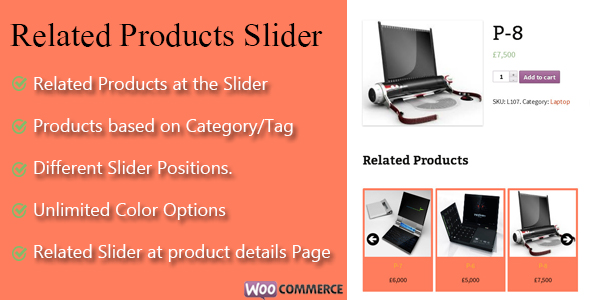
WooCommerce Related Products Slider Ecommerce is a WordPress plugin that replaces or supplements WooCommerce’s default related products output with a configurable carousel, drawing its items automatically from the same product category or tag as the product being viewed. It is aimed at store owners and freelancers who want more control over placement, styling and slider behaviour than the native WooCommerce template offers, without commissioning custom development. The plugin is sold on ThemeForest for $24 and requires WooCommerce to be installed and active before it will do anything.
The developer does not publish a sales figure for the item, and there is no rating data to report, so this review is based entirely on the documented feature set rather than on adoption or user feedback.
What the WooCommerce Related Products Slider Actually Controls
The core behaviour is automatic product selection. Rather than requiring a hand-curated list of recommendations for every item in the catalogue, the plugin reads the category and tag relationships already stored in WooCommerce and builds the slider from those. For a store with hundreds of SKUs that is the difference between a feature that stays maintained and one that quietly rots after the first fifty products are added.
Beyond selection, the plugin exposes a set of presentation controls that map fairly closely onto what a carousel needs:
- Placement on the product detail page. The slider can be positioned at different points within the single product template, so it can sit above the tabs, below them, or elsewhere in the layout depending on how the theme structures that page.
- Volume control. Up to 50 related products can be loaded into a single slider, with a separate setting for how many are visible at once — the documented maximum for simultaneous display is six.
- Navigation behaviour. The number of items advanced per click is configurable, as is the transition speed, so the carousel can be tuned to feel brisk or deliberate.
- Autoplay toggle. Auto-scrolling can be switched on or off, which matters for stores where a moving element competes with the add-to-cart area for attention.
- Dimensions. Slider width and height, plus the height of each product image, are set from the admin rather than from CSS.
- Colour and text. The background colour, product name and product price text can be adjusted, and the slider heading itself is editable.
- Master on/off switch. The entire plugin can be disabled from the admin without deactivating it, which is a small convenience when troubleshooting conflicts.
The template or theme of the slider is described as customisable, though the listing does not specify whether that means a settings-driven skin system, an override file, or direct template editing. That distinction matters a great deal to anyone planning to match a bespoke design, and buyers should check the online documentation and demo before assuming a particular workflow.
Where This Fits, and Where It Does Not
The strongest fit is a WooCommerce store running a stock or lightly customised theme where the default related products row is either absent, unstyled, or limited to a fixed number of items. Themes vary considerably in how they render related products — some show four in a plain grid, some show none at all — and a plugin that takes over that slot with a controllable carousel solves a common, concrete annoyance without touching theme files.
It also suits stores organised around a clean category or tag taxonomy. Because selection is driven by those relationships, the quality of the recommendations is a direct function of how disciplined the catalogue structure is. A store where every product sits in one broad category will get sliders full of loosely connected items; a store with granular categories and meaningful tags will get genuinely relevant groupings.
Freelancers and small agencies building stores on a budget are a natural audience. At $24 for use on a single project, the plugin is cheaper than an hour of development time spent writing a custom related products query and wiring up a slider library, and it hands the client an admin screen they can adjust themselves.
Where it is the wrong choice: stores that need algorithmic or behavioural recommendations. The plugin has no purchase-history logic, no collaborative filtering, no “customers who bought this also bought” data, and no cross-sell or upsell integration. If the goal is to increase average order value through data-driven suggestion, this tool will not deliver it — it is a presentation layer over taxonomy, not a recommendation engine. Stores with a very small catalogue are also poorly served, since a category with three products cannot fill a slider configured to show six.
Strengths and Limitations
Strengths
- Automatic population from categories and tags removes ongoing manual curation, which is the single biggest reason related-product features get abandoned on large catalogues.
- Genuinely useful granularity in the admin: item count, visible count, advance-per-click, speed, autoplay, dimensions and image height are all exposed as settings rather than hard-coded.
- Placement flexibility on the product detail page means it can be fitted around an existing theme layout instead of forcing a redesign.
- Low price relative to the alternative of custom development, with the source files included under a standard ThemeForest licence.
- Documentation and a live demo are both linked from the listing, so the interface can be inspected before purchase.
Limitations
- Recommendations are taxonomy-only. There is no behavioural, historical or cross-sell logic, so relevance depends entirely on how well the store’s categories and tags are maintained.
- The plugin is a hard dependency on WooCommerce and does nothing on its own — an obvious point, but one that rules it out for non-commerce WordPress sites entirely.
- No sales count or rating is published on the listing, so there is no independent signal about how the plugin behaves on live, high-traffic stores or how responsive the developer is to support requests.
- The changelog is thin: three entries, the most recent of which is a minor compatibility fix for a newer WooCommerce version. That is not evidence of neglect, but it is not evidence of active feature development either.
- Customisation of the slider template is claimed but not specified. Without knowing whether that means settings, CSS overrides or template files, buyers cannot predict how much work a heavily branded design will require.
- No stated support for variable product display nuances, lazy loading, or performance handling on catalogues where a 50-item slider could add significant DOM weight — the vendor does not address page-weight implications at all.
How It Compares to the Wider Category
Related products functionality in WooCommerce generally comes from one of four places: the theme itself, a general-purpose product slider plugin, a broader WooCommerce enhancement suite, or custom code. This plugin occupies a narrow slot — it does one job, and it does that job with a specific set of controls.
Against a theme’s built-in related products output, the advantage is control. Themes typically hard-code the number of items, the layout and the styling, and changing any of it means editing templates or writing CSS. This plugin moves those decisions into the admin. The trade-off is an extra dependency: a theme update cannot break the theme’s own related products, but it can conflict with a plugin that hooks into the same template area.
Against general-purpose slider plugins, the difference is automation. A generic slider can display any products, but someone has to decide which ones and keep that list current. This plugin’s value is that nobody has to. Conversely, a generic slider will usually offer more layout variety, more animation options and better-tested performance on large sites, because it is maintained by a team whose entire business depends on it.
Against full WooCommerce enhancement suites, the comparison is scope and price. Suites bundle related products alongside wishlists, quick view, AJAX filters and more, usually at a higher price and with a heavier footprint. Buyers who only need the slider will find the focused plugin cheaper and lighter; buyers who will eventually want the other features may prefer to consolidate.
Frequently Asked Questions
Does WooCommerce Related Products Slider work without WooCommerce installed?
No. WooCommerce must be installed and activated first, because the plugin extends WooCommerce’s product data and hooks into its single product template. On a site without WooCommerce there is nothing for it to read or display, so it will have no effect. This is stated explicitly in the vendor’s installation requirements.
How many related products can be shown at once?
Up to 50 products can be loaded into a single slider, and a maximum of six can be visible at a glance. The number advanced per click is set separately, so a slider showing six items could move one, three or six at a time. Both values are configured from the admin panel.
Can the slider be styled to match an existing theme?
Partially. Background colour, product name and price text, slider title, width, height and image height are all editable from the admin. The vendor also states the slider theme or template can be customised, but the listing does not explain the mechanism. Anyone needing a heavily bespoke design should review the documentation first.
Where does the slider appear on the product page?
On the product detail page, at a position chosen from the admin. The plugin does not place sliders on category archives, the shop page, the homepage or in widget areas based on the documented settings. Stores wanting related products in those locations would need a different tool or additional customisation.
Verdict
WooCommerce Related Products Slider Ecommerce is a focused, inexpensive utility for stores that want a controllable related products carousel driven by existing category and tag data. It is a sensible purchase for a freelancer or small agency building a WooCommerce store on a stock theme, where the native related products output is inadequate and the budget does not stretch to custom development. It is also reasonable for a store owner comfortable working in the WordPress admin who wants to adjust slider behaviour without touching code.
It is not the right choice for anyone seeking behavioural recommendations, cross-sells or upsells, nor for stores with a shallow catalogue where category-based selection will produce weak matches. The absence of published sales figures and ratings means there is no community track record to lean on, and the sparse changelog suggests a plugin that is maintained rather than actively developed. Buyers should treat the demo and documentation as the primary evidence, and confirm the customisation workflow before committing to a design that depends on it.