WooCommerce Bulk Price and Stock Quantity Update Ecommerce is a small WordPress plugin, sold on ThemeForest for $29, that lets a store administrator change the prices and stock levels of many products at once instead of editing each product individually. It supports adjustments across the whole catalogue or restricted to a single product category, and those adjustments can be expressed either as a fixed amount or as a percentage. It is aimed at store owners and agencies running WooCommerce shops where supplier costs, margins or inventory counts shift often enough that manual editing becomes the bottleneck.
The plugin comes from a small independent developer rather than a large commercial plugin house, and the listing does not disclose a sales figure, so there is no meaningful social proof to weigh here. Judgements in this review rest on the feature set the vendor documents and on how that feature set compares with what WooCommerce itself already provides.
What the WooCommerce Bulk Price and Stock Quantity Update plugin actually does
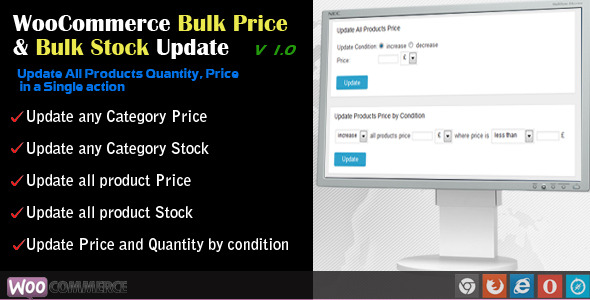
The core operation is a catalogue-wide price change. An administrator can apply an increase or a decrease to every product in the store in a single action, choosing between a flat currency amount and a percentage. That distinction matters more than it first appears: a flat amount preserves the absolute gap between products, while a percentage preserves the relative gap. A shop raising prices to absorb a shipping cost increase usually wants the flat amount; a shop passing on a supplier’s across-the-board percentage rise wants the percentage.
Category scoping is the second capability, and it is the one that turns a blunt instrument into something usable. Rather than treating the catalogue as one block, the plugin allows the operation to be limited to products in a chosen category. A store that sells both electronics and consumables can raise prices on one without touching the other, which is the realistic scenario for most multi-department shops.
Stock quantity works on the same two axes. Inventory can be updated for the entire catalogue at once, or category by category. This is useful after a physical stocktake, when the recorded counts in WooCommerce have drifted from what is actually on the shelf and need to be reset in bulk rather than product by product.
The listing also describes a conditional mode for both price and stock, where the update is applied only to products meeting a stated condition, and the direction of that update can be an increase or a decrease. The vendor does not spell out in the listing precisely which conditions are available, so the exact scope of this feature cannot be verified from the product page alone; a buyer for whom conditional logic is the deciding factor should confirm the specifics before purchase.
Where this fits, and where it does not
The clearest fit is a WooCommerce store with a catalogue large enough that manual editing is painful but not so complex that it needs a full data-management workflow. A few hundred to a few thousand simple products, a handful of categories, and a pricing policy that changes a few times a year is the sweet spot. Seasonal repricing, annual inflation adjustments, currency-driven cost changes and post-stocktake inventory corrections all map directly onto what the plugin does.
Freelancers and small agencies maintaining client stores are a second natural audience. The plugin is cheap enough to install on a client site without a procurement conversation, and the category-scoped update means an agency can fix a client’s pricing error quickly without exporting and reimporting the product table.
It is the wrong choice for stores whose products are predominantly variable products with per-variation pricing and stock, because the listing describes updates at the product level and does not document variation-level handling. Stores that need scheduled or recurring price changes should also look elsewhere: the plugin performs an update when triggered, and nothing in the listing suggests automation, cron scheduling or rule-based triggers that fire on their own. Finally, a store that already runs a full product import and export workflow, or that manages inventory in an external ERP, will likely find its existing tooling covers the same ground with more control.
Strengths and limitations
Strengths
- The two adjustment modes, fixed amount and percentage, cover the two genuinely different pricing intentions rather than forcing one model on every situation.
- Category scoping on both price and stock prevents the most common bulk-edit accident, which is changing products that should have been left alone.
- Price and stock can be handled from the same plugin, so a store does not need two separate utilities for two closely related maintenance tasks.
- The price point is low enough that it is a rounding error against the labour cost of editing a catalogue by hand.
- Documentation is published online, which means the workflow can be assessed before purchase rather than after.
Limitations
- The listing gives no indication of an undo or rollback function. Bulk price changes are destructive by nature, and without a snapshot or reversal path, a mistake applied to the whole catalogue has to be corrected by applying the inverse operation and hoping the arithmetic lands exactly where it started.
- Conditional updates are advertised but not specified. The vendor does not state which fields can be tested, which makes the feature impossible to evaluate from the product page.
- There is no documented handling of variable products at the variation level, which excludes a significant share of real WooCommerce catalogues.
- No scheduling or automation is described, so every update is a manual, on-demand action.
- No sales count is disclosed, which means there is no track record to lean on when assessing reliability or ongoing maintenance.
- Large catalogues may hit server execution time limits during a catalogue-wide operation; the listing does not mention batching, background processing or progress handling, so this is an open question for stores with tens of thousands of products.
How it compares with the alternatives
There are three broad routes to the same outcome, and the right one depends on frequency and precision rather than on price.
The first is WooCommerce’s own built-in bulk edit. It handles simple field changes across selected products and costs nothing, but it does not perform arithmetic. It can set a sale price to a fixed value; it cannot raise every price in a category by eight percent. Anyone whose need is genuinely arithmetic will outgrow the native tool immediately, and that is the gap this plugin fills.
The second route is a spreadsheet round trip: export products to CSV, adjust the price and stock columns in a spreadsheet, reimport. This is more powerful than any single-purpose plugin because formulas can express arbitrarily complex logic, and it leaves a file on disk that acts as a record of what changed. The trade-off is friction. Every update becomes an export, an edit and an import, and the import step carries its own risk of mismatched columns or overwritten fields.
The third route is a broader product-management plugin or an inventory system, which typically bundles bulk editing alongside import, export, scheduling and reporting. These cost more and take longer to configure, but they are the sensible choice for a store that expects to be doing bulk operations regularly rather than occasionally.
Against that landscape, this plugin occupies a narrow but legitimate position: cheaper and faster than a spreadsheet round trip, more capable than native bulk edit, and far simpler than a full management suite. It is a single-purpose tool, and it should be judged as one.
Frequently Asked Questions
Can this plugin change prices by a percentage rather than a fixed amount?
Yes. The plugin supports both a fixed currency amount and a percentage, and either can be applied as an increase or a decrease. Percentage changes preserve the relative margin between products, while fixed amounts preserve the absolute difference, so the choice affects the shape of the resulting price list.
Does it work on variable products and their individual variations?
The vendor does not document variation-level handling, and the listing describes updates in terms of products and categories. Stores built mainly on variable products should confirm this directly with the developer before buying, because treating a variable product as a single unit produces different results from editing each variation.
Is there a way to undo a bulk price update?
No rollback feature is described in the listing. Because a catalogue-wide change overwrites existing prices, the practical safeguard is to record current values before running an update, or to test the operation on a single category first and verify the result before applying it store-wide.
Can updates be scheduled to run automatically?
Nothing in the product listing indicates scheduling, cron jobs or automatic triggers. Updates appear to run when an administrator initiates them. Stores that need prices to change on a date or on a recurring cycle would need a different tool or a custom solution built around WooCommerce’s own hooks.
Verdict
WooCommerce Bulk Price and Stock Quantity Update Ecommerce is worth buying for a store owner or agency running a straightforward catalogue of simple products who needs arithmetic bulk edits and category-level control without paying for a full product-management suite. The $29 price is easy to justify against even a single afternoon of manual editing. It is not the right purchase for stores dominated by variable products, for anyone who needs scheduled price changes, or for shops already comfortable with a CSV export and import workflow that offers more power and a natural audit trail. The absence of a documented rollback and the vague conditional-update feature are the two things to press the developer on before committing, particularly for a large catalogue where a misapplied change would be expensive to reverse.