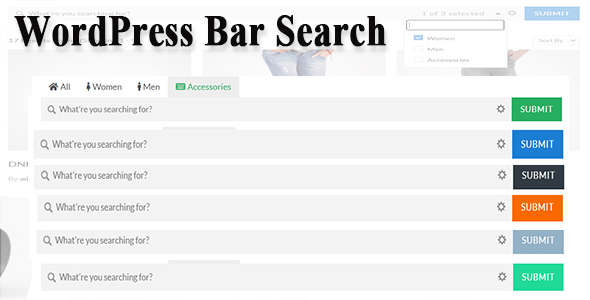
WordPress Bar Search utilities are plugins that replace the standard single-input search box with a configurable multi-field search form, and this one — sold on ThemeForest for $17 under the name WordPress Bar Search — is a form builder for exactly that job. It lets a site owner assemble search interfaces from tabs, dropdowns, radio buttons and top-bar fields, filtering by category, tag, taxonomy, author, date and sort order rather than by keyword alone. It is aimed at directory sites, blogs with deep archives and small catalogues where a plain keyword box returns too much noise.
What the search form builder actually lets a site owner assemble
The core of the product is a drag-and-drop form builder. Fields are dragged into a search bar, reordered, and saved as a named form; the vendor states that the number of forms is unlimited, so a site can run a different bar on the homepage, a category archive and a custom post type archive without duplicating configuration by hand. Forms can be exported and imported, which matters more than it first appears — it is the difference between rebuilding a complex layout on a staging site and simply moving it across.
Six field types are available, and each can be rendered in several ways. A field can appear as a tab, a dropdown, a radio group, or an inline input sitting in the top bar. That flexibility is the product’s main selling point: the same taxonomy filter can behave as a visible tab strip on a wide desktop layout and collapse into a select menu on narrower screens, without the site owner maintaining two separate forms. Dropdowns can be set to single or multiple selection, and the vendor lists checkbox, radio, select, multiselect and colour field display types for the fields themselves.
Filtering extends beyond the obvious taxonomy and tag controls. The listing names author, date, sort and order-by as searchable dimensions, and states support for Advanced Custom Fields (in the Pro version) plus arbitrary custom post types and custom taxonomies. For a site built around custom content — a property listing, a staff directory, a recipe archive — that is the difference between a search bar that understands the content model and one that only greps titles.
Autocomplete suggestion is included, which reduces the friction of typing into a category field with hundreds of terms. Tabs can carry Font Awesome icons, and tab alignment is configurable. On the output side, results can be displayed either through the active theme’s own search template or through the plugin’s grid layout, and the results page itself is configurable. Two shortcodes are provided — one for the search form and one for the grid — and a widget is also available, so placement does not depend on the theme’s widget areas being generous.
Where a multi-field search bar earns its place, and where it does not
The strongest fit is a content-heavy site whose visitors arrive with a faceted question rather than a keyword. A blog with a decade of archives benefits from letting readers narrow by category, author and date in one pass. A directory of businesses, courses or listings benefits from taxonomy and custom-field filters. A multi-author publication benefits from the author field. In each case the alternative — a single input plus WordPress’s default relevance ordering — forces visitors to guess at keywords the site owner never wrote down.
A second fit is the agency or freelancer building the same kind of site repeatedly. Import and export of forms, plus shortcode and widget placement, means a search layout can be treated as a reusable asset rather than rebuilt per project. The $17 price sits comfortably inside a project budget in a way that a bespoke search implementation rarely does.
The wrong choice is a small brochure site with a handful of pages. There, a multi-field bar adds visual weight and configuration overhead for a search function almost nobody uses, because visitors navigate by menu. It is also a poor fit for a storefront: the feature set is built around posts, taxonomies and custom fields, not WooCommerce product attributes, price ranges or stock status, and the listing makes no claim to commerce integration. Sites that need genuine faceted e-commerce filtering should look at dedicated WooCommerce filter plugins instead.
Strengths and limitations of this WordPress advanced search plugin
Strengths
- Genuinely configurable form layout. Tabs, dropdowns, radio groups and inline top-bar inputs cover most search UI patterns without custom code, and the drag-and-drop builder keeps that within reach of a non-developer.
- Custom content model support. Any post type, any custom taxonomy and Advanced Custom Fields (Pro) means the filters map to how the site is actually structured.
- Reusable across a site and across projects. Unlimited forms plus import/export turns a carefully tuned search bar into something portable.
- Two output paths. Choosing between the theme’s search template and the plugin’s own grid lets a site keep visual consistency or adopt a denser results layout, whichever suits.
- Low entry price. At $17 the plugin costs less than an hour of most freelancers’ time, which changes the build-versus-buy calculation.
Limitations
- Advanced Custom Fields support is gated behind Pro. The ThemeForest listing is the standard edition; sites whose filters depend on ACF fields will need the upgrade, and the total cost is therefore higher than the headline price suggests.
- No commerce filtering. There is no stated support for product attributes, price ranges or variation filtering, so WooCommerce sites are largely out of scope.
- Sparse public documentation and no disclosed sales history. The vendor does not publish a sales count on the listing, and the download page sits on the developer’s own site rather than in the ThemeForest item description. Buyers should expect to evaluate the plugin largely from the live preview.
- WordPress 4.9+ compatibility is stated, but nothing newer is specified. The listing does not name a tested-up-to version, so compatibility with current WordPress releases has to be verified before purchase.
- Result layout is a choice between two options, not a template system. Sites wanting a heavily bespoke results page — map view, infinite scroll, saved searches — will still be writing code.
How it compares with the wider category of WordPress search plugins
The general category splits into three camps. The first is search-relevance plugins, which leave the input box alone and improve what comes back — better indexing, fuzzy matching, weighted results. The second is faceted filter plugins, usually built for WooCommerce, which attach filter sidebars to product archives. The third is form builders like this one, which redesign the input itself so that visitors express a structured query instead of a keyword.
Against relevance plugins, WordPress Bar Search utilities solve a different problem: they do not claim to improve matching, they reduce ambiguity before the query is sent. A site that already has good search results but a confusing entry point gets more from this than from an indexing overhaul. Against faceted filter plugins, the trade-off is scope — this one is broader in content types and narrower in commerce. Against building a custom search form by hand, the calculation is straightforward: a developer can replicate the output with a custom WP_Query and some taxonomy dropdowns, but the drag-and-drop builder, the import/export and the shortcode layer represent several hours of work that $17 replaces.
The honest positioning is that this is a mid-weight tool. It is more capable than a free search-form snippet and considerably less capable than an enterprise search platform with its own index. Buyers should judge it on whether the six field types and the four display modes cover their content model — if they do, the price is easy to justify.
Frequently Asked Questions
What is WordPress Bar Search and what does it do?
It is a WordPress plugin that replaces the default search input with a configurable multi-field search bar. Site owners build forms by dragging fields into place, then choose whether each field appears as a tab, dropdown, radio group or inline input. Filters can target categories, tags, taxonomies, authors, dates and sort order, and results display either through the theme or a built-in grid.
Does WordPress Bar Search work with custom post types and custom taxonomies?
Yes. The vendor states support for any post type and any custom taxonomy, which is the feature that makes the plugin usable on directory, listing and portfolio sites rather than only on standard blog archives. Advanced Custom Fields filtering is also supported, but only in the Pro edition rather than the standard ThemeForest listing.
Can the search bar be placed with a shortcode or a widget?
Both. The plugin ships a shortcode for the search form and a second shortcode for the grid of results, and it also registers a widget. That means the bar can sit inside page content, in a sidebar, in a header widget area or inside a page builder module that accepts shortcodes, without editing theme templates.
Is WordPress Bar Search suitable for a WooCommerce store?
Probably not. The feature set is organised around posts, taxonomies and custom fields, and the listing makes no mention of product attributes, price filtering, variation handling or stock status. Stores needing faceted product filtering are better served by a plugin built specifically for WooCommerce, even though this one is cheaper.
Verdict: who should buy this and who should not
WordPress Bar Search utilities of this kind suit site owners and freelancers running content-rich WordPress sites — directories, multi-author blogs, listing archives — where visitors need to narrow results by more than a keyword and where the content model already uses custom post types or taxonomies. The drag-and-drop builder, unlimited forms and import/export justify the $17 for anyone who would otherwise hand-code a search form, and the developer, Zufusion, maintains a download page for updates. Buyers whose filters depend on Advanced Custom Fields should budget for the Pro upgrade rather than the ThemeForest price alone. It is the wrong purchase for brochure sites with little content to search, for WooCommerce stores needing product filters, and for anyone who requires a published compatibility statement covering recent WordPress releases before committing.