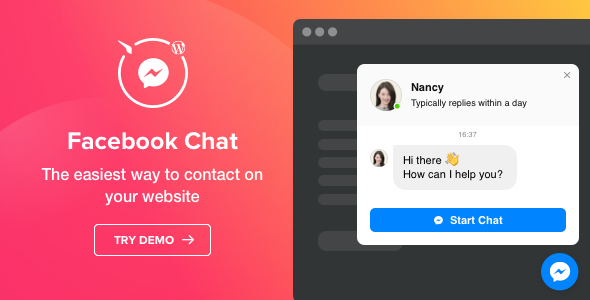
Facebook Chat – Facebook Messenger for WordPress is a commercial plugin from Elfsight that places a Facebook Messenger chat entry point on a WordPress site, letting visitors start a conversation on the vendor’s Facebook page without leaving the site first. It is aimed at small businesses, service providers and agencies that already handle enquiries through a Facebook page and want a low-friction Facebook Chat Social Networking touchpoint on their website. The plugin sells on ThemeForest for $24 as a single-site-style item with a shortcode-driven widget builder.
The concept is straightforward: Facebook already hosts a messaging inbox that many small teams monitor on their phones, so routing website visitors into that inbox avoids adding a second support channel. What the plugin actually delivers is the presentation layer — the bubble, the header, the welcome message and the rules that decide when and to whom the widget appears. The conversation itself still lives inside Facebook, which is both the product’s main convenience and its main constraint.
What the Facebook Chat Social Networking widget actually does
The core mechanic is a shortcode. After installing and activating the plugin, a widget is built in a live editor and the resulting shortcode is pasted into a page, post or template. That is the whole integration model, and it means the widget can be dropped anywhere a shortcode renders — including page builders that support shortcode blocks.
Three placement modes for different page layouts
The chat can appear as a floating bubble that follows the visitor down the page, as an embedded bubble sitting inline in the content, or as an embedded chat window that renders as an already-open conversation panel. The floating variant is the conventional choice for a site-wide contact affordance; the embedded window suits a dedicated “contact” or “support” page where the chat is the primary content rather than a persistent overlay. Alignment for the floating bubble can be set left, right or centre.
Targeting rules that go beyond a simple toggle
Display can be limited to all pages, a hand-picked list of pages, or all pages minus an exclusion list. There is a separate switch for mobile, so the widget can be suppressed on small screens where a floating bubble competes with navigation and content. Audience targeting distinguishes all visitors, new visitors and returning visitors, which allows a first-time visitor to see a welcome-oriented chat while a returning visitor sees a different configuration.
Four triggers for opening the conversation
Rather than waiting for a click, the chat can be configured to open automatically after a set time on the site, after a set time on a specific page, at a defined scroll depth, or on exit intent — the moment the cursor moves toward the browser chrome. Exit intent is the most aggressive of the four and the one most likely to annoy; time-on-page is the gentler default. The plugin also supports scheduling, so the widget can be shown only on particular days and hours, with a time zone setting added in version 1.2.0.
Visual customisation and message content
The bubble icon can be drawn from a built-in library or replaced with a custom uploaded image, and the bubble text is editable. The chat header carries a page picture, a name and a caption; the picture can be the default page image, a library option or a custom upload, and the name is editable. The caption can be one of five preset reply-time options or free text. The welcome message supports formatting and links, the Start Chat button label is editable, and the Messenger icon on that button can be switched off. Four elements — bubble background, bubble icon, header background and button — are individually colourable, and the button shape can move between square and rounded.
Notification behaviour
When a reply arrives, the visitor can be alerted with a badge on the chat bubble, a change to the browser tab title, or both. This matters more than it sounds: a chat window that has been collapsed is easy to forget, and a tab-title notification reaches the visitor even when they have scrolled away from the widget.
Where this plugin fits, and where it does not
The strongest fit is a small business whose Facebook page is already the real inbox — a salon, a tradesperson, a boutique agency, a local clinic — where staff answer messages on a phone and have no appetite for a separate helpdesk. Adding the widget turns existing web traffic into Messenger threads without changing anyone’s workflow, and the page-level targeting means it can be kept off checkout flows, legal pages and other places where a chat prompt is unwelcome.
A second good fit is the campaign or landing page. Because display can be restricted to specific pages and to new visitors only, the widget can be used as a conversion aid on a single promotional page while the rest of the site stays clean. The exit-intent trigger is designed for exactly this scenario.
It is the wrong choice where the site needs a genuine owned support channel. The plugin does not store conversations, does not provide agent assignment, canned replies, analytics on chat volume, or a fallback for visitors who do not use Facebook. Anyone who wants chat transcripts inside WordPress, or who needs to serve visitors who refuse Facebook products, should be looking at a self-hosted live chat system instead. Sites in regulated industries with strict data-processing requirements will also find the Facebook dependency difficult to justify.
Strengths and limitations
Strengths
- Genuinely broad presentation controls for a $24 item: three placement modes, four triggers, audience segmentation, scheduling and per-element colouring all ship in the box.
- Shortcode output means the widget works with classic pages, Gutenberg shortcode blocks and most page builders without a dedicated integration.
- The mobile visibility switch and page-level include/exclude rules prevent the widget from becoming a site-wide nuisance.
- Reply-time captions and a formatted welcome message let the business set expectations before the visitor commits to a conversation.
- Elfsight maintains a public wishlist for feature requests and has shipped incremental updates, including a scheduling time zone and mobile display controls.
Limitations
- Every conversation happens on Facebook. There is no message history, no transcript export and no reporting inside WordPress, so the plugin cannot answer the question “how many chats did we get last month?”
- Visitors without a Facebook account, or unwilling to log in, have no path to contact through the widget. The plugin offers no email or form fallback.
- The changelog is thin and infrequent — three releases between August 2019 and June 2021 — so buyers should not expect rapid iteration.
- Customisation is limited to what the widget editor exposes. Anything beyond the four colourable elements or the header layout requires template-level work.
- The vendor does not publish a sales count or rating for this item on the listing, so there is no independent signal of adoption to weigh.
How it compares with the wider chat widget category
The alternatives fall into three groups. The first is the free official Facebook page plugin, which embeds a Messenger entry point at no cost but offers almost none of the targeting, trigger or styling control described above; the paid item’s value is concentrated almost entirely in that control layer. The second group is general-purpose live chat and chatbot services, which keep transcripts, support multiple agents and route across channels — considerably more capable, but priced on subscriptions and heavier to set up. The third is lightweight floating-contact plugins that surface a phone number, WhatsApp link or email form; these are cheaper in effort but do not connect to an inbox the business already monitors.
Positioned against those, this plugin occupies a narrow but coherent slot: it is for teams that have decided Messenger is the channel and want the website to feed it intelligently. Judged as a Facebook Chat Social Networking tool rather than as a helpdesk, its feature depth is competitive for the price. Judged as a support platform, it is not one, and buyers expecting reporting or multi-agent routing will be disappointed.
Frequently Asked Questions
Can the Facebook chat window be embedded inside a page rather than floating?
Yes. The plugin offers an Embed Chat Window position that renders the conversation as an open panel directly in the content area where the shortcode is placed. This suits a dedicated contact or support page where the chat is the main element rather than a persistent overlay on every screen.
Does the chat widget show a notification when a new message arrives?
Yes, in two configurable ways. A badge can appear on the chat bubble, the browser tab title can change, or both can be enabled together. The setting is controlled from the widget editor, and the tab-title option is the more noticeable of the two when a visitor has scrolled away.
Can the Facebook Messenger chat be limited to certain pages or visitors?
Yes. Display can be set to all pages, a selected list, or all pages with exclusions applied. Separately, the widget can target all visitors, new visitors only, or returning visitors only, and it can be hidden on mobile devices entirely.
Does the plugin work if the business does not have a Facebook page?
No. The widget connects to a Facebook page and the conversation runs through Messenger, so an active page is a prerequisite. Sites without one would need a different chat solution, such as a self-hosted live chat plugin or a simple contact form.
Verdict: who should buy this Facebook Chat Social Networking plugin
Buy it if the business already lives in Facebook Messenger, wants a website entry point that can be tuned by page, audience and trigger, and is comfortable paying $24 for presentation controls rather than for a support platform. It is a sensible purchase for freelancers building small business sites and for agencies that need a repeatable, shortcode-based chat widget across several client projects.
Do not buy it if the requirement is an owned support channel with transcripts, agent routing or analytics, or if a meaningful share of the audience cannot or will not use Facebook. In those cases the money is better spent on a self-hosted live chat system or a multi-channel helpdesk, even at a higher monthly cost. The plugin does one job well and is honest about its boundaries; the mistake would be buying it for a job it was never built to do.