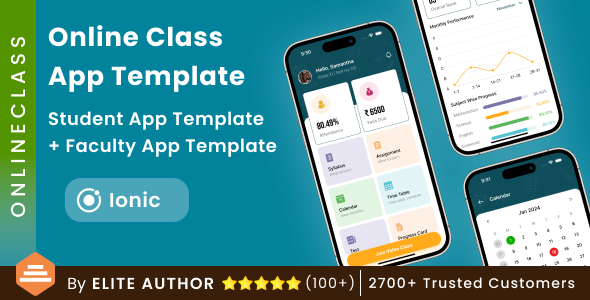
The Online Class App Template Mobile package from RenderCodeTechnology is a two-app Ionic starter kit for building an education platform, comprising a student-facing app and a separate faculty app. It ships as full source code with pre-built screens for attendance, fees, timetables, exams, leaderboards and doubt submission, and is aimed at developers and agencies who want a working UI foundation rather than a finished learning management system. Buyers should expect a front-end shell that still needs a backend, branding and testing before release.
What the Online Class App Template Mobile actually includes
The purchase delivers two distinct Ionic projects rather than one app with role-based views. That separation is the most consequential design decision in the package, because it means the student and faculty experiences can be themed, released and versioned independently. Each screen is split into its own file and component, which keeps the codebase navigable when several developers work on it at once.
The student app covers the administrative surface of a school or coaching institute: splash screen, login and sign-up, a home dashboard, attendance, fees due, a syllabus list with detail pages, assignments, a calendar, a timetable, tests, a leaderboard, an answer sheet, a progress card, leave applications, a doubt-submission screen, video lectures, notifications and account settings. The faculty app mirrors the administrative side, giving instructors a place to manage the same data. For anyone scoping an MVP, that screen inventory is the real value — it represents weeks of layout and navigation work already resolved.
Several smaller implementation details matter more than they first appear. A tab view pattern handles primary navigation, alert dialogs are wired for confirmations, and the whole thing is built on Ionic, so a single codebase targets both Android and iOS. The listing also mentions React Native in its feature list, which conflicts with the Ionic framing elsewhere; the vendor does not clearly reconcile the two, and buyers should confirm the actual framework before purchase. Version 1.1, released in July 2024, was a minor bug-fix update following the January 2024 initial release.
Where this template fits and where it does not
The strongest fit is a coaching institute, tuition centre or small edtech startup that needs a branded mobile presence quickly. A freelance developer quoting a school app can use the student and faculty split to demonstrate scope in a proposal, then build the API layer against screens that already exist. Agencies delivering multiple similar clients benefit too, since the component structure makes white-labelling and re-theming realistic.
It also suits teams building a test-prep or competition-style product. The leaderboard, answer sheet and progress card screens point toward an exam-centric experience rather than a course-marketplace one, which aligns with the byju and coursera clone tags the vendor applies.
It is the wrong choice for anyone expecting a working product out of the box. There is no backend, no authentication service, no payment processing for the fees screen and no video hosting. All of that is integration work the buyer performs. Institutions without in-house developers should also look elsewhere, because a template at this price assumes someone comfortable reading Ionic source code. Finally, projects needing deep LMS features — SCORM packages, granular role permissions, live class scheduling with a provider like Zoom or Jitsi — will find the screens are placeholders awaiting that logic.
Strengths and limitations of the Online Class App Template Mobile
Strengths
- Two complete app shells — student and faculty — for a single $34 licence, which is unusual at this price point.
- Broad screen coverage across attendance, fees, syllabus, timetable, exams and progress reporting, reducing the blank-canvas problem considerably.
- One file per page and component, making the codebase easier to hand over or extend than monolithic templates.
- Cross-platform output from Ionic, so Android and iOS builds come from the same source.
- Free lifetime updates stated by the vendor, with a documented version history showing at least one maintenance release.
- APK demos for both apps are linked from the listing, so the UI can be evaluated on a real device before buying.
Limitations
- No backend, database schema or API documentation is included; every screen needs wiring to real data.
- The feature list names React Native while the product is described as Ionic — an inconsistency the vendor does not explain, and a genuine risk for buyers who care which framework they inherit.
- The stated refund policy excludes downloaded items, so there is no safety net once the files are in hand.
- No sales figures are disclosed on the listing, which makes it hard to gauge adoption or community size.
- Documentation is referenced but its depth is not described; setup guidance for Ionic tooling and build pipelines is not confirmed.
- Education-specific compliance — student data privacy, accessibility of exam screens, parental consent flows — is not addressed anywhere in the listing.
How it compares with other education app templates
Templates in this category generally fall into three groups: single-role student apps, admin dashboards built for the web, and full LMS scripts with a backend attached. This product sits in a narrower niche — paired native-style mobile apps with no server component. Against single-role templates it offers more surface area for the same money, since the faculty app would otherwise be a separate purchase or a build from scratch.
Against full LMS scripts, the trade-off is reversed. Those packages typically bundle a database, an admin panel and user management, but their mobile output is often a wrapped web view that feels sluggish and un-native. This template gives a genuinely mobile-first interface with tab navigation and native transitions, at the cost of doing the server work yourself. For a team with backend capability, that is the better trade. For a team without it, the LMS script is the safer route despite the weaker mobile experience.
Compared with generic UI kits, the difference is domain specificity. A general Ionic component library provides buttons and cards; this provides an attendance register, a fees-due screen and an answer sheet already laid out. That specificity is worth paying for if the domain matches, and worth nothing if it does not.
Frequently Asked Questions
Is the Online Class App Template Mobile a complete app or just a UI?
It is a UI template, not a functioning learning platform. The package contains front-end screens and navigation for both student and faculty apps, but no backend, database or authentication service. Buyers must connect every screen to their own API and add business logic before the apps can be used by real students or staff.
Which framework does it use, Ionic or React Native?
The product title and description say Ionic, while the feature list mentions React Native, and the vendor does not resolve the conflict. This matters because the two frameworks have different toolchains and skill requirements. Buyers should confirm with the developer through the item comments before purchasing, or inspect the demo APK and documentation first.
Can the template be rebranded for a coaching institute or school?
Yes, rebranding is the intended use. Because each page and component sits in its own file, colours, logos, typography and screen order can be changed without restructuring the project. The two apps can also be released separately under different names, which suits institutes that want distinct student and staff downloads on the app stores.
Does the Online Class App Template Mobile support online exams and live classes?
It provides exam-related screens — a test screen, answer sheet, leaderboard and progress card — but the scoring, timing and question-delivery logic are not included. Video lecture screens exist as layouts without a hosting or streaming integration. Live class functionality with a provider such as Zoom or Jitsi would need to be built and connected by the buyer.
Verdict on the Online Class App Template Mobile
This is a sensible buy for Ionic developers, freelancers and small agencies who need a credible education app foundation and are equipped to build the backend behind it. The paired student and faculty apps, the breadth of screens and the per-component file structure justify the $34 outlay for that audience, and RenderCodeTechnology has at least shipped a maintenance update since launch. Buyers without development resources, or those wanting a turnkey LMS, should not purchase it — the integration burden is real and the no-refund policy on downloads removes any recovery path. The framework inconsistency in the listing is worth clarifying before checkout, but for the right team the Online Class App Template Mobile is a practical head start rather than a finished product.