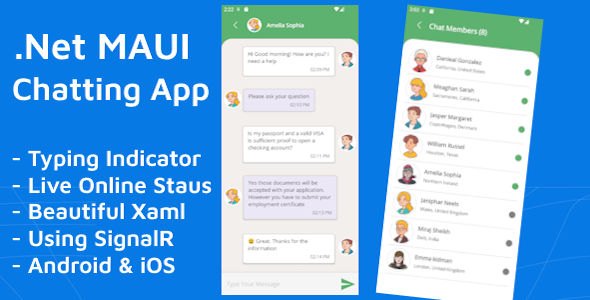
The .NET MAUI Chatting App Communication Tools template is a source-code package for building a real-time messaging client and server in Microsoft’s cross-platform framework. It pairs a XAML front end structured around the MVVM pattern with a C# SignalR hub on the server side, and it targets iOS, Android and Windows from a single codebase. It suits .NET developers and agencies who want a working chat foundation to extend rather than a hosted messaging service, and it is available on ThemeForest for $33.
What the .NET MAUI Chatting App Communication Tools Template Actually Delivers
The listing is short, so it is worth being precise about what the purchase contains. Buyers receive the full source code and project documentation. There is no hosted backend, no admin dashboard and no managed service — the SignalR hub is code that runs wherever the buyer deploys it. That distinction matters more than any single feature, because it determines who gets value from the package and who does not.
Real-time messaging built on SignalR
SignalR handles the transport layer for live message delivery, including the connection management and fallback behaviour that WebSocket implementations normally require developers to write by hand. For a buyer, this means the hardest part of a chat application — keeping messages flowing reliably between clients through a persistent connection — is already solved in the supplied code. The hub is written in C#, so the same language and toolchain cover both ends of the stack, which shortens the debugging loop considerably compared with a JavaScript client talking to a .NET server.
Typing indicators and live presence
Two features lift the template above a bare message relay. The typing indicator broadcasts when another participant is composing a reply, and the online status display shows who is currently connected. Both are the kind of small interaction details that users expect from mainstream messaging software and that are tedious to retrofit into a codebase that was not designed for them. Having them present from the start means a buyer inherits a client that already feels responsive rather than one that needs a second pass to seem finished.
MVVM structure and XAML interface
The project follows the Model-View-ViewModel pattern, which separates interface markup from business logic and makes each screen easier to test and to replace independently. The vendor describes the XAML UI as clean and elegant, and while design quality is subjective, the practical benefit of a XAML-based interface is that it adapts across form factors without a separate layout for each platform. The vendor also states the code structure is well defined and the project is easy to extend, which is the claim most worth verifying against the documentation before committing a production project to it.
Cross-platform reach from one project
Because .NET MAUI compiles to native targets, the same codebase produces builds for iOS, Android and Windows. Desktop coverage is the notable inclusion here: many chat templates in this price bracket ship mobile-only, so Windows support widens the realistic use cases to include internal desktop tooling and kiosk-style deployments.
Where This Chat Template Fits and Where It Does Not
The clearest fit is a development team that already works in C# and needs a messaging layer inside a larger application. A logistics platform that wants driver-to-dispatcher chat, a healthcare portal adding secure internal messaging, or a field-service app where technicians coordinate on site — all of these can drop the SignalR hub and the MVVM client into an existing MAUI solution rather than starting from an empty project. Freelancers quoting fixed-price work benefit too, because the connection handling and presence logic are already built and the remaining effort goes into branding and business rules.
It is also a reasonable learning artefact. A developer new to SignalR can read a working implementation of connection lifecycle, hub methods and client callbacks in a structure they can run immediately, which is faster than assembling the same understanding from scattered documentation.
The wrong choice is any project that needs a chat feature without a development team. A small business wanting a support widget on its website, or a marketer wanting a community space, should look at a hosted messaging platform instead — this package requires Visual Studio 2022, the .NET MAUI workload, a deployment target for the server, and the skills to modify and ship C# code. It is equally unsuitable for anyone who needs end-to-end encryption, message history search, media attachments or moderation tooling out of the box, since the vendor does not claim any of those capabilities.
Strengths and Limitations of the Package
Strengths
- One language across the stack. Client and server are both C#, so a single developer can own the whole feature without context-switching into a JavaScript ecosystem.
- Real-time behaviour is already implemented. SignalR transport, typing indicators and online presence are the parts most likely to consume a sprint, and they arrive working.
- Three platform targets. iOS, Android and Windows coverage from one project is broader than most templates at this price.
- Architecture that survives contact with a real project. MVVM separation means screens can be reworked or replaced without unpicking the messaging logic.
- Low entry cost. At $33 for full source code and documentation, the package costs less than a few hours of the development time it replaces.
Limitations
- No disclosed sales or rating history. The listing shows no sales figure and no customer reviews, so there is no independent evidence of how the code behaves in other buyers’ hands. That is a genuine risk on a $33 purchase, though a small one.
- Server infrastructure is the buyer’s problem. The SignalR hub needs hosting, scaling and monitoring. The listing does not describe deployment guidance, so buyers should confirm what the documentation covers before assuming it addresses production hosting.
- Feature scope is narrow by design. There is no mention of attachments, read receipts, group administration, push notifications or message persistence. Any of these will be custom work.
- Toolchain lock-in. Visual Studio 2022 and the .NET MAUI workload are hard requirements, which rules out teams standardised on other IDEs or older .NET versions.
- Support is email-only. Queries go to a single support address, with no stated response-time commitment or public issue tracker.
How It Compares With the Wider Chat Template Category
Chat templates on code marketplaces generally fall into three groups: JavaScript or React front ends paired with Firebase or a Node backend, native mobile chat kits for a single platform, and hosted software-as-a-service products with monthly fees. This package sits apart from all three. Against the JavaScript group, its advantage is stack consistency for .NET shops and a server implementation the buyer controls outright rather than a third-party backend dependency. Against single-platform native kits, it wins on reach — one purchase covers three operating systems.
Against hosted services, the comparison is less favourable on effort but stronger on ownership. A hosted product delivers working chat in an afternoon with no code, but it carries recurring cost, data residency questions and a ceiling on customisation. The .NET MAUI Chatting App Communication Tools template inverts that: higher upfront effort, no recurring licence, and complete control over both the interface and the message flow. Buyers should choose based on whether they have developers, not on which option looks cheaper in month one.
Within the template category itself, the differentiator is the inclusion of presence and typing state alongside the transport layer. Many competing packages supply a styled message list and leave the real-time mechanics as an exercise. This one does not.
Frequently Asked Questions
What is .NET MAUI Chatting App Communication Tools?
It is a source-code template for building a real-time chat client and server using .NET MAUI and SignalR. The package contains a XAML interface built on the MVVM pattern, a C# SignalR hub, typing indicators and online status, targeting iOS, Android and Windows. Buyers receive full source code and documentation, and modify it to fit their own project.
Do I need a backend server to use this chat template?
Yes, a server is required because the SignalR hub runs as a hosted C# service that clients connect to. The template supplies the hub code but not the hosting. Buyers must deploy it to a server or cloud environment and configure the client to point at that address before messages will flow between devices.
Can the .NET MAUI Chatting App run on iOS, Android and Windows?
Yes, the template targets all three platforms from a single .NET MAUI project. The shared XAML interface and MVVM structure mean one codebase produces builds for each target. Buyers should still expect per-platform testing and, in most cases, minor layout adjustments, since screen sizes and platform conventions differ considerably.
Is this suitable for someone with no C# experience?
No, it assumes working knowledge of C# and the .NET MAUI framework. The listing requires Visual Studio 2022 and the MAUI workload, and extending the template means editing hub methods, view models and XAML. Buyers without that background will find a hosted no-code chat service far more practical for their needs.
Verdict: Who Should Buy the .NET MAUI Chatting App Communication Tools Template
This package is worth buying for C# developers and agencies who need a working real-time messaging foundation inside a MAUI application and who intend to extend it. The combination of SignalR transport, presence, typing indicators and MVVM structure removes the most time-consuming work from a chat build, and $33 is a trivial outlay against the hours saved. The absence of any sales or rating history means buyers should treat the documentation as the primary signal of quality and inspect it before purchase. Those needing attachments, encryption, moderation or a no-code solution should look elsewhere, as should teams outside the Visual Studio and .NET MAUI toolchain. For the right developer, the .NET MAUI Chatting App Communication Tools template is a sensible starting point rather than a finished product.