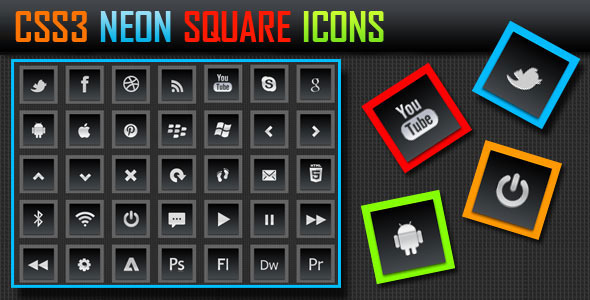
For web designers and developers aiming to add a touch of modern sophistication to their projects, the visual appeal of interface elements can make or break user engagement. The CSS3 Glowing Square Icons set offers a polished solution for those who need high-impact visual assets without the overhead of complex vector editing. This collection provides 25 essential, ready-to-use icons that feature a distinctive neon-like glow effect, built entirely with CSS3 gradients. Designed for versatility and ease of implementation, this set is a practical addition to any toolkit, allowing for rapid deployment on websites, blogs, themes, and templates.
Key Features
The CSS3 Glowing Square Icons set is packed with features that balance aesthetic appeal with practical functionality. Below is a breakdown of the core attributes that make this icon pack a valuable asset for your next project.
- 25 Essential Icons: The pack includes a curated selection of 25 fundamental icons covering common interface actions and symbols. This ensures you have the most frequently needed visuals—such as home, search, settings, and social media symbols—ready for immediate use without wading through hundreds of irrelevant options.
- CSS3 Gradient Glow Effect: Each icon is styled using a sophisticated CSS3 gradient that creates a luminous, three-dimensional glowing square effect. This technique adds depth and a modern, high-tech aesthetic to your interface, making elements pop against dark or light backgrounds.
- Easy to Edit .PNG Format: The icons are provided in the widely compatible PNG format, which simplifies the editing process. You can quickly adjust colors, sizes, or apply additional effects using any standard image editing software, such as Photoshop or GIMP. This format also guarantees consistent rendering across all browsers and devices.
- Clear Style Sheet (CSS): The included, well-organized stylesheet ensures you can integrate the icons efficiently. The code is structured for clarity, making it straightforward to adjust the glow intensity, color palettes, or animation properties to match your specific brand guidelines.
- Versatile Application: Designed for both personal and commercial projects, these icons are ideal for enhancing call-to-action buttons, navigation menus, feature lists, or any graphical user interface element that requires a premium, modern feel.
Who Is This For? Use Cases
The CSS3 Glowing Square Icons pack is built for a wide range of digital professionals. Whether you are building a new brand identity or updating an existing platform, these assets are designed to simplify your workflow while elevating the visual quality of your work.
Web Designers & Theme Developers
If you are a freelancer or an agency creating custom WordPress themes or HTML5 templates, this icon set can save hours of design time. The pre-styled glowing effect integrates seamlessly into modern layouts. Use them for feature sections, service highlights, or interactive elements in your demo content. The consistent aesthetic helps maintain visual harmony across the entire site.
App & SaaS Interface Creators
For those developing software-as-a-service dashboards or mobile application interfaces, the CSS3 Glowing Square Icons provide an immediate upgrade. The neon glow effect works exceptionally well on dark-mode UIs, helping to guide user attention to primary actions or critical data points. The PNG format allows for easy import into design tools like Sketch or Figma for prototyping.
Digital Marketers & Content Creators
Landing page optimization is key to conversion. These icons can be used to create visually striking bullet points, value propositions, or trust signals. The glowing aesthetic naturally draws the eye, making them ideal for highlighting the unique selling points of a product or service in a blog post or sales page.
E-commerce & Portfolio Sites
Online store owners can use these icons to delineate different product categories or payment methods. Portfolio sites benefit from using them as navigation anchors or contact section highlights. The modern look helps convey a sense of innovation and quality to visitors.
Technical Details & Compatibility
Understanding the technical foundation of an asset is crucial for successful integration. The CSS3 Glowing Square Icons are built with a focus on broad compatibility and ease of use.
- File Format: Icons are delivered in .PNG format, ensuring universal support across all operating systems, browsers, and content management systems, including WordPress, Joomla, and Drupal.
- Style Implementation: The associated CSS3 effects are applied via a clean, external stylesheet. This approach allows for non-destructive editing and conforms to modern web development best practices.
- Browser Support: The CSS3 gradients used for the glowing effect are compatible with all modern browsers, including Chrome, Firefox, Safari, Edge, and Opera. Basic fallback styling ensures icons remain visible in older browser versions.
- Resolution & Scalability: The icons are provided at a standard resolution suitable for screen displays. Being raster graphics (.PNG), they are best used at their native size or scaled down. For retina or high-DPI displays, the crisp design ensures clear visibility.
- Last Update & Support: As a curated asset from a reputable author (likely on platforms like ThemeForest or CodeCanyon), the package typically includes documentation and a support channel for any initial implementation questions. The stable nature of .PNG and CSS3 means compatibility issues are rare.
Pros and Cons
To provide a balanced assessment, it is important to weigh the advantages of the CSS3 Glowing Square Icons against their limitations. This transparency helps you make an informed purchasing decision.
Pros
- Instant Visual Impact: The unique glow effect immediately modernizes your interface without the need for advanced design skills.
- Time-Saving: You receive 25 pre-styled icons, eliminating the need to create custom graphics from scratch.
- Highly Compatible: The use of .PNG and CSS3 guarantees consistent appearance on virtually any device, browser, or CMS platform.
- Easy Customization: Editing the icons is straightforward with standard image editing software, giving you full control over color and context.
- Broad Utility: Ideal for blogs, corporate sites, app interfaces, and marketing materials.
Cons
- Raster Limitations: Because the icons are .PNG (raster) files, they lose quality if scaled up significantly. For projects requiring infinite scalability, vector formats like SVG or Icon Fonts would be superior.
- Pre-defined Style: The specific neon/glow aesthetic may not suit all brand identities. If you need flat or extremely minimal icons, this set’s unique styling might feel out of place.
- Limited Icon Count: The pack includes only 25 icons. For larger projects needing a comprehensive icon library, you may need to supplement this set with additional assets.
- No Native Vector Files: Advanced users who prefer working with vector files for custom scaling will miss having an .SVG or .AI source file option.
Frequently Asked Questions
Is the CSS3 Glowing Square Icons set compatible with WordPress?
Yes, absolutely. Because the icons are delivered in the universally supported .PNG format, you can easily upload them to your WordPress media library and insert them into pages, posts, or widget areas. The included CSS stylesheet can be enqueued in your theme using the functions.php file, or you can copy the relevant styles directly into your theme’s customizer or child theme style.css file. This makes it a plug-and-play solution for any WordPress website.
How do I customize the color of the glow effect?
Customizing the colors is straightforward. The icons are provided as .PNG images, so you can edit them in any graphics program like Adobe Photoshop, GIMP, or even online tools like Canva. Simply open the .PNG file, use the color replacement or adjustment layers (like Hue/Saturation) to change the icon and its glow background to match your brand palette. For the CSS3 gradient effect applied via the stylesheet, you can edit the ‘background’ property values directly in the CSS file to change the glow colors on hover or on load.
Does this icon set include commercial license coverage?
Generally, assets sold on reputable marketplaces like CodeCanyon and ThemeForest include a standard license that permits use in both personal and commercial projects. This typically means you can use the CSS3 Glowing Square Icons in websites you build for clients, in templates you sell, or in proprietary applications. However, it is always best practice to read the exact license terms provided by the author at the time of purchase to confirm specific usage rights, particularly regarding attribution and redistribution.
Final Verdict
The CSS3 Glowing Square Icons deliver exactly what they promise: a clean, visually striking set of 25 icons that integrate easily and look professional. The combination of the modern CSS3 gradient glow effect with the foolproof .PNG format makes this a reliable choice for any web professional who needs to enhance a user interface without getting bogged down by technical complexity. The style sheet provided is clear and functional, which speaks to the author’s commitment to quality.
While not suitable for every single design scenario due to its specific aesthetic and raster format, it excels in its niche. This is a fantastic asset for dark-themed designs, tech startups, gaming sites, or any project where a futuristic or high-energy feel is desired. Given the low cost and high value of ready-to-use design elements, skipping the hours of custom development and buying a polished, tested set is a smart business decision. If you are ready to add a professional glow to your next homepage, landing page, or web app, the CSS3 Glowing Square Icons are a worthy investment. Do not hesitate—elevate your design instantly by grabbing your copy today.