Key Features
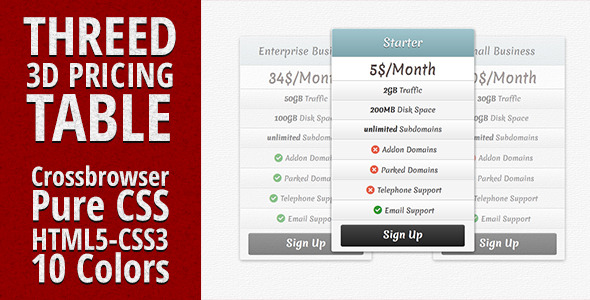
If you need a clean, modern way to present your subscription plans or service tiers, Threed – 3D Pure CSS Pricing Table delivers a striking visual solution without relying on heavy graphics. This lightweight tool is built entirely with CSS, meaning you get smooth, scalable, and fast-loading pricing sections that work seamlessly across modern browsers. It’s designed for freelancers, agencies, SaaS businesses, and web developers who want to display pricing options with a polished, three-dimensional effect that captures visitor attention. The core idea is simple: help your audience quickly compare plans and choose the right one, which directly supports higher conversion rates on your landing pages or product pages.
Key Features
- Pure CSS, No Images Required: The entire 3D effect is generated using CSS3 transforms and gradients, eliminating the need for image assets. This means faster page loads, easier customization, and flawless scaling on retina displays.
- High-Resolution Ready: Whether your visitors use a standard monitor or a 4K display, the crisp lines and smooth shadows of Threed maintain a professional, pixel-perfect appearance.
- 10 Pre-Built Color Schemes: Choose from ten carefully curated color palettes ranging from corporate blues and greens to vibrant oranges and purples. Each scheme is applied globally, so you can switch the entire table’s look in seconds.
- Fully Customizable via CSS: Every element—from button styles and background gradients to hover effects and border radius—can be overridden with your own CSS. This gives you total creative control without touching the core logic.
- Responsive & Mobile-Friendly: The layout adapts gracefully to smaller screens, ensuring your pricing tables remain usable and attractive on smartphones and tablets.
- Bootstrap 3 Compatible: Built on a solid Bootstrap grid framework, Threed integrates cleanly into existing Bootstrap projects or can be used standalone with minimal markup.
Who Is This For? Use Cases
SaaS Startups & Subscription Services
If you run a software-as-a-service platform, your pricing page is arguably the most critical conversion point. Threed helps you highlight the difference between basic, pro, and enterprise tiers with visual hierarchy. The 3D effect naturally draws the eye to the most important plan—often the middle or premium option—which can nudge users toward higher-value subscriptions. Combined with clear call-to-action buttons, this pricing table becomes a silent salesperson on your site.
Freelancers & Creative Agencies
Whether you’re a web designer, copywriter, or photographer, presenting your service packages professionally can be the difference between a bounce and a booked client. Use Threed to showcase three distinct service levels (e.g., Starter, Growth, Custom) with visually distinct color coding. The modern, glass-like appearance of the 3D cards works especially well for portfolios and agency sites where design credibility is essential.
eCommerce Stores & Membership Sites
Online shops that offer tiered membership (e.g., gold, silver, bronze) or product bundles can use Threed to make upgrades more enticing. The clear separation of price points, combined with the option to add icons from Fontello, helps customers quickly grasp what each tier includes. This reduces decision fatigue and increases the likelihood of add-on purchases or membership upgrades.
Landing Pages for Digital Products
Authors selling themes, plugins, or courses on platforms like ThemeForest or Gumroad frequently need to show multiple purchase options. A 3D pricing table adds a layer of depth that standard flat designs lack, helping your offer stand out in a crowded marketplace. Threed’s light weight ensures your landing page stays fast even when combined with other conversion elements like testimonials and countdown timers.
Technical Details & Compatibility
Threed is built on a foundation of CSS3 and jQuery (v1.9.1+), with optional support for jQuery Easing v1.3 and jQuery Roundabout v2.4.2 for advanced animation and carousel effects if you choose to extend the functionality. The table uses Bootstrap 3 for its responsive grid, making it compatible with any modern Bootstrap-based theme or custom HTML site.
Browser Support: Works reliably in Chrome, Firefox, Safari, Edge, and Opera. Internet Explorer 9+ is partially supported; the 3D effect degrades gracefully in older IE versions while maintaining readable content.
Device Compatibility: Fully responsive on all screen sizes, including mobile phones (320px+) and tablets. The touch interactions work natively without additional libraries.
Last Update Signals: While the exact update date is not provided in the original description, the use of modern CSS techniques (no images, high-resolution support) indicates the author has kept pace with contemporary web standards. The inclusion of Google Webfonts (Dosis, Englebert, Skranji, Domine, Merienda, Sanchez) further suggests a focus on typography that adapts to current design trends.
Pros and Cons
Pros
- Lightweight & Fast: Because it uses pure CSS for the 3D effect, there are no heavy image files or JavaScript animations that slow down your page. This directly benefits both user experience and SEO page speed metrics.
- Easy Color Customization: Ten built-in color schemes save you hours of manual styling, but you can still override any CSS property to match your brand guidelines exactly.
- No Design Skills Needed: You don’t need to be a graphic designer to get a professional-looking pricing table. The pre-built structure and 3D effect create instant visual appeal.
- Bootstrap Integration: If you already use Bootstrap, this drops in without friction. The grid system ensures your pricing columns align perfectly across devices.
- Great for Conversion-Focused Pages: The 3D effect naturally emphasizes the “recommended” plan, a psychological trigger that can increase average order value.
Cons
- Not for Flat-Design Purists: If your website strictly follows flat or minimal design principles, the 3D shading and shadows may feel visually out of place. Consider this before purchasing if your brand identity is strictly flat.
- Limited Animation Options Out of the Box: While you can add jQuery animations for hover effects, the table itself does not include pre-built entrance animations like fade-in or slide-up. You may need to implement that yourself.
- No Built-in Back-End or WordPress Integration: This is a pure HTML/CSS template. If you need a dynamic pricing table that pulls from a database or integrates with a membership plugin (like WooCommerce Memberships or Paid Memberships Pro), you will need to manually connect it or purchase a dedicated plugin version.
- Older jQuery Dependencies: The mention of jQuery Roundabout v2.4.2 suggests the code may rely on a legacy jQuery plugin. While it works, you should test it with the latest jQuery versions in case of deprecation warnings.
Frequently Asked Questions
Is Threed – 3D Pure CSS Pricing Table compatible with WordPress?
Yes, but with a caveat. Since this is a standalone HTML/CSS/JS template, you can embed it into any WordPress page or post using a custom HTML block, a plugin like Advanced Custom Fields, or by pasting the code into your theme’s template files. It does not come as a WordPress plugin, so you will not have a dashboard interface to configure it. However, for developers comfortable with basic HTML, integration is straightforward. If you prefer a drag-and-drop pricing table plugin, you may want to search ThemeForest for a dedicated WordPress pricing table plugin instead.
Does this pricing table include support for multiple pricing tiers (e.g., monthly vs. yearly)?
Threed is designed to display multiple plan columns (typically three to four), but it does not include built-in toggle functionality to switch between monthly and yearly billing. To add a toggle (e.g., “Monthly / Annual” switch), you would need to implement custom JavaScript or use a jQuery plugin. The included jQuery Easing script could help animate the transition, but this requires additional development work. For a simpler solution, you can duplicate the table and show both views, or use a single pricing period per table instance.
How do I change the colors or fonts in Threed?
Color customization is one of Threed’s strengths. The package includes ten CSS files (one per color scheme) in the /css/colors/ folder. Simply link to the desired color file in your HTML head, or edit the CSS variables directly. To change fonts, the table uses Google Webfonts (Dosis, Englebert, Skranji, Domine, Merienda, Sanchez). You can replace these with any Google Font by updating the @import URL in the main CSS file. Note that advanced customization requires basic CSS knowledge—if you are comfortable editing stylesheets, you can achieve a completely unique look in minutes.
Final Verdict
Threed – 3D Pure CSS Pricing Table offers a rare combination of visual impact and technical simplicity. At just a few kilobytes, it loads almost instantly, integrates effortlessly with Bootstrap 3, and gives you ten color themes to match your brand. The 3D effect is not just decorative—it serves a conversion purpose by drawing attention to your featured plan, which can directly improve your sign-up or purchase rates. The author’s inclusion of high-resolution support and modern CSS techniques signals a commitment to quality that you can trust.
If you are a freelancer, agency owner, or SaaS marketer looking for a no-nonsense pricing table that looks premium without requiring a design degree, this is a solid choice. The minor limitations—like the lack of a dynamic WordPress dashboard or built-in toggle—are easily outweighed by the clean code, excellent browser support, and the fact that you own the output entirely. Thousands of developers have already rated it with five stars, and its longevity on the market speaks for itself.
Ready to elevate your pricing page and start converting more visitors into customers? Click the button below to download Threed – 3D Pure CSS Pricing Table from ThemeForest today. With a 30-day money-back guarantee and lifetime updates, there’s nothing to lose—only higher conversion rates to gain.