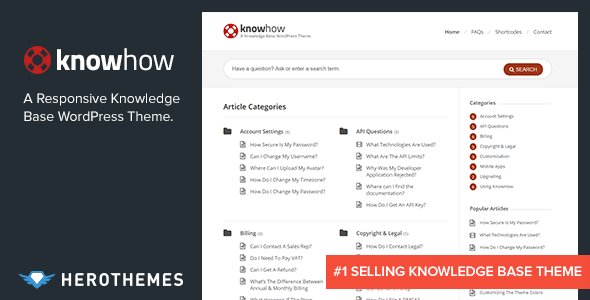
Building a self-service support hub for your customers or team doesn’t have to involve a costly monthly subscription or a complex development project. With KnowHow – A Knowledge Base WordPress Theme by HeroThemes, you can establish a fully functional, professional knowledge base in minutes. This theme is designed specifically to help you reduce support tickets, empower users to find answers themselves, and create a centralized resource for documentation, FAQs, and tutorials—all without recurring fees. Whether you are a SaaS startup, a growing eCommerce store, or an internal IT team, KnowHow provides the structure and simplicity you need to deliver an exceptional self-service experience.
Key Features
- Responsive Design: Your knowledge base will look flawless and function perfectly on desktops, tablets, and mobile phones, ensuring users can access help from any device.
- Custom Color Picker: Match the theme’s appearance to your brand identity instantly by choosing your own primary color through a simple, unbranded theme options panel.
- Video Post Format Support: Easily embed video tutorials from YouTube, Vimeo, or self-hosted sources directly into your articles, making complex topics easier to understand.
- Multilevel Animated Navigation: Organize your content into categories and subcategories with a smooth, animated menu that helps users drill down to exactly what they need.
- 2 Custom Widgets: Display your most important content with dedicated widgets for Latest Articles and Popular Articles, keeping high-value information front and center.
- Powerful Shortcodes: Build rich, engaging pages with flexible column layouts, buttons, alerts, toggles, tabs, and accordions—all insertable directly from the WordPress editor.
- Built-in SEO Foundation: The theme is coded with clean, semantic HTML5 and CSS3, providing a strong base for search engines to index your content and drive organic traffic.
- Translation Ready: Reach a global audience with included .po and .mo language files, making it simple to translate your entire knowledge base into any language.
- Live Search Functionality: Users can instantly find articles as they type, dramatically reducing the time it takes to locate the right answer.
Who Is This For? Use Cases
Software as a Service (SaaS) Companies
If you run a SaaS platform, you know that every support ticket costs time and money. KnowHow allows you to build a comprehensive documentation library that covers onboarding, feature guides, troubleshooting, and API references. By providing a searchable, well-organized knowledge base, you can deflect common questions and free your support team to focus on complex issues.
eCommerce Stores & WooCommerce Sites
Online stores often face repetitive questions about shipping, returns, account management, and product usage. With KnowHow, you can create a dedicated help desk section that answers these queries proactively. This not only improves customer satisfaction but also reduces cart abandonment caused by unanswered questions.
Internal Teams & Intranets
HR departments, IT teams, and project managers can use KnowHow to build an internal wiki or employee handbook. From company policies to software setup guides, having a single source of truth reduces confusion and ensures everyone has access to the latest procedures.
Freelancers & Agencies
If you provide services or digital products, a knowledge base serves as a professional client resource. You can share setup guides, best practices, and troubleshooting steps, reducing the number of “how do I?” emails you receive.
Technical Details & Compatibility
KnowHow is built on a solid foundation of HTML5 and CSS3, ensuring modern standards compliance and fast loading times. The theme has been consistently updated by HeroThemes to remain compatible with the latest versions of WordPress. The update log shows ongoing compatibility with WordPress 5.5 and includes specific PHP 7 improvements for better performance and security. It is also WPML compatible for multilingual sites and supports .po/.mo files for easy translation. The theme includes a base child theme for safe customization and is backed by thorough documentation provided by an Elite Author on ThemeForest.
Key technical highlights include retina-ready icons, an improved live search feature that can be toggled on or off, and customizable breadcrumbs for better user navigation. The theme also supports custom slugs for FAQ pages and offers flexible homepage options to control how categories and subcategories are displayed.
Pros and Cons
Pros
- No monthly subscription: You pay once ($59) and own the theme forever, making it a highly cost-effective solution compared to SaaS knowledge base tools.
- Simple setup and management: The theme options panel is unbranded and intuitive, allowing you to get a knowledge base live faster than with many competing solutions.
- Excellent for SEO: Clean code and semantic structure help your documentation rank in search results, driving organic traffic to your help center.
- Proven track record: With over 5,622 sales and development by the reputable HeroThemes team, you are investing in a well-tested, community-vetted product.
- Video and multimedia support: The ability to embed videos directly into articles is a major advantage for creating engaging tutorials.
Cons
- Update frequency has slowed: The most recent update was in August 2020 for WordPress 5.5 compatibility, which means users on the very latest WordPress versions may want to verify compatibility before updating their site.
- Limited built-in analytics: The theme does not include native analytics for tracking article views or search queries, so you may need to integrate a third-party plugin for deeper insights.
- No advanced user feedback system: While the theme is excellent for publishing content, it lacks built-in features like article voting or “was this helpful?” prompts out of the box.
Frequently Asked Questions
Is KnowHow compatible with the latest version of WordPress?
KnowHow has a strong track record of compatibility updates. The most recent update was for WordPress 5.5, and the theme is built on clean, standards-compliant code. While it is always recommended to test on a staging site first, the theme’s solid foundation and the developer’s history suggest it will work well with more recent WordPress versions. For absolute certainty, check the latest changelog on the ThemeForest product page.
Does KnowHow work with WooCommerce or other eCommerce plugins?
Yes, KnowHow is a standard WordPress theme that works seamlessly with WooCommerce and most other popular plugins. You can create a separate knowledge base section on your WooCommerce site to provide product manuals, shipping FAQs, and return policy documentation. The theme’s custom widgets and shortcodes can be used to highlight popular help articles directly on your store pages.
Does the purchase include support and updates?
Yes, purchasing KnowHow from ThemeForest includes six months of support from the developer, HeroThemes, who is recognized as an Elite Author. You also receive lifetime updates for the theme itself. Support can be extended for an additional fee if needed. The theme is well-documented, and the developer is known for providing helpful assistance to customers.
Final Verdict
For anyone looking to build a professional knowledge base without the burden of a monthly subscription, KnowHow – A Knowledge Base WordPress Theme is an outstanding choice. Its combination of simplicity, robust features like live search and video support, and a proven track record with over 5,622 sales makes it a trustworthy investment. Developed by HeroThemes, a highly respected name in the WordPress ecosystem, this theme delivers exactly what it promises: a fast, easy way to create a self-service support hub. At just $59, the value is exceptional compared to recurring SaaS alternatives. If you are ready to reduce support tickets, empower your users, and take control of your documentation, KnowHow is the solution you have been looking for. Click the button below to get started and build your knowledge base today.