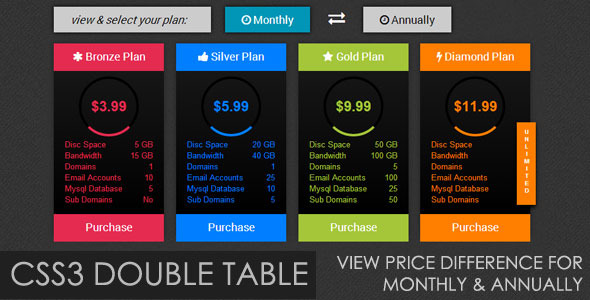
When it comes to maximizing conversions on a SaaS landing page, membership site, or subscription-based service, the pricing table is often the single most decisive element. A poorly designed table creates friction; a dynamic, visually compelling table can instantly communicate value and reduce hesitation. For developers and site owners who demand flexibility without bloated code, the Trendy Pricing Tables plugin offers a sleek solution. This tool enables you to display both monthly and annual pricing tiers within a single, interactive component, allowing users to toggle between plans with a simple click. Built for the modern web, it provides four distinct color schemes designed to match a variety of brand aesthetics.
This article provides an in-depth analysis of the Trendy Pricing Tables plugin, examining its core features, ideal use cases, technical requirements, and overall value proposition. Whether you are a freelancer building client sites or a product manager optimizing a checkout page, this guide will help you determine if this pricing table tool is the right fit for your project.
Key Features
The Trendy Pricing Tables plugin distinguishes itself through its focus on user experience and visual impact. Here are the standout features that make it a compelling choice for showcasing subscription plans:
- Clickable Toggle Between Monthly and Annual Plans: The core functionality allows customers to instantly see the price difference between recurring billing cycles. This feature is critical for highlighting discounts on annual plans, a proven tactic to increase average order value and customer lifetime value.
- Four Distinct Trendy Color Schemes: Out of the box, the plugin includes four professionally designed color palettes. This eliminates the need for extensive CSS customization, allowing you to deploy a polished pricing table that aligns with modern design trends like gradients and flat UI elements.
- Fully Responsive Layout: Designed for mobile-first indexing, the pricing tables scale perfectly on smartphones, tablets, and desktops. The tabular data remains readable and functional across all screen sizes, ensuring a consistent user experience.
- Clean and Semantic HTML Structure: The codebase follows web standards, making it easier for search engines to parse the pricing data and for developers to integrate or modify the structure without breaking the layout.
- Lightweight and Fast Loading: The plugin is optimized for performance, meaning it will not bloat your site’s page speed. This is essential for maintaining good Core Web Vitals scores and reducing bounce rates on high-stakes pricing pages.
Who Is This For? Use Cases
The Trendy Pricing Tables plugin is purpose-built for specific digital scenarios. It is not a generic shortcode solution for every type of list, but rather a specialized tool for specific conversion goals.
SaaS and Membership Website Owners
If you run a software-as-a-service (SaaS) platform, a membership community, or an online course marketplace, this plugin is ideal. You need to present a clear choice between month-to-month flexibility and annual commitment. The toggle feature allows you to visually anchor the annual price, making the monthly cost seem higher in comparison, which psychologically nudges users toward the higher-value annual plan. The trendy color schemes help your pricing page feel modern and trustworthy, which is essential for reducing churn and increasing sign-ups.
Freelance Web Designers and Developers
For professionals who build client sites using WordPress, this plugin serves as a reliable asset. Instead of coding complex pricing tables from scratch or relying on bloated page builders, you can quickly insert a professional-grade pricing section. The four color variations offer enough flexibility to match a client’s branding guidelines without requiring deep CSS skills. This saves development time and ensures a high-fidelity output that impresses end clients.
E-commerce Store Owners with Subscription Products
WooCommerce store owners who sell subscription-based products (e.g., monthly coffee deliveries, curated boxes, premium support) can use this plugin to clearly display the price differences. It helps customers quickly understand the cost breakdown between a one-time payment and an ongoing subscription, reducing confusion and cart abandonment.
Technical Details & Compatibility
Understanding the technical foundation of Trendy Pricing Tables is crucial for ensuring it works seamlessly within your existing tech stack. The plugin is designed with modern web standards in mind, but it is important to note its limitations regarding older browsers.
- WordPress Compatibility: The plugin is built for the WordPress platform and should function correctly on standard, well-coded themes.
- CSS3 Dependency: The visual effects, including the toggle animation and color gradients, rely heavily on CSS3 properties. This means the plugin performs optimally on modern browsers like Chrome, Firefox, Safari, and Edge.
- Legacy Browser Limitation: As explicitly noted by the developer, Internet Explorer (IE) does not fully support the CSS3 attributes used in this plugin. Users on older IE versions may experience broken layouts or missing animations. This is a common trade-off for achieving modern, visually rich interfaces.
- Update Status: The plugin is a simple, lightweight tool. While it may not receive frequent updates, its stable CSS and HTML foundation mean it is unlikely to break with standard WordPress updates. Always check the author’s profile on CodeCanyon for the latest changelog.
Pros and Cons
No plugin is perfect for every scenario. Here is an honest assessment of the strengths and weaknesses of the Trendy Pricing Tables plugin to help you make an informed decision.
Pros
- Excellent User Experience: The clickable toggle between monthly and annual plans is intuitive and speeds up the decision-making process for customers.
- Visually Appealing: The four trendy color schemes are modern and can elevate the design of a standard pricing page without additional design work.
- Lightweight Codebase: The plugin does not add unnecessary JavaScript or database queries, keeping your site fast.
- Easy Implementation: It focuses on a single, specific function, meaning there is no steep learning curve. You can install and integrate it quickly.
- Responsive by Default: It works out of the box on mobile devices, which is critical for modern web traffic.
Cons
- Internet Explorer Incompatibility: The lack of support for IE means you may lose a small segment of users still using that legacy browser.
- Limited Customization Scope: The plugin offers four color schemes but likely lacks a built-in color picker or extensive layout options. Customization might require editing the CSS directly.
- Breadth vs. Depth: This is a niche tool. It does not offer a drag-and-drop builder or support for complex promotional badges, countdown timers, or advanced pricing tiers with multiple features.
- Potential for Update Friction: As a lightweight plugin, long-term support and updates may be less frequent compared to larger, more actively maintained premium products.
Frequently Asked Questions
Is this pricing table compatible with WooCommerce subscriptions?
This plugin is primarily a front-end design tool for displaying static pricing information. It creates the visual table and toggle, but it does not directly connect to WooCommerce or handle payment processing. You can use it to display the pricing options, but you will need to link the buttons in the table to your WooCommerce product pages or subscription gateway manually. It is an excellent visual companion for a subscription-based store.
Does the plugin include support and future updates?
Like most items on CodeCanyon and ThemeForest, the purchase of the Trendy Pricing Tables plugin typically includes support from the author for a set period (often six months), with the option to extend it. It also usually includes lifetime updates for the plugin itself. It is best to review the specific item page on CodeCanyon to confirm the exact support and update terms offered by the author before purchasing.
Can I add unlimited pricing columns to the table?
The standard configuration for this type of pricing table includes a specific number of columns (often three or four) that match the four color schemes. The plugin is designed for clarity and simplicity, not for creating huge tables with dozens of columns. If you need more than four columns, you would likely need to edit the HTML directly, which may require some coding knowledge. For most standard pricing strategies (e.g., Basic, Pro, Enterprise), four columns are sufficient.
Final Verdict
The Trendy Pricing Tables plugin delivers precisely what it promises: a beautiful, functional, and modern pricing table that solves the common problem of displaying monthly vs. annual costs. It is a specialized tool that excels in its niche. The ability to provide a seamless user experience that encourages customers to choose an annual plan makes it a valuable asset for increasing revenue per customer. While it may not offer the extensive customization of a massive page builder, its simplicity and focus are its greatest strengths. The clean code and four trendy color palettes make it a reliable choice for professionals who value speed and aesthetic quality.
If you are tired of clunky, slow pricing tables that confuse visitors and hurt conversions, this plugin is a straightforward solution that gets the job done. It is a modest investment that can yield significant returns on your pricing page. Check the author’s reputation and sales numbers on ThemeForest or CodeCanyon to see how many other savvy site owners have already adopted it. For a developer or site owner who values a clean, mobile-friendly, and conversion-optimized design, Trendy Pricing Tables is a smart addition to your toolkit. Do not let a boring pricing page be the reason you lose a sale; give your customers the clear, visual comparison they need to make a confident purchase.