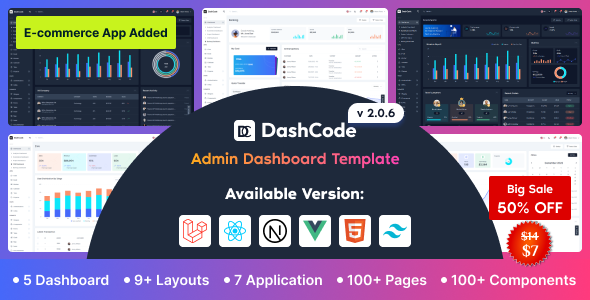
For developers and teams building modern web applications, the choice of an admin dashboard template can dramatically impact both development speed and the quality of the final user interface. Many templates promise flexibility but deliver rigid, bloated code that is difficult to customize. DashCode – React, Vuejs, NextJs, Laravel, HTML, Tailwind Dashboard Template emerges as a standout solution, offering a powerful, versatile, and remarkably developer-friendly foundation for crafting sophisticated backends. Built by the reputable Codeshaperbd, this template is engineered to streamline your workflow, providing a clean, scalable starting point that supports multiple frameworks, including React, Vue 3, Next.js, Laravel, and plain HTML with Tailwind CSS. With over 2,864 sales and consistent updates, it has proven itself as a reliable asset for solo developers, agencies, and enterprises alike.
Key Features
- Multi-Framework Support: DashCode is not a one-trick pony. It ships with versions for React, Vue 3, Next.js, Laravel, and plain HTML. This allows you to use the same design system across different projects, regardless of your preferred stack.
- Tailwind CSS & Headless UI Powered: Built on the utility-first Tailwind CSS framework (recently updated to version 4 in the React build) and Headless UI, the template ensures a highly customizable, accessible, and lightweight codebase. You get unstyled, accessible components with full control over the visual design.
- 5 Conceptual Dashboards: Jumpstart your project with five pre-built, real-world dashboards: Analytics, Ecommerce, Project, CRM, and Banking. These are not just placeholders; they are fully designed interfaces ready for data integration.
- 9 Prebuilt Layouts: Choose from a wide array of layout options, including Horizontal Menu, Vertical Menu, Collapsed Menu, Boxed, Bordered, and Menu Hidden layouts. This flexibility allows you to match the template to your specific application’s navigation needs.
- Multiple Theme Modes: Deliver a personalized user experience with built-in support for Light, Dark, Semi Dark, and Monochrome color schemes. The integrated customizer makes switching themes seamless.
- 7 Integrated Applications: Speed up development with fully functional application modules, including Chat, Email, Kanban Board, Calendar, Todo, and Project Management with detailed views.
- 80+ Advanced UI Elements & Components: A comprehensive library of over 80 elements, from forms, tables, and charts to UI components like Modals, Alerts, Accordions, Carousels, and Date Pickers, all themed consistently with Tailwind.
- Built-in Customizer: A dedicated panel allows you or your end-users to change themes, layouts, and other visual settings in real-time without touching the codebase.
Who Is This For? Use Cases
DashCode is designed for a broad range of technical users, from independent freelancers to large development teams. Its multi-framework nature makes it incredibly versatile for different project types.
Full-Stack Developers and SaaS Founders
If you are building a Software-as-a-Service (SaaS) application, the Laravel or Next.js versions are ideal. The pre-built authentication pages, CRM dashboard, and subscription-ready pricing page provide a massive head start. You can focus on your core business logic while DashCode handles the entire admin interface.
React and Vue.js Frontend Teams
For agencies or teams working on multiple client projects, the ability to switch between React and Vue 3 versions is a game-changer. The clean, well-documented code ensures that new team members can quickly onboard and contribute. The component-based architecture using Headless UI and Tailwind ensures design consistency across all projects.
Freelance Web Developers
Freelancers who need to deliver polished, professional admin panels quickly will find DashCode invaluable. The pre-built applications like Chat, Email, and Kanban can be added to any project with minimal effort, allowing you to charge a premium for feature-rich deliverables without the development overhead. The single purchase price of $19.00 offers exceptional value for the scope of components included.
Technical Details & Compatibility
DashCode is built with modern, industry-standard technologies. The core framework is Tailwind CSS v4 (as of the latest React update), paired with Headless UI for accessible components. The JavaScript versions utilize Vite as the build tool, ensuring fast development and build times. The Vue 3 version has transitioned from Vuex to Pinia for state management, reflecting current best practices.
The template is fully responsive and compatible with all modern browsers (Chrome, Firefox, Safari, Edge). It includes RTL (Right-to-Left) language support, making it suitable for multilingual applications. The changelog shows a consistent update history from its initial release in December 2022 through May 2025, with significant additions like the Next.js, Laravel, and HTML versions rolled out in subsequent updates. This signals a well-maintained product with a responsive developer.
Pros and Cons
Pros
- Exceptional Framework Versatility: Having React, Vue, Next.js, Laravel, and HTML versions in a single purchase is a phenomenal value proposition.
- Clean and Modern Codebase: The use of Tailwind CSS and Headless UI ensures the code is readable, maintainable, and free from unnecessary bloat.
- Rich Feature Set Out-of-the-Box: The inclusion of multiple dashboards, applications, and over 80 components dramatically reduces the need for third-party plugins.
- Excellent Customization Options: The built-in customizer and multiple layout/theme options give you full control over the look and feel.
- Strong Developer Support & Updates: Codeshaperbd provides active support and has a proven track record of regular, meaningful updates.
- Incredible Value for Money: At $19.00, the cost per framework version is negligible compared to buying individual templates.
Cons
- Learning Curve for Tailwind Beginners: If you are not familiar with the utility-first approach of Tailwind CSS, there will be a learning curve compared to traditional CSS frameworks.
- Potential Overkill for Simple Projects: For a very basic admin panel with only a few pages, the sheer number of features and files might feel overwhelming.
- Reliance on Specific Libraries: The template is tightly integrated with Headless UI and specific state management tools (Pinia for Vue), which may not be your team’s preferred stack.
Frequently Asked Questions
Is DashCode compatible with Laravel 11 or the latest version?
Yes, the template includes a dedicated Laravel starter kit version. While it was initially released for an earlier Laravel version, the active support and update history from Codeshaperbd indicate that the template is updated to be compatible with the latest stable releases of Laravel. Always check the latest changelog on the product page for the most current framework version support.
Does the template include support for dark mode and RTL languages?
Absolutely. DashCode comes with multiple built-in themes, including a fully functional Dark mode and a Semi Dark mode. Furthermore, RTL (Right-to-Left) language support was added in version 1.0.1, making it ready for Arabic, Hebrew, and other RTL scripts.
Can I use the pre-built applications like Chat and Email as-is?
The included applications (Chat, Email, Kanban, Calendar, Todo) come with fully designed and functional front-end interfaces. However, they are front-end demonstrations and require you to connect them to your own backend API and database for full production use. The code is structured cleanly, making API integration straightforward.
Final Verdict
DashCode – React, Vuejs, NextJs, Laravel, HTML, Tailwind Dashboard Template is more than just a collection of UI components; it is a comprehensive, multi-framework development platform. Its strength lies in its versatility, allowing a single purchase to cover projects built with five different technologies. The clean code, commitment to modern standards like Tailwind CSS and Vite, and the wealth of pre-built applications and dashboards make it an exceptional tool for any serious developer or agency. With over 2,864 sales and a clear track record of updates from Codeshaperbd, you are investing in a reliable, well-supported product. If you are looking to drastically cut development time on your next admin panel without sacrificing quality or customization, DashCode is a compelling, cost-effective choice. Click the link to get started and see how it can transform your workflow.