Key Features
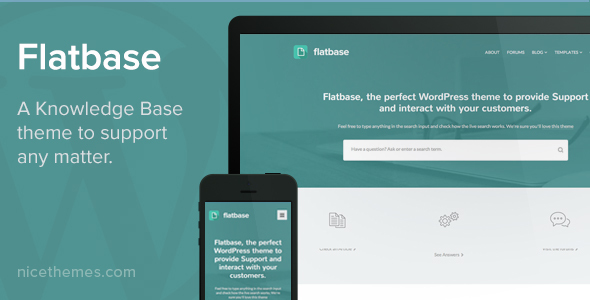
Flatbase – A responsive Knowledge Base/Wiki Theme is engineered to transform how you present support documentation, FAQs, and internal wikis. Developed by NiceThemes_, a respected name in the WordPress ecosystem, this theme is not just about aesthetics; it’s a fully functional help desk solution. Below, we break down the core features that make this theme a standout choice for building a self-service knowledge hub.
- Live Search on HomePage: This is arguably the most critical feature for any knowledge base. Users can instantly search for articles from the moment they land on your site. This reduces friction and helps visitors find answers without navigating through complex menus, directly lowering your support ticket volume.
- Reading Time Display: Modern users appreciate knowing the time commitment before clicking an article. Flatbase automatically calculates and displays the estimated reading time for each post. This subtle UX detail improves user trust and helps them decide which articles to prioritize.
- Article Likes: Empower your community by allowing users to “like” helpful articles. This gamification element provides you with valuable social proof and helps surface the most useful content to the top of your knowledge base, creating a self-curating resource.
- Dynamic Widgetized Spaces: The theme offers multiple, strategically placed widget areas. You can drop in custom widgets for popular articles, recent posts, or even promotional banners without touching a line of code. This flexibility allows you to tailor the layout to your specific content strategy.
- bbPress Support: Seamlessly integrate a community forum using the popular bbPress plugin. This transforms your static knowledge base into a dynamic support hub where users can ask questions and interact with each other, further offloading pressure from your support team.
- Unlimited Styles & Colors: With an extensive options panel, you have absolute control over the look and feel. Choose from unlimited color schemes, 700+ Google fonts, and layout variations to ensure the theme aligns perfectly with your brand identity.
- Blog Masonry & Infinite Scroll: While the primary focus is on knowledge, Flatbase doesn’t neglect content marketing. The masonry blog layout with infinite scroll provides a visually engaging way to publish company news, updates, or tutorials, keeping your site dynamic and fresh.
- Ajax Contact Template: A dedicated contact template powered by Ajax ensures that user inquiries are submitted without page reloads. This modern approach feels fast and responsive, enhancing the overall user experience for those who still need to reach out directly.
- One-Click Demo Install & Plugin Installer: Getting started is remarkably simple. The one-click demo import lets you replicate the stunning demo site in seconds, while the built-in plugin installer handles all required extensions automatically. This is a massive time-saver for non-developers.
- Retina Ready & Responsive Design: The theme is built on a clean, modern responsive framework that looks crisp on everything from large desktop monitors to mobile phones. The retina-ready graphics ensure your site appears sharp on high-DPI screens, which is non-negotiable in today’s mobile-first world.
Beyond these headline features, Flatbase includes SEO optimization, translation-ready files (.po/.mo), Contact Form 7 support, and FAQ templates (both accordion and list style). It is built with valid HTML5/CSS3 and is ready for WordPress 4.6+, ensuring you have a stable and future-proof foundation.
Who Is This For? Use Cases
Flatbase – A responsive Knowledge Base/Wiki Theme is not a one-size-fits-all template; it is a specialized tool designed for specific scenarios. Its feature set makes it ideal for anyone who needs to manage and present large amounts of structured information. Here are the primary use cases where this theme excels.
SaaS Companies & Tech Startups
If you run a software-as-a-service (SaaS) platform, your product likely has a learning curve. A robust knowledge base is essential for onboarding new users and reducing churn. Flatbase allows you to create a comprehensive help center with categorized articles, video tutorials, and a community forum via bbPress. The live search feature ensures users can find answers to complex queries quickly, improving customer satisfaction and reducing the workload on your support staff. The ability to display reading times helps users gauge the depth of your documentation, while the “Likes” feature lets you identify your most valuable tutorials.
Corporate Intranets & Internal Wikis
Large organizations often struggle with knowledge silos. Flatbase provides an elegant solution for building an internal wiki or employee handbook. The clean, flat design makes navigation intuitive, and the powerful search function allows staff to find company policies, HR documents, or project guidelines instantly. The dynamic widgetized spaces can be used to highlight important announcements or upcoming deadlines. Since the theme is translation-ready, it is perfect for multinational companies that need to provide documentation in multiple languages. The full-width or boxed layout options allow you to integrate the wiki seamlessly into your existing corporate branding.
Online Communities & Forums
With native bbPress support, Flatbase is an excellent choice for launching a niche community or forum. You can use the knowledge base component to create “Getting Started” guides and rules, while the forum section handles user-generated questions and discussions. The masonry blog layout is perfect for sharing community news or spotlighting member achievements. The Ajax contact template provides a direct line to the moderators for private inquiries. This combination of structured articles and open discussion creates a vibrant, self-sustaining ecosystem.
Help Desk & Customer Support Portals
For businesses that want to deflect tickets before they reach a human agent, Flatbase is a powerful asset. You can populate the knowledge base with troubleshooting guides, FAQs, and product manuals. The live search on the homepage acts as a self-service portal, encouraging users to solve their own problems. The “Likes” feature acts as a feedback mechanism, highlighting articles that are clear and helpful versus those that need improvement. The integration with Contact Form 7 ensures that if a user cannot find an answer, they have a straightforward way to submit a ticket, creating a complete support loop.
Technical Details & Compatibility
Understanding the technical foundation of a theme is crucial before making a purchase. Flatbase – A responsive Knowledge Base/Wiki Theme is built to modern standards and offers a high degree of compatibility. The current version is 2.0.9, released on January 11th, 2023. This recent update signals that the developer, NiceThemes_, is actively maintaining the theme, fixing bugs, and ensuring compatibility with the latest WordPress core updates.
The theme is WordPress 4.6+ ready, which means it is built to work with a wide range of WordPress versions. It utilizes a “Fabulous Options Panel” and supports live customization, allowing you to see changes in real-time as you adjust settings. The theme is written in valid HTML5/CSS3 and is fully responsive and retina-ready, ensuring a pixel-perfect display across all devices. It includes a child theme for safe customization and comes with demo files (XML) for easy content import. The theme is also translation-ready, including .po/.mo files for localization.
Flatbase supports several key plugins out of the box, including bbPress for forums, Contact Form 7 for forms, and a custom plugin installer for required extensions. The theme is SEO optimized, ensuring your support articles have the best chance of ranking in Google. It also features one-click updates to keep your site secure and up-to-date without manual file downloads. The developer has also provided extensive documentation and HD video tutorials to guide you through the setup process.
Pros and Cons
To make an informed decision, it is important to weigh the strengths and potential limitations of the theme. Based on the feature list and user feedback, here is an honest assessment of Flatbase.
Pros
- Purpose-Built for Knowledge Management: Unlike multi-purpose themes, Flatbase is specifically designed for knowledge bases and wikis. This means the layout, typography, and search functionality are optimized for reading and discovering information, not just looking pretty.
- Comprehensive Feature Set: The inclusion of live search, reading time, likes, and bbPress support covers all the essential elements of a modern help desk. You won’t need to purchase multiple plugins to achieve basic functionality.
- User-Friendly Setup: The one-click demo install and plugin installer make it accessible for beginners. You can have a fully functional knowledge base running within minutes of installation.
- Extensive Customization: With unlimited colors, 700+ fonts, and layout options, you can tailor the theme to match your brand perfectly without needing to hire a developer.
- Active Development & Support: The version 2.0.9 update from 2023 indicates the theme is still being supported. The 5-star support system includes HD video tutorials and a ticket system, which is invaluable for troubleshooting.
- Proven Track Record: With 2,489 sales, Flatbase has a substantial user base. This social proof indicates that the theme is reliable and trusted by other website owners.
Cons
- Niche Functionality: If you are looking for a general-purpose business theme or an e-commerce storefront, this is not the right choice. Its focus on documentation and forums limits its use for other types of websites.
- Learning Curve for Advanced Options: While the options panel is powerful, it can be overwhelming for absolute beginners. There is a learning curve to understanding all the settings available for typography, layout, and widgets.
- Demo Images Not Included: The sample images in the demo are from Unsplash and are not included in the purchase. You will need to source your own images, which is standard practice but can be a minor inconvenience.
- bbPress Aesthetics: While bbPress is integrated, the default forum styling may not perfectly match the sleek, flat design of the rest of the theme. Some custom CSS may be required to fully unify the look.
Frequently Asked Questions
Before you commit to a purchase, it is wise to clarify any doubts. Here are answers to the most common questions potential buyers have about Flatbase – A responsive Knowledge Base/Wiki Theme.
Is Flatbase compatible with the latest version of WordPress?
Yes, the theme is explicitly stated to be “WordPress 4.6+ Ready” and has been updated as recently as January 2023 to version 2.0.9. This indicates that the developer, NiceThemes_, is actively maintaining the codebase to ensure compatibility with current WordPress standards and security protocols. You can install it with confidence on a modern WordPress installation.
Does Flatbase include a forum plugin integration?
Absolutely. Flatbase comes with native bbPress support. This allows you to easily create community forums directly alongside your knowledge base articles. This is a powerful combination for customer support, as it allows users to discuss topics and ask questions that may not be covered in your official documentation. The integration is seamless and designed to work out of the box.
Can I customize the colors and fonts to match my brand?
Yes, customization is one of the theme’s strongest suits. The “Extensive Theme Options” panel provides unlimited color options and advanced typography settings with access to over 700 Google Fonts. You can also choose between full-width or boxed layouts and configure header, footer, and blog options. The live customization feature allows you to preview all these changes in real-time before they go live.
Final Verdict
In a saturated market of WordPress themes, Flatbase – A responsive Knowledge Base/Wiki Theme stands out as a specialized, high-quality solution for a very specific need. It is not just a pretty face; it is a functional tool built to solve real business problems related to customer support, information dissemination, and community building. The developer, NiceThemes_, has demonstrated a commitment to quality with a recent update and a robust support infrastructure.
The theme’s strength lies in its thoughtful integration of features. The live search, reading time, and likes system are not gimmicks; they are practical tools that improve the user experience and provide value to the site owner. The inclusion of bbPress and Contact Form 7 support means you can build a complete support ecosystem without juggling multiple incompatible plugins. For the price of $49, you are getting a premium product with a proven track record of 2,489 sales, which is a testament to its reliability and user satisfaction.
If you are serious about creating a professional, user-friendly knowledge base, wiki, or help desk, this theme is a smart investment. It saves you time on development, offers extensive customization to match your brand, and provides the necessary tools to reduce support tickets and improve user autonomy. Don