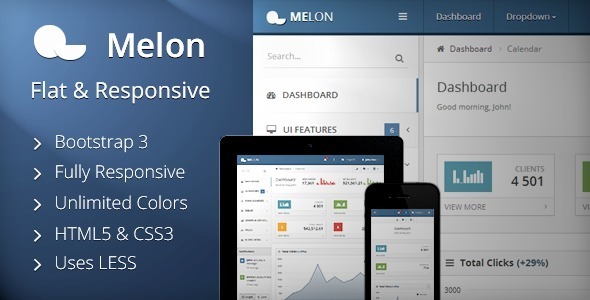
Building a backend interface that looks as polished as it performs is one of the hardest challenges in web development. Melon – Flat & Responsive Admin Template solves that problem directly. Created by developer Stammi and available on ThemeForest for just $22, this Bootstrap 3 admin template gives developers, agencies, and product teams a complete front-end foundation for dashboards, CMS backends, and web applications of any size. With 2,405 sales to date, it has already proven itself as a dependable choice for anyone who needs a clean, modern admin panel without building every component from scratch.
Melon is built on Twitter Bootstrap 3 and combines HTML5, CSS3, and JavaScript into a lightweight, fast package. Its flat design language, retina-ready assets, and fully responsive layout mean your admin panel looks sharp on desktops, tablets, and phones alike. Whether you are launching a SaaS product, wiring up an internal tool, or reskinning an existing backend, Melon provides the interface elements, form controls, charts, and tables you need — all organized in well-documented, developer-friendly code.
Key Features
- Bootstrap 3 foundation — built on Twitter Bootstrap 3.1.1, giving you a familiar grid system and component library that most front-end developers already know.
- Fully responsive flat design — works on all major browsers, tablets, and phones, with a clean, intuitive visual style that keeps interfaces user-friendly.
- Flexible layout controls — choose fixed or unfixed headers and sidebars, and show, hide, or resize the sidebar on the fly.
- Two sidebar themes — switch between Bright and Dark sidebar styles to match your brand or application mood.
- LESS-based CSS — the stylesheet is built with LESS, and the LESS source files are included so you can customize colors and spacing at the source level.
- Unlimited color possibilities — because the CSS is compiled from LESS, you are not locked into a fixed palette.
- Integrated Flot charts — line, bar (vertical and horizontal), and pie charts, plus auto-updating charts and chart widgets with tooltips.
- Comprehensive table support — static tables, dynamic DataTables, responsive tables, striped, bordered, hoverable, condensed, and checkable variants, complete with footers and pagination.
- Rich form elements — text inputs with placeholders and validation states, autogrowing textareas with character counters, styled dropdowns with search, spinners, masked inputs, dual list boxes, and horizontal or vertical form layouts.
- WYSIWYG editor and validation engine — ship content editing and client-side form validation without hunting for separate plugins.
- Fullscreen date and timepicker — plus colorpicker support for scheduling and configuration interfaces.
- Ready-made authentication pages — login, sign-up, and “password forgotten” screens are included out of the box.
- Interface elements library — sidebar search, project switcher, notifications, modals (including Bootbox), progress bars, alerts, widgets, labels, badges, tooltips, popovers, tabs, accordions, sliders, nestable lists, and styled typography.
- Button system — seven button colors (grey, blue, cyan, green, yellow, red, black) in mini, small, large, and block sizes, with dropdown and drop-up variants.
- Three icon sets — Font Awesome, Glyphicons, and Fugue, plus the Open Sans Google Font for typography.
- Lifetime updates — purchase once and receive all future updates at no additional cost.
Who Is This For? Use Cases
Melon targets anyone who needs a production-ready admin interface without spending weeks on layout and component work. Because it is built on Bootstrap 3 and ships with documented, developer-friendly code, it slots into a wide range of projects.
Web Application Developers
If you are building a SaaS dashboard, a customer portal, or an internal tool, Melon gives you the entire front-end shell. The DataTables integration handles large datasets with pagination and filtering. Flot charts cover analytics views. The form library covers settings pages, user management, and data entry screens. You focus on backend logic while the interface is already handled.
Agencies and Freelancers
Client work often means tight deadlines. Melon’s login, sign-up, and password recovery pages alone save hours of design and markup. Add the two sidebar themes, unlimited color options via LESS, and the project switcher, and you can deliver a customized admin panel that looks bespoke — while starting from a proven base.
CMS and Backend Integrators
Melon is categorized under Admin Templates and Site Templates, and its tag list includes cms and backend. That makes it a natural fit for wrapping around a custom CMS, an e-commerce back office, or a reporting tool. The nestable lists, tabs, accordions, and widget layouts give you the structural flexibility to organize complex navigation.
Startups and MVPs
When speed to market matters, a $22 template that includes charts, tables, forms, modals, and authentication screens is a practical shortcut. The responsive design means you do not need a separate mobile admin build — the same interface adapts to tablets and phones.
Technical Details & Compatibility
Melon is built with valid HTML5, CSS3, and JavaScript, with CSS authored in LESS. The LESS files are included in the package, so you can recompile styles after customizing variables. The template is based on Bootstrap 3.1.1 following the version 2.0.0 update released on 22 April 2014.
Compatibility extends across all major browsers, tablets, and phones. The changelog shows active attention to cross-browser issues, including fixes for Internet Explorer 8 and 9, Firefox rendering quirks, and Chrome behavior on Android tablets. Retina support is included, so high-density displays render icons and graphics cleanly.
The template uses Font Awesome, Glyphicons, and Fugue for icons, and Open Sans as the Google Font. JavaScript dependencies include jQuery, jQuery UI, Flot for charts, DataTables for dynamic tables, Bootbox for modals, and Lo-Dash (which replaced Underscore.js in version 1.1.0 for faster page loads). The changelog also references nprogress for slim Ajax progress bars, select2 for styled dropdowns, and a validation engine for forms.
Version history is a strong signal of maintenance. From the initial 1.0.0 release in September 2013 through 1.1.0, 1.2.0, and 2.0.0, Stammi shipped new features such as the Form Wizard, a 404 error page, Bootstrap Switch, Google Maps widgets, zoomable charts, and ribbons — alongside dozens of documented bug fixes. Support is handled through the developer’s support forum, and the item includes lifetime updates at no extra cost.
Pros and Cons
Pros
- Complete component library covering charts, tables, forms, modals, and authentication pages in a single purchase.
- Responsive flat design that works across desktops, tablets, and phones without a separate mobile build.
- LESS source included, enabling deep customization and unlimited color options.
- Well-organized and documented code that is explicitly developer friendly.
- Strong maintenance record with multiple documented releases and bug fixes.
- Lifetime updates included at no additional cost.
- Excellent value at $22, especially given the breadth of included features.
- Proven adoption with 2,405 sales.
Cons
- Built on Bootstrap 3, which is an older framework generation — teams standardized on Bootstrap 4 or 5 will need to adapt.
- The most recent documented version in the description is 2.0.0 from April 2014, so buyers should confirm current compatibility with their stack.
- Support is forum-based rather than a dedicated ticket system, which may not suit teams needing guaranteed response times.
- As a front-end template, it does not include backend logic — you still need to build your own server-side integration.
Frequently Asked Questions
Is Melon – Flat & Responsive Admin Template compatible with Bootstrap 3?
Yes. Melon is built directly on Twitter Bootstrap 3, specifically updated to Bootstrap 3.1.1 in version 2.0.0. That means the grid system, utility classes, and component conventions follow Bootstrap 3 standards, so developers familiar with that framework can work with Melon immediately.
Does Melon include support and future updates?
Yes. Purchasing the item gives you lifetime updates at no additional cost, and the developer has a track record of shipping new features and bug fixes across multiple releases. Support is conducted through Stammi’s support forum, where you can create an account and post questions. The developer also invites feature requests, stating that requested features will be considered for future updates.
Can I customize the colors and layout of Melon?
Absolutely. The CSS is built with LESS and the LESS files are included in the package, so you can modify variables and recompile to achieve unlimited color options. On the layout side, Melon supports fixed and unfixed headers and sidebars, show/hide/resize sidebar controls, and two sidebar themes (Bright and Dark), giving you substantial flexibility without touching core structure.
Final Verdict
Melon – Flat & Responsive Admin Template delivers exactly what most backend projects need: a clean, responsive, Bootstrap 3 interface with charts, tables, forms, authentication pages, and a deep library of UI components — all in well-documented code. At $22 with lifetime updates included, the value proposition is hard to argue with. The 2,405 sales and the developer’s consistent release history, from version 1.0.0 through 2.0.0, reinforce that this is a template people trust and that Stammi actively maintains.
If you are starting a dashboard, CMS backend, or web application and want to skip weeks of interface work, Melon is worth trying. Head over to ThemeForest, purchase the template, and see how quickly you can move from blank page to a polished, production-ready admin panel.