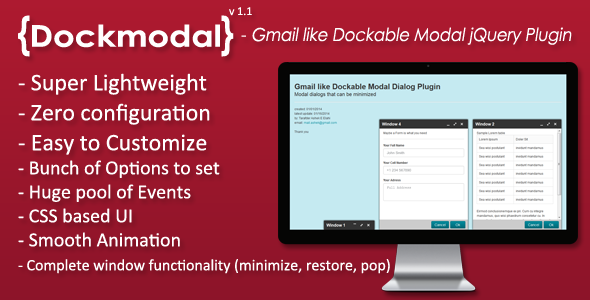
For developers and designers tired of the clunky, single-window modal experience, Dockmodal offers a paradigm shift in interface interaction. This lightweight jQuery plugin brings the multitasking efficiency of Gmail-style dialogs to any web application, providing users with the power to open, minimize, dock, and restore multiple modal windows simultaneously. Instead of forcing visitors to close one dialog before opening another, Dockmodal lets them stack and organize essential actions, dramatically improving workflow and user satisfaction. Whether you are building a complex dashboard, a customer support portal, or a project management tool, this plugin delivers a fluid, modern experience that mimics the polished behavior of a native desktop application, all within the browser.
Key Features
- Gmail-Style Dockable Modals: The core feature that sets this plugin apart. Users can open multiple modal dialogs, and each can be “docked” to a customizable footer bar, keeping the workspace clean and uncluttered.
- Complete Window Manipulation: Offers full control over every dialog state. Users can minimize a modal to a small tab, restore it to its full size, and close it at will, with all actions handled via smooth, CSS-driven animations.
- Ultra-Lightweight Footprint: At under 2.3 KB (compressed), Dockmodal is incredibly efficient. It adds negligible load time to your site, making it ideal for performance-conscious projects.
- CSS-Based Customization: The entire look and feel is controlled through CSS, not JavaScript. This means you can easily style the modal windows, dock bar, and tabs to match your brand’s design system without touching the core logic.
- Robust Callback Hooks: Developer-friendly events fire at every stage of the modal lifecycle (open, close, minimize, restore, dock). This allows you to trigger custom functions, such as form validation, data loading, or analytics tracking, with precision.
- Cross-Browser Reliability: Tested and confirmed to work flawlessly in all modern browsers, including Chrome, Firefox, Safari, Edge, and Opera, ensuring a consistent experience for all users.
- Free Updates and Support: Your purchase includes access to future updates and dedicated support from the author, ensuring long-term compatibility and help when you need it.
Who Is This For? Use Cases
Web Application Developers Building Complex Dashboards
If your app requires users to frequently open, compare, or edit multiple data sets—like an admin panel, CRM, or analytics tool—Dockmodal is a game-changer. Instead of navigating away from the main interface, users can open multiple detail views or edit forms as dockable modals. They can work on one record, minimize it, open another, and refer back to the first one instantly. This reduces page load times and keeps users engaged within your app’s core workflow.
E-commerce & Shopping Cart Optimizers
Enhance the shopping experience by using Dockmodal for product quick views, size charts, or customer reviews. Shoppers can open a product’s detailed popup, drag it to the dock bar to continue browsing, and then restore it for a final check before adding to cart. This non-intrusive pattern increases browsing time and can directly improve conversion rates by reducing friction.
Support & Help Desk Portals
Create a more efficient support environment where agents can manage multiple tickets or knowledge base articles simultaneously. A ticket can be opened as a modal window. While waiting for a customer response, the agent can minimize the ticket, open a new one, or search the documentation in a separate docked window. This multitasking ability is essential for high-volume support teams.
Email & Messaging Interface Designers
As the name suggests, this plugin is perfect for email and messaging clients. Model your interface after Gmail’s proven pattern, allowing users to compose a new message, view a previous email, and check calendar invites—all in separate, dockable panes. This creates a fluid, desktop-like environment that users already intuitively understand.
Technical Details & Compatibility
Dockmodal (version 1.1, updated February 11, 2014) is built as a lightweight jQuery plugin. Its primary requirement is jQuery version 1.2 or higher, ensuring backwards compatibility with older projects while also working seamlessly with modern jQuery builds (version 1.x, 2.x, and 3.x). The plugin uses CSS for all visual layout and transitions, meaning no external image assets are required, and it integrates naturally into responsive frameworks. It is universally compatible with all modern browsers that support jQuery and CSS3 transitions. The development community has consistently praised its stability and straightforward implementation.
Pros and Cons
Pros
- Unmatched Multitasking: The ability to open and manage multiple modals is a feature rarely found in other plugins, giving your app a significant usability advantage.
- Exceptional Performance: At under 2.3 KB, it is one of the smallest and fastest modal solutions available, which is critical for page speed scores.
- Highly Customizable Look: Full CSS control means you are not locked into a pre-made style. It adapts to any visual theme perfectly.
- Developer-Friendly Code: Clean, well-documented JavaScript with lifecycle callbacks makes it easy to integrate and extend.
- Intuitive User Experience: The Gmail-inspired pattern is familiar to billions of users, meaning no learning curve for your audience.
Cons
- jQuery Dependency: This plugin requires jQuery, which may be unnecessary overhead for modern projects that do not use the library.
- No Native Responsive Settings: While it works on mobile, the plugin does not include built-in touch-friendly gestures for minimizing or docking. You may need to adjust CSS for very small screens.
- Specific Use Case: The dockable paradigm is not suitable for simple, single-action alerts or login boxes. It is best reserved for content-rich applications where multitasking is required.
Frequently Asked Questions
Is the Dockmodal plugin compatible with the latest versions of jQuery?
Yes. The plugin requires jQuery 1.2 or higher. It has been tested and is fully functional with jQuery 1.x, 2.x, and 3.x series libraries. You can safely use it in both legacy and modern projects.
Can I use Dockmodal on multiple different websites with a single license?
No. The standard license for Dockmodal on CodeCanyon allows you to use it on a single project (one website). If you need to use it on multiple websites, you must purchase a separate regular license for each project or obtain an extended license for broader distribution, such as embedding it in a SaaS application.
Does the plugin include support for dynamic content loaded via AJAX?
Yes. Dockmodal works perfectly with dynamic content. You can initialize the plugin and load your modal’s HTML content via AJAX. The callback hooks (such as `onOpen` and `onCreate`) give you the precise control needed to bind events and manipulate the DOM after the modal’s content has been loaded into the container.
Final Verdict
Dockmodal remains a uniquely powerful tool in a web developer’s arsenal. It solves a real-world UX problem—the need for parallel workflows—that most modal plugins completely ignore. With its featherlight file size, comprehensive callback system, and full CSS customization, it offers a professional-grade feature set that is rare even in premium plugins. Author feedback and the item’s history on CodeCanyon show a reliable, well-crafted solution perfect for serious web developers and agencies building high-end dashboards, support systems, and productivity tools.
If your project demands a modern, multitasking interface that boosts user efficiency without compromising on performance, the decision is clear. Do not settle for a single-dialog limitation that frustrates your users. Try the live demo and see exactly how Dockmodal transforms your application’s workflow. Purchase your license today and bring professional, Gmail-like window management to your frontend.