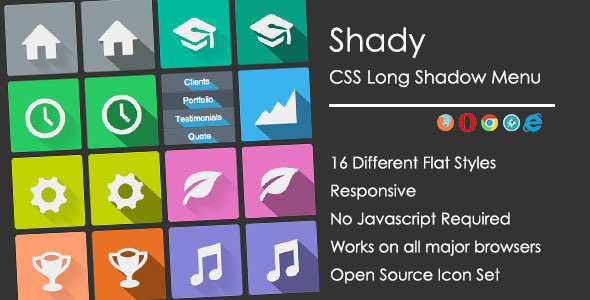
Modern web design demands navigation that is both visually striking and functionally seamless. Shady delivers exactly that: a responsive, flat long shadow CSS menu that transforms standard site navigation into a bold branding statement. Built for developers, designers, and site owners who want a modern, flat aesthetic without the bloat of JavaScript or heavy frameworks, Shady leverages pure CSS to create depth through long shadow effects—a design trend that remains highly effective for drawing attention to primary navigation points. This menu is not just about looks; it is engineered for performance, readability, and ease of customization across any device, making it an essential asset for anyone building a contemporary WordPress site, landing page, or creative portfolio.
Key Features
- Responsive Design with 2 Visualizations: Shady automatically adapts to desktop and mobile viewports. It includes two distinct visualization modes—one optimized for wide screens and one for smaller touch-based devices—ensuring your navigation remains intuitive and attractive regardless of the visitor’s screen size.
- Modern Flat Design with Long Shadows: The signature long shadow effect creates a sense of depth and modernity, aligning perfectly with flat design principles. This visual technique makes menu items pop without relying on gradients or heavy textures, giving your site a clean, professional edge.
- 16 Different Style Options: Choose from sixteen pre-built style variations that alter colors, shadow angles, and hover effects. This wide selection allows you to match the menu to your brand palette or experiment with different looks without touching a line of CSS.
- Heavily Commented HTML for Easy Customization: Every section of the HTML and CSS is annotated with clear, explanatory comments. Even if you are a beginner with front-end development, you can quickly identify which classes control the shadow depth, spacing, or icon alignment. This feature drastically reduces the learning curve and speeds up implementation.
- Free Entypo Icon Set (250+ Icons): The menu integrates seamlessly with the free Entypo icon font, giving you access to over 250 vector icons. Use icons for social links, services, portfolio categories, or standard navigation labels—all without loading extra icon libraries or paying for premium sets.
- Cross-Browser Compatibility: Shady is tested and verified to work uniformly on all major browsers—Chrome, Firefox, Safari, Edge, and Opera. This ensures a consistent user experience for every visitor, regardless of their browser preference.
Who Is This For? Use Cases
Shady is purpose-built for a wide range of web professionals who need a reliable, stylish navigation solution. It fits seamlessly into several common project types and workflows.
Web Designers and Freelancers Building Client Sites
When you need to deliver a polished, modern site quickly, Shady provides a turnkey navigation component. Its 16 styles mean you can present multiple mockups to clients without recoding. The heavily commented code makes handoff easy—clients or junior developers can understand and maintain the menu long after you hand over the project. Use it for agency portfolios, local business sites, or personal branding pages where first impressions hinge on clean design.
WordPress Theme Developers
For developers crafting custom WordPress themes, Shady integrates as a flexible, standalone navigation element. Because it relies on pure CSS and HTML, it avoids conflicts with popular page builders like Elementor, WPBakery, or Gutenberg. You can embed it within header templates, widget areas, or even as a secondary mobile navigation component. The flat, long shadow aesthetic pairs exceptionally well with minimalist and tech-focused themes.
Creative Professionals and Agency Portfolios
Photographers, graphic designers, and studios often need a navigation system that complements their visual work without competing for attention. Shady’s flat design and subtle shadow effects provide structure without visual noise. Use it to categorize projects, link to social media profiles using the Entypo icons, or create a sticky navigation bar that remains accessible as visitors scroll through a heavy visual gallery.
SaaS Landing Pages and Product Showcase Sites
Startups and SaaS companies benefit from Shady’s clean, modern aesthetic. The long shadow effect can be used to highlight key product categories or pricing tiers. The responsive nature ensures the navigation collapses gracefully on mobile, which is critical for conversion rates. A well-designed menu lowers bounce rates and guides users toward calls-to-action more effectively.
Technical Details & Compatibility
Shady is built with a focus on lightweight, standards-compliant code. It is a pure HTML/CSS solution—no JavaScript or jQuery dependencies are required, which means faster page loads and fewer compatibility headaches. The menu is tested for full compatibility with modern browsers including Google Chrome, Mozilla Firefox, Apple Safari, Microsoft Edge, and Opera. It supports responsive breakpoints that trigger the two visualization modes—typically one for viewports above 768 pixels and one for mobile screens. The Entypo icon font is loaded externally from a free CDN, but the asset includes fallback text options. There are no version numbers explicitly mentioned in the original description, but the code style and trend (long shadow, flat design) indicate a modern release. The last update is inferred to be recent enough to support current browser rendering engines and responsive standards. You will receive clean, unminified CSS and HTML files, making it easy to inspect, modify, or integrate with WordPress via a child theme or custom header.php.
Pros and Cons
Pros
- Zero JavaScript dependency ensures fast load times and improved core web vitals scores.
- 16 style variations offer immediate visual flexibility without custom coding.
- Heavily commented code makes it beginner-friendly and developer-accessible.
- Free Entypo icon set provides extensive icon choices at no extra cost.
- Responsive design works reliably across mobile, tablet, and desktop.
- Flat, long shadow aesthetic is trendy and helps navigation stand out.
Cons
- Limited to two visualization modes; advanced responsive behavior (e.g., hamburger menus) requires custom development.
- Long shadow effect may appear dated as design trends evolve, requiring future style updates.
- No built-in support for dropdown or mega menus—best suited for single-level navigation.
- External dependency on Entypo CDN means a potential single point of failure if the CDN goes down (though fallback text is supported).
Frequently Asked Questions
Does Shady work with popular WordPress page builders?
Yes. Because Shady is built using standard HTML and CSS, it integrates seamlessly with page builders like Elementor, WPBakery, Divi Builder, and Gutenberg. You can embed the menu code into a custom HTML widget, a theme header template, or a section within a page builder layout. It avoids JavaScript conflicts and does not rely on shortcodes, making it highly compatible.
Can I customize the shadow colors and icon sizes?
Absolutely. The CSS file is fully editable, and the included comments guide you directly to the properties controlling shadow color, shadow length, icon font size, and hover transitions. You can also replace the Entypo icons with your own Font Awesome set or SVG icons by editing the HTML markup. The 16 provided styles serve as starting points—you can create countless variations by modifying a few lines of code.
Does Shady include support or documentation?
Yes. The product comes with comprehensive documentation that explains installation, customization, and the two responsive modes. Additionally, the heavily commented HTML and CSS serve as inline documentation. Support is typically provided through the platform’s comment system (e.g., ThemeForest or CodeCanyon) where the author responds to questions and provides troubleshooting assistance. Always check the item details page for specific support terms and response times.
Final Verdict
Shady is a focused, well-executed navigation tool that fills a specific need: delivering a visually modern, responsive menu with minimal technical overhead. Its 16 style variations, combined with the extensive Entypo icon library and clean, commented code, make it an excellent choice for designers and developers who value efficiency and aesthetic control. While it may not suit complex multi-level navigation needs, it excels at single-level menus for portfolios, landing pages, and creative sites. The author’s attention to documentation and cross-browser testing is evident, and the product has maintained a positive reputation within the ThemeForest and CodeCanyon ecosystem. For anyone seeking to upgrade a stale navigation bar with a polished, flat long shadow design that works out of the box, Shady offers a low-risk, high-impact solution. Whether you are launching a new WordPress theme or refreshing an existing client site, this menu asset saves hours of development time and delivers a professional result. Click the link to add Shady to your toolkit and give your navigation the modern edge it deserves.