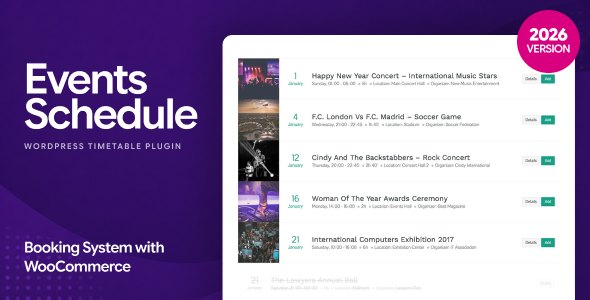
Managing a busy schedule of events, classes, or appointments on your WordPress site requires more than just a basic list. You need a tool that is both visually appealing and functionally robust. The Events Schedule – WordPress Events Calendar Plugin by CurlyThemes delivers exactly that. With over 9,340 sales, this plugin has proven itself as a reliable solution for displaying complex timetables in a clean, user-friendly format. Whether you run a dance studio, a fitness center, a university, or a medical practice, this plugin is designed to turn your raw schedule data into an engaging, filterable calendar that keeps visitors informed and converts them into customers.
Key Features
- 12 Unique Schedule Styles: Choose from a variety of layouts including Weekly Tabs, Large List, Compact List, Weekly Schedule, and Plain List. Each style offers a different design and feature set, allowing you to match the look to your specific needs.
- Easy Schedule Builder: Built for basic WordPress users, the intuitive builder lets you set up your entire schedule in minutes. You can configure styles, classes, filters, labels, colors, and messages without touching a line of code.
- Unlimited Classes and Events: Create as many classes or events as you need, just like writing a WordPress post. Each event can be set to repeat automatically every week, saving you time on repetitive data entry.
- Elegant Pop-up Window: Each class or event supports its own text and images via a modal pop-up. Choose between light and dark layouts to match your site’s design.
- Advanced Filters: Allow visitors to filter by Type, Location, Instructor, Day, or Time of the Day. Filters can be placed left, right, or center, and you can use checkboxes or switchers for a modern UI.
- Call-to-Action Buttons: Add custom buttons for each class to drive conversions. Options include adding the event to iCal calendars, opening an email for reservations, or linking to an internal or external URL.
- 100% Responsive and Retina Ready: The plugin looks great on any device, from desktop monitors to smartphones and tablets.
- Visual Composer Integration: A custom Visual Composer element makes it easy to add your schedule to any page. Alternatively, use the auto-generated shortcode.
- Fully Localized and Translatable: The plugin is ready for multilingual sites and supports translation files.
- No Duplicate Content: All schedule data is loaded only once per page, keeping your site clean and SEO-friendly.
- Daily Cron Job: Automatically updates past repetitive events to keep your schedule current without manual intervention.
- Assign Class Types, Locations, and Instructors: Categorize your events for better organization and easier filtering. This also displays useful metadata directly in the schedule.
- Customizable Labels and Messages: Add your own text for labels and messages to match your brand voice.
- Easy Color Customization: Change colors for text and special elements directly from the settings panel.
- Flexible Date Display: Show all events, only the next week, or just a few days at a time.
- Canceled Event Display: Mark events as canceled and they will appear visibly in the schedule, keeping your visitors informed.
- Featured Image Support: The Plain List style and pop-up windows support featured images for a richer visual experience.
- Extended Documentation: Comprehensive documentation with screenshots guides you through every step of setup and customization.
Who Is This For? Use Cases
Dance Studios, Fitness Centers, and Sports Facilities
The Weekly Tabs and Large List styles are perfect for studios and gyms that offer recurring classes. You can assign instructors, locations, and class types, then let members filter by day or instructor. The call-to-action button can link to a booking page or open an email for reservations, making it easy to convert visitors into paying clients.
Conferences, Workshops, and Seminars
For events with multiple speakers and sessions, the Compact List style provides a clean, scannable layout. Attendees can filter by time of day or location, and each session can include a pop-up with speaker bios, images, and links to resources. The iCal integration lets attendees add sessions directly to their digital calendars.
Schools, Colleges, and Universities
The Weekly Schedule style is ideal for academic institutions that repeat the same classes every week. You can assign instructors and rooms, and students can quickly find their courses by filtering by day or instructor. The plugin handles the repetitive nature of academic timetables effortlessly.
Medical Centers and Beauty Parlors
Professionals who need to display working hours or appointment availability can use the Plain List or Weekly Tabs styles. Pop-up windows can include details about services, pricing, and practitioner bios. The email call-to-action button allows patients or clients to request appointments directly.
Music Festivals, Sports Arenas, and Exhibition Centers
The Plain List style is designed for rich visual displays of important events. Use featured images and pop-up windows to showcase headliners, performers, or exhibitors. The advanced filters help attendees navigate large schedules by day, stage, or time slot.
Technical Details & Compatibility
The Events Schedule – WordPress Events Calendar Plugin is built to work with standard WordPress installations. It is fully responsive and retina-ready, ensuring a seamless experience across all modern browsers including Chrome, Firefox, Safari, and Edge. The plugin integrates with Visual Composer (WPBakery) via a custom element and also supports simple shortcodes for non-VC users. It is fully localized and translatable, making it suitable for multilingual websites. The plugin uses a daily cron job to automatically update past repetitive events, and it is designed to avoid duplicate content issues by loading data only once per page. No external image assets are included; all visuals are created using the plugin’s own features and your content.
Pros and Cons
Pros
- 12 distinct schedule styles provide versatility for nearly any type of event or class display.
- Easy-to-use builder designed for non-technical users, with no coding required.
- Advanced filtering by Type, Location, Instructor, Day, and Time of Day improves user experience for large schedules.
- Call-to-action buttons with iCal, email, and URL options drive conversions and engagement.
- Responsive and retina-ready design ensures a professional look on all devices.
- Excellent value at $39.00, given the breadth of features and 9,340 sales attest to its reliability.
- Comprehensive documentation and a dedicated developer (CurlyThemes) provide ongoing support.
Cons
- Images are not included; you must supply your own visuals for featured images and pop-up content.
- The demo uses Visual Composer and a specific theme, which may require additional setup if you use a different page builder or theme.
- Some users may find the number of style options overwhelming if they only need a simple calendar.
Frequently Asked Questions
Is the Events Schedule plugin compatible with the latest version of WordPress?
Yes, the plugin is designed to work with standard WordPress installations and is regularly updated to maintain compatibility with the latest WordPress versions. Always check the plugin’s changelog on CodeCanyon for the most current compatibility information.
Can I use this plugin with a page builder other than Visual Composer?
Yes. While the plugin includes a custom Visual Composer element for easy integration, it also generates a simple shortcode that you can use with any page builder or the classic WordPress editor. Simply copy the shortcode and paste it into any page or post.
Does the plugin include support and updates?
Yes. When you purchase the plugin from CodeCanyon, you receive six months of support from CurlyThemes, with the option to extend. Updates are included for the duration of your support period, ensuring you have access to new features and bug fixes.
Final Verdict
The Events Schedule – WordPress Events Calendar Plugin by CurlyThemes is a powerful, flexible, and user-friendly solution for displaying event timetables on WordPress sites. With 12 distinct styles, advanced filtering, and conversion-focused call-to-action buttons, it caters to a wide range of industries from fitness studios to academic institutions. The plugin’s 9,340 sales and consistent updates speak to its reliability and the developer’s commitment to quality. At just $39.00, it offers exceptional value compared to similar premium plugins. If you need a professional, responsive, and feature-rich event calendar that your visitors will love using, this plugin is a smart investment. Try it today and transform your schedule into a dynamic, engaging part of your website.