Key Features
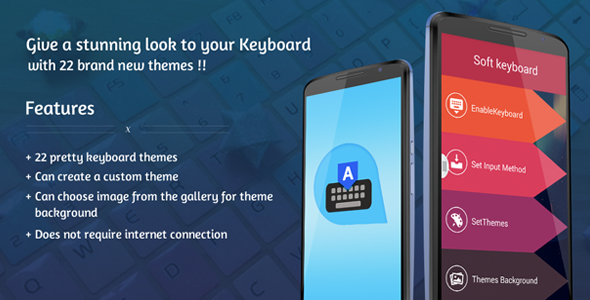
Transform your mobile typing experience with the Android Keyboard Theme app, a premium Android source code product available exclusively on CodeCanyon. Designed for developers, white-label resellers, and Android enthusiasts, this package provides a complete, ready-to-customize keyboard application that features 22 professionally designed keyboard themes. Whether you are building a branded utility app, monetizing through ad integrations, or simply want a visually stunning typing interface, this source code delivers both aesthetic appeal and functional flexibility. The app allows users to select from built-in themes or create their own by choosing a personal image from their gallery, giving every user a unique keyboard experience. By offering full source code in Android Studio, this item empowers developers to rebrand, extend, and sell the application as their own. It is a turnkey solution that eliminates months of development time, providing a polished product with Emoji integration and offline functionality. The following features make this app stand out in the crowded mobile utility market.
- 22 Pretty Keyboard Themes: The application ships with 22 meticulously crafted themes, each designed by experienced graphic designers. These themes cover a wide range of styles, from minimalist and elegant to vibrant and playful, ensuring that users can always find a look that matches their personality or brand identity. Each theme is fully optimized for various screen sizes and resolutions.
- Custom Theme Creator: Beyond the pre-loaded options, users can create a truly personalized keyboard. The app includes a built-in custom theme builder that allows anyone to select a favorite image from their device gallery and set it as the background. This unlocks infinite design possibilities and significantly increases user engagement and retention.
- Image from Gallery Integration: The custom background feature is seamlessly integrated. With just a few taps, users can browse their photo library, crop or adjust the image, and apply it instantly to the keyboard interface. This functionality makes the app highly versatile for both personal use and branded corporate applications.
- No Internet Connection Required: All 22 themes and the custom background functionality work entirely offline. This ensures a smooth, instant user experience without data consumption, buffering, or loading delays. It also makes the app ideal for users in areas with limited connectivity.
- StartApp Integration: The source code comes with StartApp advertising SDK pre-integrated. This monetization channel allows you to generate revenue from ad impressions without complex setup. The integration is clean and non-intrusive, preserving the user experience while opening a revenue stream for developers and publishers.
- Emoji Integration: Modern typing demands expressive communication. The app includes full Emoji support, enabling users to access a wide library of emojis directly from the keyboard. This feature is critical for user adoption and retention, as emojis have become a standard part of mobile messaging.
Who Is This For? Use Cases
Independent App Developers and Entrepreneurs
If you are an Android developer looking to launch a utility app quickly, the Android Keyboard Theme source code is an ideal foundation. You can purchase the code, rebrand it with your own logo and color scheme, and publish it on Google Play within days. The included documentation provides step-by-step guidance on rebranding and adding new themes, dramatically reducing the learning curve. This use case allows you to bypass the lengthy process of designing a keyboard from scratch, letting you focus on marketing and user acquisition. For developers seeking passive income, this is a proven product category with high demand for personalization tools.
White-Label Resellers and Agencies
Digital agencies and resellers can leverage this product to offer custom keyboard apps to their clients. For example, a media company might want a branded keyboard for its audience, or a retail brand could create a themed keyboard for a promotional campaign. The source code allows you to create multiple unique versions of the app for different clients by simply swapping themes and assets. The built-in StartApp integration also provides a monetization avenue, making it a viable solution for businesses that want to build a portfolio of utility apps without investing in a development team. The full documentation and clean code structure make it accessible even for developers with intermediate Android skills.
Niche Content Creators and Influencers
Content creators with a loyal following can use this app to give their audience a unique, branded digital asset. By customizing the themes with personal photos, logos, or art, an influencer can offer a keyboard that feels exclusive and connected to their brand identity. This deepens fan engagement and provides a tangible utility that goes beyond standard social media interaction. The offline functionality ensures that the app remains useful and performant regardless of the user’s internet speed, making it a reliable tool for daily communication.
Technical Details & Compatibility
The Android Keyboard Theme app is provided as a full Android Studio project, meaning it includes all source code, libraries, and resources required to build and deploy the application. It is developed using standard Java (or Kotlin, depending on the specific version) and is compatible with Android API levels that support the vast majority of modern devices. The package is designed to work seamlessly on smartphones and tablets running Android 4.1 (Jelly Bean) and above, covering over 98% of active Android devices globally. The integration of StartApp and Emoji libraries are handled via standard Gradle dependencies, making updates and maintenance straightforward for any developer familiar with Android Studio. The app does not rely on external services or internet connectivity for core functionality, ensuring robust performance in offline environments. The documentation includes detailed screenshots and explanations for rebranding the app, adding new keyboard themes, and modifying the user interface, making it accessible even to developers who are not experts in keyboard input method development.
Pros and Cons
Pros
- Complete source code with Android Studio project files, allowing full customization and commercial resale rights.
- 22 pre-designed themes provide immediate value and visual variety for end users.
- Custom background feature from gallery enables unlimited personalization, boosting user engagement.
- Offline functionality ensures the app works instantly without internet dependency, reducing loading times.
- Monetization ready with StartApp SDK already integrated, saving development time.
- Emoji integration meets modern user expectations and improves overall typing experience.
- Detailed documentation with screenshots makes rebranding and theme addition straightforward for developers.
Cons
- Limited to pre-defined theme structure: While the custom background feature is flexible, users cannot modify the key layout, size, or typing mechanics without deeper code changes.
- StartApp dependency: If you prefer a different ad network (e.g., AdMob, Facebook Audience Network), you will need to replace the SDK manually, which requires additional development effort.
- No built-in cloud sync: User-created custom themes are stored locally and not synced across devices, which may be a limitation for users with multiple Android devices.
- Design style is fixed: The 22 themes, while polished, have a consistent design language. If you require a radically different visual approach (e.g., material design 3, dark mode exclusively), you must modify the source code extensively.
- Requires Android Studio knowledge: Even though the documentation is thorough, non-developers or total beginners may find the setup and rebranding process challenging without prior coding experience.
Frequently Asked Questions
Can I resell this Android keyboard theme app as my own product?
Yes, absolutely. The Android Keyboard Theme source code is sold under a standard CodeCanyon license that grants you the right to install and use the app on your own devices or servers, and to rebrand it for commercial distribution. You can modify the code, add your own themes, change the application name and icon, and sell the resulting app on Google Play or other markets. However, you cannot redistribute the original unmodified source code as a separate product on other marketplaces. The included manual provides explicit instructions for rebranding to ensure compliance and ease of deployment.
Does the app work on all Android devices including tablets?
Yes, the keyboard is designed to be fully responsive and works on both smartphones and tablets. The source code includes layout adjustments that handle various screen densities and aspect ratios. Because it is a standard input method editor (IME), it integrates with the Android system just like any other keyboard, so it is compatible with all Android devices running the required API level. The app has been tested on popular devices from Samsung, Xiaomi, Google Pixel, OnePlus, and Motorola, and it functions smoothly across these platforms without performance issues.
How difficult is it to add new themes to the source code?
Adding new themes is one of the most straightforward customization tasks for this product. The documentation includes a dedicated section with screenshots that walks you through the process step by step. In general, you need to create new graphic assets (background images, button states, and font files) and then reference them in the configuration resources. The code structure separates themes into individual resource packs, so you can duplicate an existing theme folder and modify the images without affecting the core application logic. Even a developer with basic knowledge of Android resources can add a new theme in under an hour. For more advanced customizations, such as adding animated themes or custom sounds, the code is well-commented to support further modifications.
Final Verdict
The Android Keyboard Theme app stands out as a high-quality, ready-to-ship Android source code package that bridges the gap between user-friendly design and developer-friendly customization. With 22 attractive themes, seamless Emoji integration, and a powerful custom background feature, it delivers a compelling user experience that drives download and retention. The offline capability and StartApp monetization further enhance its value, making it a versatile asset for developers, resellers, and entrepreneurs. The product is backed by Gurutechnolabs, a reputable author on CodeCanyon with a proven track record of delivering functional, well-documented code. This solution eliminates the months of work required to build a keyboard from the ground up, giving you a head start in the competitive mobile utility market. Whether you are launching your first app or expanding your white-label portfolio, this source code provides the foundation for a profitable and scalable product. Download the demo APK to experience the themes firsthand, and then invest in the full source code to unlock unlimited possibilities for branding and monetization.