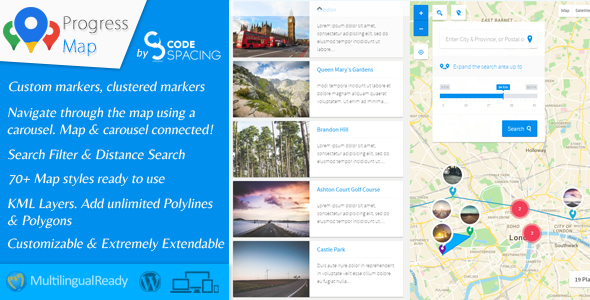
Key Features
The Progress Map WordPress Plugin is packed with an extensive array of features designed to turn a standard Google Map into a fully interactive, searchable, and visually compelling directory. Below is a breakdown of the core functionalities that make this plugin a standout choice for location-based websites.
- Interactive Map & Carousel Sync: The plugin pairs a Google Map with a fully synchronized carousel. When a user clicks a listing in the carousel, the map instantly zooms and centers on that specific location, and vice versa. This creates an intuitive browsing experience that keeps visitors engaged.
- Unlimited Custom Post Types: While it works perfectly with default posts and pages, the plugin truly shines with custom post types. You can integrate an unlimited number of custom post types, making it ideal for complex directories like real estate, restaurants, or job boards.
- Advanced Marker Management: You have complete control over markers, including the ability to upload custom icons, use SVG icons, set marker labels (numbers or letters), and even configure a “Visited Marker” style that changes the appearance of markers after a user clicks them.
- Sophisticated Clustering Options: When dealing with hundreds of locations, markers can become cluttered. The plugin offers robust clustering solutions, including a unique “Color Clustering” feature that uses a gradient color pattern based on marker density, making it easy to spot high-density areas at a glance.
- Powerful Search & Filtering: Enhance user experience with a powerful search form that includes distance-based radius search, geo-targeting to find locations near the user, and a faceted search to filter by categories, tags, or custom taxonomies.
- Heatmap Layer: Visualize data density with a highly performant heatmap layer. The latest version has migrated to deck.gl, offering smoother gradients, better rendering quality, and new parameters like “Heatmap threshold” and “Heatmap aggregation” for finer control.
- Overlays & Drawing Tools: The plugin supports the addition of polygons, polylines, image overlays, and KML/KMZ layers. You can draw these directly on the map in the admin panel, making it easy to define custom areas, routes, or property boundaries.
- Route Maps: Create a route map that connects multiple posts with a line, perfect for showcasing tour itineraries, delivery routes, or multi-location business journeys.
- Geo-Targeting & Nearby Places: Automatically geolocate visitors (with their consent) to show locations nearest to them. The “Nearby Points of Interest” feature can also display surrounding amenities like restaurants, gas stations, or hotels for each listing.
- Performance & Caching: The developers have focused heavily on speed. The plugin includes a map caching system to improve loading times, and the carousel has been optimized to handle thousands of locations without lag.
- Modern API Compatibility: The plugin stays ahead of the curve by migrating to the latest Google Maps APIs, including support for Advanced Markers, the new Places API, and Map IDs for advanced cloud-based styling.
Who Is This For? Use Cases
The Progress Map WordPress Plugin is not a one-size-fits-all tool; it is a specialized solution for anyone whose website relies on physical locations. Its versatility, combined with deep customization options, makes it suitable for a wide range of industries and use cases.
Real Estate Agencies
For real estate websites, this plugin is a game-changer. You can create a property listing map where each marker represents a home for sale or rent. The carousel can display property thumbnails, prices, and brief descriptions. Users can filter by price range, number of bedrooms, or property type using the faceted search. The ability to draw polygons allows you to highlight specific neighborhoods or school districts, while the route map feature can show the distance from a property to local schools or amenities.
Restaurant & Hospitality Directories
If you run a food blog or a city guide, the plugin allows you to map out all the best dining spots. Each marker can open an infobox with the restaurant’s name, cuisine type, rating, and a link to the full review. The “Nearby Points of Interest” feature is particularly useful here, allowing users to see what other attractions or eateries are located near a specific restaurant. The search functionality lets users find “Italian restaurants within 5 miles,” creating a highly interactive and useful resource.
Store Locators for Retail Chains
For multi-location businesses, a store locator is essential. The Progress Map WordPress Plugin handles this flawlessly. You can add all your physical store locations, and visitors can use the geo-targeting feature to automatically find the store closest to them. The carousel can be set to display store names, addresses, and phone numbers. The plugin’s ability to handle thousands of markers without performance degradation ensures that even large national or international chains can use it effectively.
Job Boards & Career Portals
Location is a critical factor in job searching. This plugin allows job boards to display openings on a map, with markers color-coded by job category or type. Job seekers can filter by location, salary, or job title. The “Visited Marker” feature is useful here, letting users know which job postings they have already viewed. This visual approach to job hunting offers a significant advantage over traditional list-based boards.
Travel & Tourism Websites
Showcase points of interest, hotels, and tour stops on an interactive map. The route map feature is perfect for displaying tour itineraries, while the image overlay feature can be used to add a visual plan or brochure to the map. Visitors can explore a city virtually before they even arrive, making your website a go-to resource for trip planning.
Technical Details & Compatibility
Built by the experienced developer codespacing, the Progress Map WordPress Plugin is engineered with modern web standards in mind. It is fully compatible with PHP 8, ensuring smooth operation on the latest server environments. The plugin has also been tested for compatibility with WordPress 5.6 and above, including block themes and Full-Site-Editing environments.
The plugin requires a Google Maps API key to function. It supports the latest Maps JavaScript API v3.65+ and has migrated to the new Places API and Advanced Markers, ensuring it will remain functional as Google deprecates older services. The frontend is built to be responsive, and the carousel now uses the modern “swiperjs” library, which automatically adjusts to mobile devices and small screens. The plugin also includes a Content Security Policy (CSP) compliance update, loading the Google Maps API from the correct domain to avoid conflicts.
For developers, the plugin offers a range of hooks and filters, allowing for deep customization. It also includes a “Troubleshooting” section in the admin panel to help resolve potential script conflicts with themes or other plugins. The plugin is translation-ready and supports WPML for multilingual websites.
Pros and Cons
To provide a balanced and honest review, let’s examine the strengths and potential weaknesses of the Progress Map WordPress Plugin.
Pros
- Exceptional Feature Depth: Few map plugins offer this level of control, from clustering styles and heatmaps to polygons, polylines, and KML layers. It is a comprehensive solution.
- Highly Customizable: With options for map styles, marker icons, infobox layouts, carousel settings, and even custom CSS, you can tailor the map to match your brand perfectly.
- Proven Track Record: With over 6,355 sales and 12 years of development history, this is a mature and battle-tested plugin. The extensive changelog shows a commitment to fixing bugs and adding new features.
- Performance Focused: The recent updates have significantly improved speed, with a new caching system and optimized carousel handling for thousands of locations.
- Future-Proof Technology: The migration to Advanced Markers, the new Places API, and deck.gl ensures compatibility with the latest Google Maps features and reduces the risk of breakage from deprecated APIs.
- Excellent Value: At $114.00, it represents a solid investment when you consider the breadth of features included, which are often sold as separate premium add-ons in other plugins.
Cons
- Steep Learning Curve: The sheer number of settings and options can be overwhelming for beginners. It may take some time to fully understand and configure all the features.
- Requires Google Maps API Key: Users must have a Google Cloud account and set up billing to obtain an API key, which can be a hurdle for non-technical users.
- Premium Price Point: At $114, it is more expensive than many basic map plugins. However, the feature set justifies the cost for professional use.
- Potential for Overkill: For a simple blog with just a handful of locations, this plugin might be more complex than necessary. It is best suited for serious directory and listing sites.
Frequently Asked Questions
Is the Progress Map WordPress Plugin compatible with WooCommerce?
While the plugin does not have a dedicated WooCommerce integration, it works seamlessly with custom post types. Since WooCommerce products are a custom post type, you can use the Progress Map WordPress Plugin to display your products on a map. You would need to add the latitude and longitude coordinates to your products, and the plugin will pick them up. This is a great way to create a “Find a Retailer” map or show the origin of your products.
Does the plugin work with the latest version of Google Maps API?
Yes, the developer has been proactive in ensuring compatibility. The latest version (6.0) includes a migration to the new Places API and Advanced Markers, which are the future of the Google Maps JavaScript API. It also supports Map IDs for advanced cloud-based styling and features. This ensures the plugin will continue to function smoothly as Google phases out older API versions.
Can I add locations from the frontend of my website?
Yes, the plugin includes a shortcode for a frontend submission form. This allows registered users (or even guests, depending on your settings) to submit new locations directly from the frontend. This is perfect for user-generated content, such as community-driven directories or review sites. The plugin also allows you to automatically convert the submitted address into latitude and longitude coordinates.
Final Verdict
The Progress Map WordPress Plugin is a powerhouse solution for any website that needs to display location-based content. After 12 years on the market, with over 9,000 licenses sold and a current sales count exceeding 6,350 on CodeCanyon, it has proven its reliability and staying power. The developer, codespacing, has consistently updated the plugin to keep pace with WordPress and Google Maps API changes, demonstrating a strong commitment to quality and longevity.
While it has a learning curve, the depth of features is unmatched at this price point. Whether you are building a real estate portal, a restaurant guide, a store locator, or any other location-centric website, this plugin provides the tools you need to create a professional, engaging, and highly functional map experience. The recent performance upgrades and migration to modern APIs ensure that your investment is future-proof.
If you are serious about taking your website’s map functionality to the next level, the Progress Map WordPress Plugin is a worthy investment. It offers incredible value for its $114 price tag, and the active development and support make it a safe choice for developers and site owners alike. Don’t settle for a basic map—give your visitors the interactive and intuitive experience they deserve. Click here to get your copy of Progress Map today and transform the way you showcase your locations.