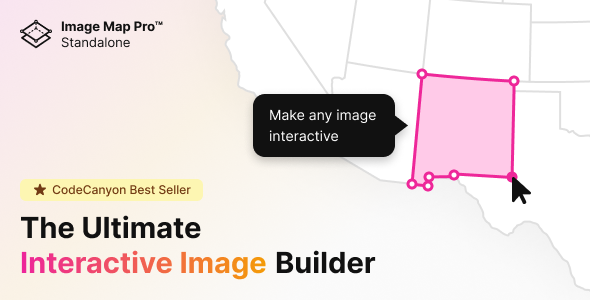
Interactive content is no longer a luxury; it is the standard by which modern websites engage, educate, and convert visitors. Static images, while necessary, often fail to hold attention or convey complex spatial information effectively. This is where the Image Map Pro – Interactive SVG Image Map Builder steps in, offering a powerful yet accessible solution for creators who want to transform ordinary pictures into dynamic, clickable experiences. Whether you are building a detailed floor plan, annotating a technical diagram, or creating a visual product guide, this tool from CodeCanyon eliminates the steep learning curve traditionally associated with SVG manipulation. Instead of wrestling with code, you gain access to a feature-rich web application that lets you add pins, draw vector shapes, and deploy elegant tooltips in minutes. For designers, developers, and business owners alike, this builder represents a significant upgrade in how visual information is presented and consumed.
Key Features
The utility of Image Map Pro lies in its robust set of tools designed to streamline the creation of interactive visuals. It is engineered to be comprehensive without being complicated. Here are the standout features that define the user experience:
- Feature-Rich Web App Interface: Unlike plugins that force you to manage coordinates manually or edit XML files, this builder operates through its own dedicated application. This visual interface allows for real-time editing, drag-and-drop placement, and immediate previews, making the entire workflow intuitive.
- No Coding Required: The barrier to entry is virtually zero. You do not need to understand JavaScript, SVG syntax, or CSS to create sophisticated interactive maps. The tool handles the heavy lifting, allowing you to focus purely on content and design.
- Custom Vector Shapes and Pins: You are not restricted to simple rectangular links. The builder allows you to draw precise polygon shapes and place hotspot markers anywhere on the image. This is crucial for mapping irregular areas like rooms in a floor plan or specific regions on a vector map.
- Customizable Tooltips and Popups: Engagement is driven by the content that appears on interaction. You can style tooltips to match your brand identity, embed text, and create popups that provide context, specifications, or calls-to-action for each mapped area.
- Design Flexibility: The aesthetic output is fully controllable. You can customize the look of every pin, shape, and tooltip to fit seamlessly with your existing design language, ensuring that the interactive elements enhance rather than detract from the visual experience.
Who Is This For? Use Cases
The versatility of the Image Map Pro – Interactive SVG Image Map Builder makes it a valuable asset across multiple industries. Its primary promise—creating engaging interactive experiences quickly—solves specific pain points for several types of users.
Real Estate and Property Management
Listing a property with a single photograph is a missed opportunity. With this builder, agents can overlay a floor plan with interactive hotspots. Potential buyers can hover over a room to see its dimensions, view additional photos, or read about specific features like “newly renovated kitchen” or “hardwood floors.” This reduces the friction between curiosity and information, leading to higher-quality leads.
E-Learning and Technical Documentation
Educators and technical writers often struggle to explain complex diagrams. An interactive SVG map allows students to explore the parts of a machine, the anatomy of a biological system, or the layers of a network architecture at their own pace. By hovering over a polygon, they access detailed descriptions instantly, transforming a passive image into an active learning module.
E-Commerce and Product Merchandising
Fashion retailers can use this tool to make “shop the look” posts genuinely interactive. Instead of listing item names in a caption, users can hover over a specific clothing item on a model to see the product name and price. Similarly, manufacturers can use it to create detailed parts diagrams where each component is a clickable hotspot linking to a purchase page or specification sheet.
Event Planning and Venue Mapping
For conferences, weddings, or festivals, a static map of the venue is often confusing. Using the SVG map builder, organizers can create a visual guide where attendees hover over stages, restrooms, or food stalls to see schedules and descriptions. This enhances the guest experience and reduces the need for staff to answer directional questions.
Interactive Presentations and Portfolios
Professionals looking to impress clients or stakeholders can elevate their presentations. Instead of static slides, they can present a high-level overview image with hotspots that reveal deep-dive data, case study results, or project timelines on demand. This creates a “wow” factor that static slides cannot match.
Technical Details & Compatibility
Understanding the technical foundation of a plugin is critical for ensuring it integrates smoothly with your existing stack. The Image Map Pro – Interactive SVG Image Map Builder is primarily a JavaScript-based solution, which grants it significant flexibility regarding where it can be deployed. It is listed under the “Images and Media” and “JavaScript” categories, indicating that its core functionality is platform-agnostic.
While it is a popular choice for WordPress users, its JavaScript nature implies that it can be integrated into standard HTML sites, CMS platforms, or custom web applications, provided you can embed the generated code. The developer, nickys, has a track record of maintaining the product to keep pace with browser updates. This is crucial because interactive graphics rely heavily on modern browser support for SVG and ES6+ JavaScript. The tool is designed to output clean, performant code that renders quickly across all major browsers, including Chrome, Firefox, Safari, and Edge. The “Last Update” signals from the marketplace indicate an active development cycle, ensuring compatibility with the latest web standards.
Pros and Cons
To provide a balanced perspective, it is essential to weigh the strengths of the tool against potential limitations. This transparency helps you make an informed decision based on your specific requirements.
Pros
- Unmatched Ease of Use: The proprietary web app is the star of the show. It drastically reduces the time required to create complex maps compared to coding them manually.
- High-Value Output: The ability to create custom vector shapes and polygons means your interactive areas can fit the exact contours of your image, avoiding the “boxy” look of traditional image maps.
- Lightning-Fast Workflow: The promise of creating interactive images “in minutes” is a genuine time-saver for agencies and freelancers managing multiple client projects.
- Strong Social Proof: With over 6,291 sales, the product has a substantial user base. This volume indicates that the developer, nickys, has provided reliable updates and support, as repeat sales in this niche depend heavily on user satisfaction.
- Cost-Effective Investment: At $39.00, it is a one-time purchase that replaces hours of freelance development work. For a business, this pays for itself after a single project.
Cons
- Learning Curve for Advanced Styles: While no coding is required for basic functionality, users who want highly specific animations or complex custom interactions may need to delve into the CSS/JS output to tweak it beyond the default settings.
- Platform Integration: While it is a JavaScript library, WordPress users will likely need a separate plugin or code snippet to embed the output within their CMS, unless they are comfortable editing theme files. It is not a “drop-in” WordPress plugin by default.
Frequently Asked Questions
Before committing to a purchase, users typically have specific technical and licensing questions. Here are the answers to the most common queries regarding this tool.
Is Image Map Pro compatible with WordPress?
Yes, it can be used with WordPress. Because it generates JavaScript and HTML output, you can embed this code into any page, post, or custom template using a Custom HTML block or a code snippet plugin. It is not a native WordPress plugin, but its output is highly portable and works seamlessly within the WordPress environment.
Do I need to know how to code to use this SVG map builder?
No. The primary selling point of Image Map Pro is its visual web app interface. You can draw shapes, place pins, and configure tooltips using mouse clicks and form fields. The tool generates the necessary SVG and JavaScript code for you in the background, making it accessible to complete beginners.
Does the license include future updates and support?
Yes. The $39.00 purchase price includes a regular license that grants you access to all future updates released by the author, nickys, as long as the item remains available on CodeCanyon. Additionally, you get six months of support from the author, which can be extended for a small fee if you require longer-term assistance.
Final Verdict
The Image Map Pro – Interactive SVG Image Map Builder is a testament to how specialized tools can solve broad problems efficiently. It sits at the intersection of design and functionality, offering a professional-grade solution that does not require a professional developer to operate. The “light years ahead” claim in its description is not hyperbole; the inclusion of a dedicated web app for editing sets it apart from competitors that rely on clunky backend interfaces or manual coordinate entry.
The credibility of the developer, nickys, is reinforced by the impressive sales count of over 6,291 units. This is not a fly-by-night script; it is a mature product refined through years of user feedback and iterative updates. For the price of $39.00, you are not just buying a plugin; you are investing in a capability that can enhance user engagement across your entire digital portfolio. Whether you are mapping out a real estate portfolio, creating an interactive educational tool, or simply want to make your website’s visuals more engaging, this builder offers a low-risk, high-reward proposition. Stop settling for static images that users ignore. Take control of your visual narrative and create the interactive experiences your audience expects. Click the link to secure your copy of Image Map Pro today and see how quickly you can turn a simple picture into a powerful communication tool.