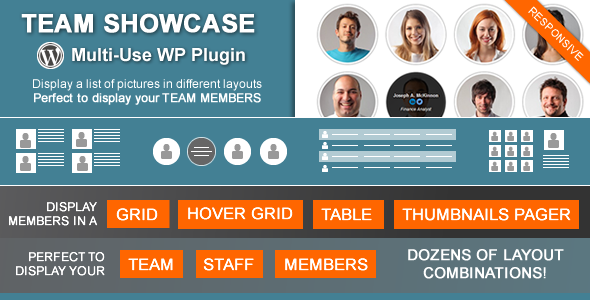
Building a credible online presence often comes down to the people behind the brand. Whether you run a corporate agency, a creative studio, or a bustling online community, showcasing your team humanizes your website and builds immediate trust with visitors. The Team Showcase – WordPress Plugin by developer cmoreira is a dedicated tool designed to display your staff, members, or crew in a polished, highly customizable way. This plugin transforms the often-clunky process of adding team pages into a streamlined, drag-and-drop experience, offering multiple layout styles, advanced filtering, and even SEO-friendly structured data. For site owners who want a professional-looking directory without hiring a developer, this plugin delivers a comprehensive solution that is both flexible and easy to manage.
Key Features
The Team Showcase – WordPress Plugin is packed with features that go far beyond a simple list of names and photos. Here is a breakdown of the core functionalities that make it a standout choice for displaying your workforce:
- Four Distinct Display Layouts: Choose between a responsive Grid, a Grid with Information on Hover, a clean Table layout, and a Thumbnails Pager gallery style. This variety ensures you can match the presentation to your site’s design aesthetic.
- Comprehensive Customization Options: Tailor the look with adjustable column numbers, image shapes (squared, rounded, or circular), grayscale effects, borders, and shadow styles. You also have control over text alignment and image composition (above, right, or left of content).
- jQuery Category Filtering: Organize members into groups and allow visitors to filter them instantly with a click. This is perfect for sorting staff by department, position, or location directly on the front end.
- Theme Presets: If you don’t want to manually configure every setting, the plugin includes pre-built style combinations. You can select a preset and have a fully styled layout in seconds.
- Drag & Drop Re-Ordering: Managing the sequence of your entries is intuitive. Simply drag and drop members into the desired order from the admin panel.
- Single Pages & JSON-LD Structured Data: Activate individual pages for each member to provide detailed bios. The plugin integrates JSON-LD structured data, helping search engines understand your content and potentially display rich snippets in search results.
- Shortcode & PHP Function Generator: A built-in generator creates the exact shortcode or PHP function you need. You can preview the layout live before embedding it into posts, pages, widgets, or directly into your theme files.
- Extensive Custom Fields: Beyond the standard name and image, you have specific fields for Job Title, Email, Telephone, Location, Personal Website, and links to major social networks (Twitter, Facebook, LinkedIn, YouTube, Vimeo, and more).
- Widget Ready: The shortcode works seamlessly in text widgets, allowing you to display team members in your sidebar or footer without any coding.
Who Is This For? Use Cases
The versatility of the Team Showcase – WordPress Plugin makes it suitable for a wide range of websites. While its primary function is to display staff, its architecture supports various image-and-text content types.
Agency and Corporate Websites
For digital agencies, law firms, or consulting companies, establishing expertise is crucial. Use the grid layout with information on hover to create a sleek “Meet the Team” page. Highlight your senior partners and department heads with circular image shapes and links to their LinkedIn profiles. The category filter allows clients to view only the “Management” team or the “Creative” department, making navigation effortless.
Non-Profit Organizations and Clubs
Showcasing board members, volunteers, or committee leaders builds transparency and community trust. The table layout is ideal for displaying a large number of members in a compact, readable format. You can use the custom fields to display contact information and specific roles, while the drag-and-drop feature lets you prioritize key figures like the President or Treasurer.
Educational Institutions and Online Communities
Universities can use the plugin to list faculty members by department, while online communities can display moderators or “squad” leaders. The thumbnails pager layout works exceptionally well here, functioning like an interactive gallery where users can click through avatars to see detailed bios. This creates an engaging user experience that is more dynamic than a standard list.
E-commerce and Service Providers
The plugin is not limited to people. As the developer notes, you can use it to display a portfolio of products, services, or even client testimonials. Create a grid of your best-selling items with a short description and a link to the product page. This flexibility makes it a multi-purpose tool for any content that pairs an image with text.
Technical Details & Compatibility
Understanding the technical backbone is essential for ensuring smooth integration with your existing WordPress setup. The Team Showcase – WordPress Plugin is built with modern web standards in mind.
- WordPress Compatibility: The plugin is designed for standard WordPress installations. It includes an option to enable the block editor (Gutenberg) for those who prefer modern editing, ensuring it remains functional in both classic and new workflows.
- PHP 8 Readiness: A critical update in version 25.05.14 fixed PHP errors, ensuring full compatibility with the latest PHP 8 environment. This guarantees stability and performance on modern hosting servers.
- Responsive Design: All layouts are fully responsive. The grid columns adapt to different screen sizes, ensuring a seamless experience on mobile devices, tablets, and desktops.
- Translation & Multilingual Support: The plugin has been optimized for better integration with WPML and Polylang, making it a viable option for multilingual websites.
- Security & Maintenance: The latest update (May 14, 2025) included security improvements, demonstrating that the developer is actively maintaining the plugin.
- JavaScript Libraries: The plugin utilizes Font Awesome for vector icons and bxSlider for the thumbnail pager layout, ensuring smooth animations and a professional finish.
Pros and Cons
To provide a balanced perspective, here is a look at the strengths and potential limitations of the Team Showcase – WordPress Plugin.
Pros
- Exceptional Value: Priced at just $24.00, this plugin offers a robust feature set that rivals more expensive directory solutions.
- High Flexibility: With four distinct layouts, multiple image styles, and customizable fields, you are not locked into a rigid template.
- SEO Benefits: The inclusion of JSON-LD structured data is a forward-thinking feature that helps with search engine visibility and rich snippet eligibility.
- User-Friendly Admin: The drag-and-drop ordering and shortcode generator make it accessible for beginners, while the PHP function option satisfies developers who need deeper integration.
- Active Development: With a recent update in 2025 and a changelog spanning over a decade, the plugin is continuously improved and maintained by cmoreira.
- Social Proof: With over 5,753 sales, this is a proven product that has been purchased and used by a large community of website owners.
Cons
- Learning Curve for Advanced Features: While basic setup is easy, utilizing advanced shortcode parameters (like meta_query) may require some technical knowledge.
- Dependency on Shortcodes: Users who exclusively use the block editor (Gutenberg) may need to rely on the shortcode block, which is slightly less intuitive than a native block.
- Visual Style: The default presets are functional but may not match the ultra-modern, flashy aesthetics of some newer page builder widgets. However, the custom CSS field allows for personalization.
Frequently Asked Questions
Is the Team Showcase plugin compatible with WordPress block editor (Gutenberg)?
Yes, the plugin includes an option to enable the block editor. While it primarily operates through shortcodes, you can easily insert the generated shortcode into a Shortcode block within Gutenberg. This allows you to use the plugin alongside modern WordPress editing workflows without conflicts.
Can I display different teams on different pages?
Absolutely. You can create multiple categories (e.g., Sales, Support, Management) and use the shortcode generator to filter by specific categories or member IDs. This means you can have a “Leadership” team on your About page and a separate “Developers” team on your Services page, each with its own unique layout and settings.
Does the plugin support custom fields for additional information like social links?
Yes, the plugin comes with pre-defined fields for job title, email, phone, location, website, and a wide array of social networks. Additionally, the settings page allows you to add new custom fields to collect specific information you need for your team members, offering great flexibility for unique use cases.
Final Verdict
In a crowded market of WordPress team plugins, the Team Showcase – WordPress Plugin stands out for its balance of power, flexibility, and simplicity. It successfully bridges the gap between a simple gallery plugin and a complex directory system. The ability to choose between grids, hover effects, tables, and interactive pager layouts gives you total control over the user experience. The inclusion of SEO-friendly JSON-LD markup is a significant advantage for those looking to improve their search presence, a feature often missing from competing products.
With over 5,700 sales and a developer like cmoreira who has shown consistent dedication through years of updates, this plugin offers reliability that is hard to beat. The recent 2025 update ensures it remains compatible with the latest WordPress and PHP standards, making it a safe investment for the future. Whether you are a freelancer building sites for clients or a business owner managing your own team page, the Team Showcase – WordPress Plugin provides a professional, cost-effective solution. For $24.00, you are getting a tool that saves hours of development time and delivers a polished result. Don’t settle for a generic list; give your team the showcase they deserve and elevate your website’s credibility today.