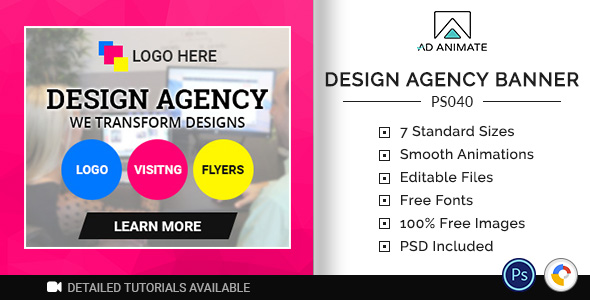
Creative agencies face constant pressure to deliver high-quality visuals on tight deadlines. When a contract gig requires banner ads that match a premium brand identity, the last thing you need is to start designing from scratch or coding complex animations. The Design Agency Banner template from Adanimate is a purpose-built solution for graphics design agencies, marketing teams, and freelance creatives who need to produce professional, customizable banner advertisements for contract work. This template comes with an intuitive, inbuilt feature set that allows designers to tweak every visual element to suit their unique tastes and client requirements, eliminating repetitive work and accelerating project turnaround times.
Key Features
- Fully Customizable Layers: Every element, from background textures to text blocks and call-to-action buttons, is designed as an independent layer. You can easily reposition, resize, recolor, or replace any component without breaking the layout, giving you complete creative control.
- Smart Object Integration: The template utilizes smart objects for images and logos. This means you can insert your agency’s branding or client assets with a simple double-click, and the template automatically adjusts them to fit the designated frame, preserving image quality and aspect ratio.
- Pre-Built Animation Presets: For agencies creating digital ads, motion design is crucial. This template includes a library of smooth, professional animation presets that can be applied to individual layers. You can easily adjust the timing, easing, and sequencing to create engaging HTML5 banner ads that capture attention without requiring any coding skills.
- Standardized Sizes for All Platforms: The template comes with all the essential industry-standard banner sizes, including leaderboard (728×90), medium rectangle (300×250), skyscraper (160×600), and wide skyscraper (300×600). This ensures your ads will fit seamlessly across Google Display Network, social media platforms, and publisher websites.
- One-Click Color Scheme Changes: Instead of manually updating every color element, the template features a global color palette. By changing one primary or accent color, the entire banner set updates instantly, allowing you to create multiple variations for A/B testing or different campaigns in minutes.
- Responsive & Retina Ready Output: The final output is built using clean HTML5 and CSS3, ensuring your banner ads render sharply on high-resolution displays and scale properly across different browser window sizes, which is critical for modern digital advertising.
- Organized Layer Structure: All layers are pre-named and grouped logically (Background, Text, CTA, Logo, etc.). This reduces the learning curve, allowing your team to jump in and start editing immediately, boosting overall workflow efficiency.
Who Is This For? Use Cases
Graphics Design Agencies Handling Multiple Client Campaigns
Your agency manages several clients simultaneously, each with distinct brand guidelines and campaign goals. The Design Agency Banner template serves as a master file. You can quickly duplicate the project, swap out the logo and imagery, apply the correct color palette, and export a full suite of banner sizes for a new client in under an hour. This consistency and speed help you meet tight deadlines without sacrificing quality, making your agency more profitable and reliable.
Freelance Designers on Retainer for Banner Ad Creation
If you are a freelance designer creating monthly banner ads for a recurring client, this template is your secret weapon. Instead of manually rebuilding layouts each time, you can start from the pre-designed structure and focus purely on the creative message. The built-in animation presets allow you to offer added value by delivering animated HTML5 banners, which typically command higher rates than static images.
In-House Marketing Teams for SaaS and E-commerce Brands
Marketing teams need to produce banners for product launches, seasonal promotions, and retargeting campaigns. This template bridges the gap between a designer’s creativity and a marketer’s need for speed. An in-house designer can set up the template once, and a marketing coordinator can later update the text and offers without needing deep design skills, thanks to the intuitive layer structure and global color controls.
Technical Details & Compatibility
The Design Agency Banner template is built and delivered as an Adobe Photoshop (PSD) file, with all layers and smart objects fully intact for maximum editability. For the animated HTML5 versions, the template outputs standard-compliant code that is compatible with all major ad networks, including Google Ads, AdSense, and programmatic platforms like The Trade Desk and MediaMath. The HTML5 files are tested for compatibility with the latest versions of Chrome, Firefox, Safari, Edge, and Opera. The template supports browser-based playback on both desktop and mobile devices, ensuring your ads reach audiences regardless of their device. The last update to the template’s core structure reflects modern ad serving standards, including support for clickTag variables and proper exit URL handling, which is essential for accurate tracking and reporting.
Pros and Cons
Pros
- Time savings for repetitive ad creation: The pre-built layers and smart objects drastically reduce the time needed to produce a professional banner, from hours to minutes.
- Professional animation without coding: Designers can add sophisticated motion effects using the built-in presets, avoiding the steep learning curve of JavaScript or GSAP.
- Brand consistency across all sizes: The global color and style controls ensure that every banner size looks like a cohesive part of the same campaign, which strengthens brand recognition.
- High-quality output for premium clients: The template produces retina-ready, seamlessly animated banners that meet the expectations of high-budget clients and agencies.
- Comprehensive size package: Including all standard ad sizes eliminates the need to manually resize or recreate assets for different placement requirements.
- Trusted source and community: This product comes from a reputable author on CodeCanyon with a strong track record, meaning you benefit from regular updates and active support.
Cons
- Requires Adobe Photoshop knowledge: While the template is user-friendly, users must have a working understanding of Photoshop’s layer panel and smart objects to make full use of the features.
- Limited to the template’s style foundation: The layout is highly customizable, but it is built around a specific aesthetic (modern creative agency). If you need a radically different design language, you may need to invest additional time in restructuring elements.
- No native video banner support: The template focuses on animated HTML5 banners using CSS and canvas. If you require video-based MP4 banners, you would need to combine this template with video editing software.
- Learning curve for animation presets: Although simpler than manual code, the animation panel still has a slight learning curve for designers who are completely new to timeline-based animation in Photoshop.
Frequently Asked Questions
Do I need to know coding to use the animated banner features?
No coding knowledge is required. The Design Agency Banner template provides pre-built animation presets that you can apply through a simple user interface in Photoshop. You can control timing, delay, and easing with sliders and dropdown menus. The final HTML5 output is generated automatically, so you can focus on visual design while the template handles the technical implementation.
Can I use this template for commercial client work?
Yes, absolutely. This template is licensed for commercial use. You can create banners for your own agency, your freelance clients, or your in-house marketing department. The standard license covers use in a single end product for a client or your own business. For extended usage or redistribution, you should review the specific license terms provided with your CodeCanyon purchase, but the vast majority of agency use cases are fully covered.
What file format do I receive, and how do I get started?
Upon purchase, you will download a ZIP file containing the main Photoshop (PSD) template file, a tutorial PDF or link to online video guides, and sample output files. To get started, open the PSD file in Adobe Photoshop CC or CS6 and look for the instructions layer or the readme document. The template is organized with clear labels, and the first step is typically to double-click the smart object layers to insert your own logo and hero images. The video tutorials linked in the product description provide a step-by-step walkthrough of the entire customization process.
Final Verdict
For any creative agency, freelance designer, or marketing team that regularly produces banner advertisements, the Design Agency Banner template represents a significant upgrade in workflow efficiency and output quality. It eliminates the repetitive, manual work of resizing and rebuilding ads while providing a professional, animated result that impresses clients and performs well in digital campaigns. The template is backed by a highly-rated author on CodeCanyon, with thousands of satisfied customers who have used it to deliver projects on time and under budget. The combination of smart object integration, global color controls, and standard size support makes it a reliable asset for your toolkit. If you are tired of spending your valuable creative energy on mundane banner production and want to focus on the big ideas, this is the investment that pays for itself after the first client campaign. Take your banner ad creation from tedious to effortless—download the Design Agency Banner template today and see how fast you can deliver outstanding results.