Key Features
When you need to build immersive, interactive experiences directly inside WordPress, the iPanorama 360° – Virtual Tour Builder for WordPress delivers a professional-grade toolkit without requiring a single line of code. Developed by Avirtum, a reputable author on CodeCanyon, this plugin transforms static panoramic photography into navigable, media-rich tours. Below is a breakdown of the core capabilities that make this one of the most flexible panorama solutions available.
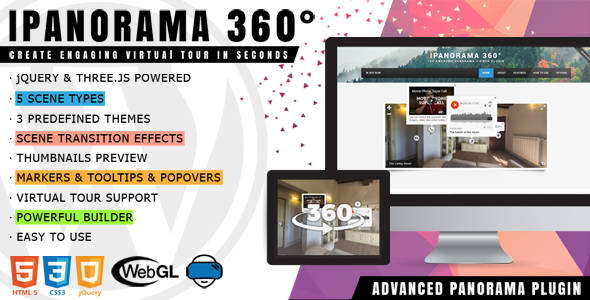
- Five Distinct Scene Types: Choose between sphere, cube, little planet, flat, and Google Street View formats. This variety ensures that whether you are showcasing a real estate interior or an artistic 360° photo, the visual output matches your content perfectly.
- Interactive Marker System: Place clickable markers anywhere within the scene. These are not just visual pins; they act as navigation triggers that allow users to move seamlessly from one scene to another, creating a true virtual tour flow.
- Comprehensive Popover & Tooltip System: Enrich your tours with contextual information. The plugin features a powerful tooltip system for quick hover details and a popover system that opens a lightbox to display massive amounts of content, including text, images, videos, and other online media.
- Advanced Animation & Transition Effects: Select from 50+ tooltip and popover animations to control how information appears. Additionally, choose from 20+ scene transition effects (such as zoom, fade, and swirl) to ensure movement between scenes feels polished and modern.
- Customizable Visual Design: Use the Marker Style Creator to design your own unique pin views that match your brand. The plugin also includes two predefined themes (light and dark) to ensure the player integrates smoothly with your website’s existing aesthetic.
- User-Friendly Navigation Controls: Support for mouse wheel zoom, keyboard arrows, touch gestures, fullscreen toggling, and a compass ensures that users can explore the tour using whatever device or input method they prefer.
- Mobile & Device Optimization: The plugin is fully responsive and includes a gyroscope feature, allowing mobile users to navigate by physically moving their device—an intuitive touch that elevates the user experience on smartphones and tablets.
- Media Integration: Set an audio background to set the mood for the scene, or utilize the autoplay feature to have the camera slowly rotate around the axis, drawing attention to the panoramic view automatically.
- Sharing & Embedding: Publish your virtual tour on external sites using the built-in iframe embed feature. Save and load entire tour configurations via the Export & Import system, making it easy to back up your work or apply settings across multiple projects.
- Developer-Friendly API: For those who want to push the limits, the plugin includes a Powerful API with over 45 options, allowing for deep customization and integration with custom WordPress themes.
Who Is This For? Use Cases
The iPanorama 360° plugin is designed for anyone who needs to present spatial environments in a compelling, interactive way. Its low learning curve makes it accessible to beginners, while the extensive feature set ensures that advanced users are not left wanting. Here are the most common scenarios where this tool excels:
Real Estate Agents & Property Developers
Selling a property is about showcasing the flow and feel of the space. With iPanorama, agents can stitch together panoramic shots from each room into a single, navigable tour. Prospective buyers can click on markers to “walk” from the living room to the kitchen or view the backyard. Adding popovers with key details—like square footage or recent renovations—provides instant, valuable context that static images cannot offer. This reduces time wasted on physical viewings for unqualified leads and gives listings a significant competitive advantage.
Hospitality & Travel Industries
Hotels, resorts, and rental properties use this plugin to let guests preview rooms, amenities, and views before booking. A virtual tour of a lobby, suite, or pool area builds trust and reduces the anxiety of booking sight-unseen. Tour operators can also create interactive maps and presentations of destinations, highlighting key landmarks or excursion points with embedded video or image popovers.
Museums, Galleries & Educational Institutions
Create virtual field trips or digital exhibitions that are accessible to a global audience. Museums can build tours of their permanent collections, using the tooltip system to display artifact names and the popover system to show high-resolution images or historical context. Universities can offer interactive campus tours for prospective students, complete with informational hotspots at libraries, lecture halls, and dormitories.
Architects, Interior Designers & Construction Firms
Presenting a design concept is much easier when clients can “walk through” the space. Architects can upload 3D renders or photospheres of planned interiors to give clients a realistic sense of scale and lighting. Designers can showcase furniture layouts or color schemes using flat scene types for detailed close-ups, while markers link to specific product sheets or material samples.
Professional Photographers
For photographers specializing in 360° imagery, this plugin is a perfect client delivery tool. It allows you to present your work in a branded, interactive portfolio piece. You can use the export & import configuration feature to quickly apply your signature style and marker designs to every new client project, streamlining your workflow and adding a premium service offering.
Technical Details & Compatibility
Understanding the technical backbone of a plugin is crucial for ensuring smooth integration with your existing WordPress setup. The iPanorama 360° plugin is built on robust, widely-used libraries including Three.js and jQuery, which are responsible for rendering the 3D scenes and handling user interactions. This ensures high performance and compatibility across modern web standards.
The plugin is fully responsive and works on all modern browsers, including Chrome, Firefox, Safari, and Edge. It is optimized for touch devices, ensuring that navigation via swipe and pinch gestures is fluid on tablets and smartphones. The gyroscope feature relies on device orientation APIs available on most modern mobile hardware.
Regarding WordPress compatibility, the developer has consistently updated the plugin to align with core updates. The changelog indicates specific fixes for WordPress 6.1 and improvements to ensure stability with the latest PHP versions. It supports both classic shortcodes and the modern Gutenberg block editor, allowing you to insert tours into posts and pages regardless of your preferred editing interface. While the tags mention compatibility with page builders like Elementor and Visual Composer, this is typically achieved through shortcode execution within those builders, making iPanorama a flexible addition to any site architecture.
Avirtum has a strong history of maintaining this product, with recent updates focusing on security patches (preventing SQL injection and XSS vulnerabilities) and performance enhancements. This active development cycle is a strong signal that the plugin is safe to use and will continue to evolve with the WordPress ecosystem.
Pros and Cons
To give you a balanced perspective for your purchasing decision, we have analyzed user feedback and the feature set to outline the primary advantages and potential drawbacks of this plugin.
Pros
- No Coding Required: The drag-and-drop builder is intuitive, allowing you to create complex tours from scratch in minutes.
- Versatile Scene Types: The inclusion of Google Street View and Little Planet modes offers creative flexibility that many competitors lack.
- Rich Media Integration: The ability to add video, audio, and images inside popovers creates a multimedia experience rather than just a visual one.
- Excellent Mobile Support: The gyroscope and touch controls are not afterthoughts; they are core features that perform reliably on mobile devices.
- Active Maintenance & Security: The changelog shows regular updates addressing security vulnerabilities and WordPress compatibility issues, giving users peace of mind.
- Strong Social Proof: With over 4,347 sales on CodeCanyon, the plugin has a proven track record and a substantial user base.
Cons
- Learning Curve for Advanced Features: While basic tours are easy to build, mastering the API and advanced marker styling may require some experimentation.
- Asset-Heavy Potential: Tours with multiple high-resolution 360° images and embedded videos can become large, potentially impacting page load times if not optimized with the preload settings.
- No Native Elementor Widget: While it works with Elementor via shortcodes, it does not have a dedicated drag-and-drop widget for that specific page builder, which some users might expect.
Frequently Asked Questions
Is the iPanorama plugin compatible with the Gutenberg block editor?
Yes. As of version 1.6.19, the developer added native Gutenberg block support. This allows you to insert your virtual tours directly into the block editor without having to switch to a classic editor or manually paste shortcodes, providing a seamless editing experience.
Can I use this plugin for commercial client projects?
Absolutely. The regular license allows you to use the plugin in your own commercial projects or on behalf of a single client. Given the professional output quality and the ability to export configurations, it is an excellent tool for agencies and freelancers who want to offer virtual tour services without recurring subscription fees.
Does the plugin support embedding tours on external websites?
Yes, the plugin includes a dedicated Embed feature. You can generate an iframe URL that allows you to publish your virtual tour on any external site, independent of WordPress themes or third-party plugins. This is ideal for sharing tours on portfolio platforms, social media, or custom HTML landing pages.
Final Verdict
The iPanorama 360° – Virtual Tour Builder for WordPress stands out as a comprehensive solution for creating interactive visual content. It successfully bridges the gap between complex 3D programming and user-friendly website management. The depth of features—from multiple scene types and transition effects to a robust marker system and API—demonstrates that Avirtum has crafted a tool that scales from simple presentations to complex, multi-scene virtual tours suitable for professional real estate, hospitality, and educational use.
With over 4,347 sales, the plugin has established a solid reputation within the Envato community. The regular updates focusing on security and performance enhancements indicate a developer who is committed to the longevity of the product. Considering the breadth of functionality and the fact that it is a one-time purchase at $39.00, the value proposition is exceptionally strong when compared to subscription-based virtual tour platforms that can cost hundreds of dollars annually.
If you are looking to elevate your website’s engagement, provide an immersive experience for your clients, or simply add a “wow” factor to your portfolio, this plugin is a worthy investment. The combination of powerful features, mobile optimization, and ease of use makes it a top contender in the WordPress panorama niche. Stop settling for static galleries and give your audience the power to explore—try iPanorama 360° – Virtual Tour Builder for WordPress today and turn your panoramic photos into interactive journeys.