Key Features
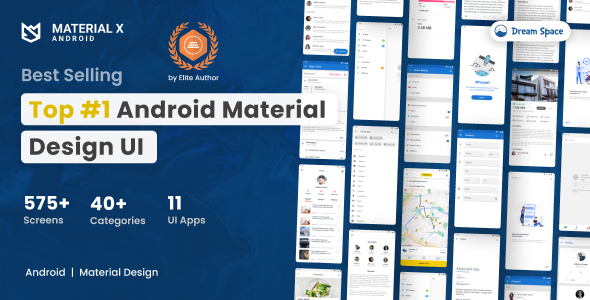
MaterialX – Android Material Design UI 3.5 is not just another UI kit; it is a comprehensive toolkit designed to bridge the gap between design concepts and native Android code. With over 30 distinct feature categories, this template provides a robust foundation for developers. Here are the standout features that make it a powerful asset:
- Complete Activity Coverage: From Splash Screens to Dashboards, the template includes ready-to-use layouts for the entire app lifecycle. You get access to Profile pages, Article views, and Search Pages that are often the most time-consuming to build from scratch.
- Material Design 3 (M3) Implementation: The changelog reveals a dedicated effort to implement the latest Material Design 3 guidelines. This includes updated Buttons, Cards, Chips, Dialogs, and AppBars that follow the modern “Material You” aesthetic, ensuring your app looks current and native.
- Diverse UI Components: The template includes a massive library of components such as Bottom Navigation, Bottom Sheets, Side Sheets, and Expansion Panels. For forms, it provides Pickers (Date, Time, Color), Sliders, and Steppers to handle user input elegantly.
- Functional Screen Templates: It goes beyond simple components by offering full screen templates for specific use cases. This includes a Media Player, a Social Media Timeline, an E-commerce Shopping flow, and a Chat interface. These are not just static mockups but functional layouts ready for integration.
- Feedback & State UI: Proper app feedback is crucial. The kit includes Snackbars, Toasts, Progress & Activity indicators, and Empty State pages (No Item Page) to ensure your user interface communicates effectively even when data is missing.
- Visual Effects & Animations: Enhance the user experience with built-in Ripple Effects for touch feedback and Slider Images for featured content. The inclusion of Animation categories helps make transitions feel fluid.
- Clean, Well-Organized Code: The developer, dream_space, emphasizes that all folders, file names, class names, variables, and function methods are well-organized and clearly named. This structure makes the template easy to navigate, customize, and reuse, saving hours of refactoring.
- Open Source Support Libraries: The template leverages reputable open-source libraries like Material Ripple Layout and Material DateTime Picker, ensuring that you are building on stable, community-tested code rather than proprietary black boxes.
Who Is This For? Use Cases
This template is tailored for a wide range of Android developers, from solo freelancers to agile startup teams. It is designed to accelerate the development process by removing the friction of UI implementation. Here are the primary use cases:
Freelance Developers & Agencies
If you are building apps for clients, time is money. MaterialX – Android Material Design UI 3.5 allows you to prototype and deliver high-fidelity apps rapidly. You can show clients a working demo with a professional Material Design aesthetic before writing a single line of custom UI code. The ability to “pick some part you like and implement it into your code” means you can mix and match components to create bespoke solutions without starting from zero.
Startups Building MVPs
For startups, speed to market is critical. Instead of spending weeks on UI development, you can focus your engineering resources on backend logic and unique features that differentiate your product. Whether you are building a social media app, an e-commerce store, or a content-heavy news portal, having a ready-made Material UI foundation lets you launch a polished beta version much faster.
Students & Junior Developers Learning Material Design
The template serves as an excellent learning resource. Because the code is “clean and neat” and well-documented, junior developers can study how complex layouts like Grid Views, Tab Views, and Bottom Sheets are structured in native Android Studio. It provides a practical, real-world example of how to implement Google’s Material Guidelines effectively, which is far more valuable than reading abstract documentation.
Rapid Prototyping & Hackathons
In hackathons, every minute counts. Instead of wrestling with XML layouts, developers can use this template to quickly scaffold a functional app skeleton. With the inclusion of specific app templates like the Messenger app or Travel app added in version 3.1, you can instantly have a base to demonstrate a concept or pitch an idea to judges.
Technical Details & Compatibility
Understanding the technical foundation is crucial before integrating a template. MaterialX – Android Material Design UI 3.5 is built for the modern Android ecosystem, ensuring long-term viability for your projects.
- Latest SDK Support: The current version (3.5) has been updated to SDK 36, ensuring compatibility with the latest Android OS versions and Play Store requirements.
- Build System: The template uses Gradle, the standard build system for Android. Version 3.5 includes an update to the Gradle version, ensuring smoother builds and better performance.
- AndroidX Migration: The project has been fully migrated to AndroidX (since version 2.5), which is the standard library for modern Android development.
- Material Design 3: The template is actively integrating Material Design 3 (M3) components, as seen in versions 3.2 and 3.3. This means you have access to both classic Material 2 components and the newer M3 variants.
- Development Environment: It is designed to be used with Android Studio, the official IDE. The folder structure is optimized for easy import and navigation.
- Documentation: You receive Project Documentation alongside the full source code, which is essential for understanding the architecture and getting started quickly.
Pros and Cons
To give you a balanced view, we have analyzed the strengths and potential limitations of this product based on the provided data.
Pros
- Extensive Component Library: With over 30 categories, it covers almost every standard UI pattern needed for modern apps, from simple buttons to complex e-commerce layouts.
- Proven Track Record: With over 4,100 sales, this template is a trusted resource in the developer community. The consistent sales history indicates that it has been a reliable solution for many projects over the years.
- Regular Updates: The changelog shows a clear pattern of updates from 2017 to 2025. This is a critical indicator that the developer actively maintains the product, fixing bugs, updating libraries, and adding new features to keep pace with Android’s evolution.
- Time-Saving Value: At $25.00, the price is exceptionally low compared to the hundreds of hours of development time it can save. It is a one-time purchase for a resource that can be used across multiple client projects.
- Clean Code Structure: The emphasis on well-named files and organized folders reduces the learning curve and makes customization much less error-prone.
Cons
- Requires Android Knowledge: This is not a drag-and-drop website builder. You need a working knowledge of Android Studio, Java/Kotlin, and XML layouts to effectively integrate these templates into a functional app.
- Generic UI Risk: Because it follows standard Material Design guidelines, your app might look similar to other apps using the same template if you do not invest time in customizing colors, typography, and branding.
- Relative Code Structure: The developer notes that the code is “Clean & Neat Code (Relative).” This might imply that while the code is organized, it may not be the absolute most optimized architecture for every scenario, and you may need to refactor for specific complex functionalities.
Frequently Asked Questions
Is MaterialX – Android Material Design UI 3.5 compatible with the latest Android Studio and SDK?
Yes, the developer has consistently updated the template to work with the latest tools. Version 3.5, released in October 2025, includes updates for Gradle and SDK 36. This ensures that you can import the project into the current version of Android Studio without encountering dependency or compilation errors related to outdated APIs.
Does MaterialX come with full source code and documentation?
Absolutely. The “What You Get” section clearly lists that the purchase includes the Full Android Source Code and Project Documentation. The documentation is designed to help you understand the project structure and how to customize the components for your specific needs.
Can I use this template to build a commercial app for my client?
Yes, this is one of the primary use cases for the template. It is designed to be a foundation for any app project. You can select specific parts, such as the Timeline or Shopping screens, and integrate them into your client’s app. The regular licence allows you to use it in a single end product for yourself or a client, making it a cost-effective solution for agencies.
Final Verdict
MaterialX – Android Material Design UI 3.5 stands out as a high-value investment for any Android developer. It successfully addresses the most common pain point in app development: the laborious task of converting UI concepts into native, functional code. By providing a comprehensive set of pre-built, well-documented components and screens, dream_space has delivered a tool that significantly accelerates the development pipeline.
The sheer volume of components—from Bottom Sheets and Expansion Panels to full E-commerce and Social Media templates—means you are unlikely to get stuck searching for a specific layout. The commitment to staying current, evidenced by the recent updates to SDK 36 and Material Design 3, ensures that your apps will not feel dated. With thousands of sales, the template has a proven track record of reliability in real-world projects.
For a one-time fee of $25.00, the return on investment is immediate. You are not just buying code; you are buying back dozens of hours of development time that you can redirect to perfecting your app’s unique logic and user experience. If you are serious about developing high-quality Android apps efficiently, MaterialX – Android Material Design UI 3.5 is a resource you should strongly consider adding to your toolkit. Click the button to download it today and give your next project a professional, polished head start.