Launching a successful e-commerce store goes far beyond listing a product, a price, and a description. In today’s high-competition digital marketplace, customer hesitation is your biggest revenue killer. Shoppers abandon carts when they cannot visualize the item in action or understand how to use it. While high-quality images are essential, they often fall short of answering the most critical question: “How does this actually work?”
Video Modules for PrestaShop bridges this gap by allowing merchants to embed a rich, dynamic video gallery directly into their product pages. Instead of sending customers to YouTube or Vimeo—where they are one click away from a competitor’s ad—this tool keeps your audience captive within your storefront. It is a comprehensive solution designed to reduce pre-sale inquiries, boost conversion rates, and elevate the overall professionalism of your catalog. By enabling you to display product tutorials, assembly guides, and lifestyle demos directly at the point of sale, this module transforms passive browsing into active engagement.
Key Features
This PrestaShop extension is packed with utility, combining ease of use with powerful front-end display options. Here are the standout features that make it an essential addition to your e-commerce toolkit:
- Native Video Upload (No External Links): Unlike standard PrestaShop configurations that force you to embed videos via third-party URLs, this module allows you to upload video files directly to your server. This ensures your customers never leave your site, keeping them focused on your sales funnel.
- Responsive Design Integration: The module is built with a fluid, mobile-first approach. Whether your customer is viewing on a 27-inch desktop monitor or a 5-inch smartphone, the video player adjusts seamlessly. It works with virtually any theme without breaking your layout.
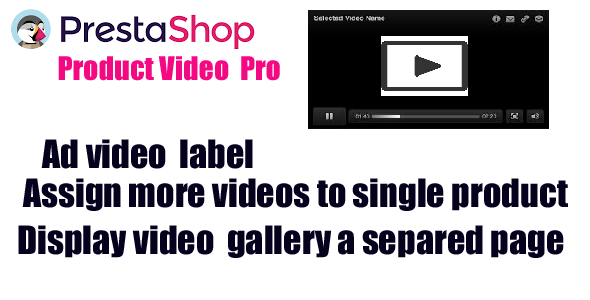
- Multiple Video Assignments: You are not limited to a single clip. Assign multiple videos to a single product to show different angles, specific features, or size guides. This is perfect for complex products that require diverse explanation.
- Dedicated Video Gallery Page: Beyond the product page, the module generates a separate gallery page. This acts as a centralized “showreel” for your brand, allowing customers to browse all your content in one cohesive location.
- Custom Video Labels: Improve clarity by adding specific labels to each video. Instead of a generic play button, customers will now see “Product Review,” “Tutorial,” or “Unboxing,” setting clear expectations before they hit play.
- High Reactivity & Speed: The module is optimized for performance. It uses lazy loading and lightweight scripts to ensure that adding video does not slow down your page speed—a critical factor for SEO and user retention.
Who Is This For? Use Cases
Any merchant using the PrestaShop platform can benefit, but the value skyrockets for specific industries and business models. If your products require explanation, assembly, or a “try before you buy” feel, this module is your best asset. Here are a few specific scenarios where this tool delivers exceptional ROI:
Electronics & Gadgets Retailers
Selling a smartwatch or a wireless router involves explaining connectivity, battery life, and interface navigation. Written specs are often complex. By using the video module, you can upload a 90-second walkthrough showing the pairing process. This drastically reduces the “fear of the unknown” that plagues technical purchases, leading to fewer returns and higher seller ratings.
Furniture & DIY Stores
Flat-pack furniture has a notorious reputation for complicated assembly. As a seller, you can upload a time-lapse or instructional video showing exactly how to put the item together. This proactive support eliminates dozens of support tickets and increases buyer confidence. The “Assign more videos to a single product” feature is ideal here—one for the finished look, one for the assembly, and one for the material quality.
Fashion & Apparel Brands
Static images often fail to show how fabric drapes or how a garment fits. With this module, you can upload a 360-degree video or a quick runway clip showing the outfit in motion. This gives buyers the “physical” data they need to make a purchase decision, significantly lowering the return rate on high-ticket fashion items.
Technical Details & Compatibility
When it comes to technical robustness, this plugin is designed for the modern PrestaShop ecosystem. It supports a wide range of versions, ensuring that whether you are on a legacy setup or the latest stable release, you can integrate this functionality without a hitch. The module supports standard HTML5 video formats, ensuring broad compatibility across all major browsers including Chrome, Firefox, Safari, and Edge.
One of the primary advantages mentioned by the developers is the theme-agnostic architecture. This means it uses smart hooks to inject the video display into your product page without requiring you to edit the underlying template code. Even if you change your theme later, the module’s functionality will persist. The gallery page is also fully responsive and mobile-ready. Furthermore, the module aligns with PrestaShop’s standard coding conventions, ensuring security and stability, and it allows for easy translation if you run a multi-language store.
The development team prioritizes usability; the admin interface is intuitive, allowing you to drag-and-drop videos and manage labels without touching a single line of code. While the description does not specify a “last update” date, the core architecture—relying on native uploads and responsive design—indicates a modern build focused on core web vitals.
Pros and Cons
To give you a transparent view of the product, we have broken down the strengths and potential limitations of this module. No product is perfect, and understanding both sides will help you decide if it fits your specific needs.
Pros
- Increased Conversions: Providing video content directly on the page has been proven to increase time-on-site and purchase intent.
- Server-Side Hosting: No external links means no YouTube ads playing before your content, and no competitor recommendations shown after the video ends.
- Reduces Support Load: The “How to use” demos preemptively answer customer questions, freeing up your support team for other tasks.
- Lightweight & Fast: Optimized code ensures your precious page load times are not sacrificed for the sake of video content.
- Flexible labelling: You can categorize your videos instantly, making the user experience much cleaner.
Cons
- Server Storage: Since videos are uploaded to your own server, large files can consume significant disk space. You may need to optimize file sizes before uploading to avoid server bloat.
- Bandwidth Costs: If you have high traffic, streaming video from your own server uses substantial bandwidth. You will want to ensure your hosting plan can handle the additional load.
- Manual File Management: Unlike YouTube, where compression is automatic, you are responsible for encoding the videos in the correct web-friendly format (MP4 recommended) before uploading.
Frequently Asked Questions
Is this module compatible with the latest version of PrestaShop?
Yes, the module is built to be compatible with a wide array of PrestaShop versions, including the latest stable releases. The developers utilize standard hooks and overrides which are maintained across versions. If you are running a slightly older version, it is still highly likely to work, but checking the specific version requirements on the CodeCanyon page before purchase is always recommended.
Will the video player work on mobile devices and tablets?
Absolutely. The player uses a responsive design that automatically adjusts to the screen size of the device. It utilizes HTML5 video players, which are the industry standard for iOS and Android devices. This ensures that your shoppers on smartphones have the exact same seamless viewing experience as those on desktops.
Can I assign different videos to different product variations?
While the module allows you to assign multiple videos to a single product listing, the general functionality focuses on the product level rather than specific attribute combinations (like size or color). You can, however, use custom labels to direct users to the specific video for “Large Size” or “Blue Color” within the same gallery, effectively segmenting the information clearly for the buyer.
Final Verdict
In an era where user attention spans are shrinking and competition is fierce, conversion optimization is not just a luxury—it is a necessity. Video Modules for PrestaShop offers an elegant, high-utility solution that addresses the core friction point of online shopping: the inability to physically handle the product. By leveraging the native upload system, you eliminate external distractions and keep the customer locked into your ecosystem. The ability to assign multiple videos and label them effectively turns your product page into an interactive showroom rather than a static text file.
The solution is specifically designed for sellers who understand that proactive communication beats reactive support. Whether you are selling complex electronics, customizable furniture, or high-end fashion, this tool empowers your customers with the “how-to” knowledge they need to buy with confidence. The author maintains a strong reputation for responsive support, meaning that if you do encounter a snag, their “fast answer support” ensures your store downtime is minimal. Stop losing sales to unanswered questions. Equip your product pages with this dynamic layer of communication and watch your engagement metrics improve. Take your PrestaShop store to the next level by providing the immersive experiences your customers expect and deserve.