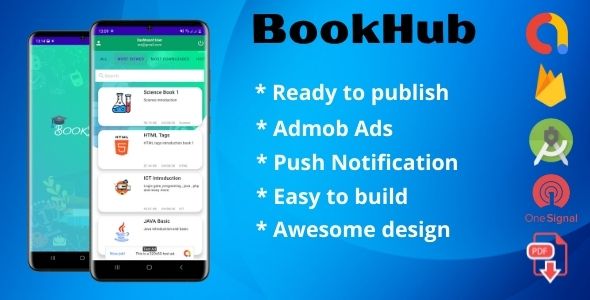
For students, educators, and lifelong learners, the journey of acquiring knowledge has been transformed by mobile technology. Yet, the gap between having a smartphone and having a reliable, organized digital library remains vast. Many existing reading apps are either too complex, too expensive, or lack the administrative tools needed to manage a growing collection of PDFs. This is where BookHub (Book App User + Admin Dashboard) steps in, offering a complete, ready-to-deploy solution that bridges the gap between a polished user-facing mobile application and a powerful back-end management system. This isn’t just a theme; it’s a fully functional Android project designed to put a beautiful, scalable digital library into your pocket within hours, not months.
BookHub is engineered for creators who want to launch a dedicated reading platform without starting from zero. It combines a sleek, intuitive user interface with a robust Firebase-powered backend, ensuring that your app is not only attractive but also fast, secure, and easy to manage. Whether you are an aspiring entrepreneur looking to create a niche book subscription service, an educational institution aiming to distribute course materials, or a developer seeking a high-quality foundation for client projects, BookHub provides the architecture and the aesthetic to get you there immediately. The core experience revolves around seamless PDF reading, categorized browsing, and a frictionless user journey, all anchored by an admin dashboard that gives you total control.
Key Features
The true strength of BookHub lies in its comprehensive feature set, which covers every aspect of the mobile app lifecycle, from user acquisition to content monetization. Here are the standout components that make this project a valuable asset:
- Complete User Authentication System: The app includes a fully integrated Register and Login system powered by Firebase Authentication. This provides a secure and reliable method for managing user accounts, supporting email/password sign-ups, and ensuring that your content is gated appropriately for registered members.
- Dynamic Content Categorization: Organize your library with a flexible Category system. Whether you are sorting by genre (Fiction, Sci-Fi), academic subject (Mathematics, History), or audience (Kids, Adults), the app allows you to structure your books in a way that makes sense to your readers. This structure is crucial for app store optimization regarding user engagement, as it drastically reduces the time spent searching for specific titles.
- Immersive Reading Mode: The reading experience is king in any book app. BookHub includes a dedicated Read Mode that prioritizes comfort and focus. It delivers a clean, distraction-free environment for consuming PDF documents, with a user interface designed to feel natural on both phones and tablets.
- Engagement & Retention Tools: Keep your audience coming back with Push Notifications. Send announcements about new arrivals, special promotions, or educational updates directly to your users’ devices, a key feature for boosting daily active users. This direct line of communication is essential for any content-based subscription model.
- Monetization-Ready (AdMob Support): The project comes with Google AdMob support, allowing you to integrate banner or interstitial ads to generate revenue from free content. This feature is elegantly set up to ensure ads do not interrupt the core reading experience, making it a viable option for the freemium business model.
- Admin Dashboard for Total Control: Separating the user app from the management side, BookHub includes a full Admin Panel. This dashboard is the command center for your entire operation, designed to be intuitive enough for non-technical staff to use.
- Easy Content Management (CRUD): The dashboard allows you to Add Books, Edit Books, and Update Books with absolute ease. You can manage book titles, thumbnails, PDF files, and category assignments without needing to touch a single line of code. This is the scalability pillar of the product, allowing your library to grow indefinitely without developer intervention.
- Polished User Interface: Featuring an Awesome user interface, BookHub is crafted with modern design principles. This includes a standard Splash Screen, smooth transitions, and a cohesive color scheme that makes the app feel professional and premium out of the box.
- Real-Time Data Sync: Leveraging the Real-time Database capabilities of Firebase, any changes you make in the admin panel—like adding a new PDF or updating a book bio—are reflected immediately in the user app. This ensures that your readers always see the latest version of your library without needing to download an APK update.
Who Is This For? Use Cases
The versatility of BookHub makes it an ideal solution for a wide variety of use cases. It is not limited to just one type of business or project; it solves the common problem of content distribution in several key sectors.
Educational Institutions and E-Learning Platforms
Schools, universities, and coaching centers can utilize BookHub to distribute syllabi, lecture notes, and reference materials securely. Instead of printing costly handouts or relying on email attachments, professors can upload PDFs to the admin panel, categorize them by course or semester, and notify students instantly via push notifications. This solves the logistical nightmare of document version control and ensures all students have access to the exact same, most current resources. It creates a centralized, branded learning hub that enhances the institution’s technological reputation and streamlines the administrative workload.
Independent Authors and Publishers
For indie authors or small publishing houses, getting visibility is a constant battle. Publishing a book on major retailers often means losing a significant percentage of revenue to fees. BookHub offers a direct-to-consumer pathway. Authors can bypass the middleman, sell or distribute their PDFs directly to their fanbase, and even monetize through AdMob or a subscription model. The admin dashboard acts as a lightweight content management system, allowing the author to manage their entire catalog—from their debut novel to a series of guides—and maintain full control over their intellectual property and customer relationship.
Startups and Entrepreneurs in the Digital Space
If you’re an entrepreneur aiming to create a niche reading community, like a subscription service for comic books, romantic novels, or professional business reports, BookHub serves as the functional prototype and launchpad. You can get the MVP (Minimum Viable Product) to market quickly to test your business hypothesis. The Google AdMob support allows you to test revenue generation strategies, while the Firebase Real-time Database allows you to scale your content database from ten books to ten thousand without needing to overhaul your infrastructure. This speed to market is often the deciding factor between a successful first-mover and a follower.
Freelance Developers and Agencies
For Android developers looking to expand their portfolio or offer white-label solutions to clients, the BookHub (Book App User + Admin Dashboard) project is a goldmine. It is a complete, functional product that can be rebranded and customized to meet specific client demands in a fraction of the time it would take to build from scratch. The inclusion of a full admin panel is a huge selling point for clients, as it empowers them to manage their own content post-launch. This allows agencies to take on more projects, deliver higher value, and increase their profit margins while providing a reliable, battle-tested codebase.
Technical Details & Compatibility
To ensure a smooth setup and successful launch, it is crucial to understand the technical environment required for BookHub. This project is built natively for the Android platform, prioritizing performance and ease of integration with Google’s services.
- Development Environment: You will need the latest version of Android Studio. This ensures you have the latest build tools, emulator support, and compatibility with official Android APIs. The codebase is structured to be opened and run directly from this IDE.
- Backend Infrastructure: The project requires a Firebase Account. This is a free-to-start Google service that provides the necessary backend components: Firebase Authentication for user logins, Real-time Database for storing book metadata and URLs, and Firebase Cloud Messaging for push notifications.
- Target Audience & Device Support: As a native Android app, it is optimized for devices running the modern Android OS versions. The UI is designed to scale across various screen sizes, from standard handsets to larger tablet devices, ensuring a consistent user experience.
- Deliverables: Upon purchase, you will not receive a pre-built APK. Instead, you will receive the Full Android Studio Project (source code) that you can compile and modify yourself, along with a Full Document with Screenshots that guides you through the setup process, Firebase integration, and app customization step-by-step.
Pros and Cons
To provide a balanced and trustworthy view, it is essential to evaluate both the strengths and potential limitations of the BookHub project. This transparency helps buyers make an informed decision based on their specific technical expertise.
Pros
- Time Efficiency: The most significant advantage is the sheer speed of deployment. You can have a working app in a matter of hours, saving weeks of development time, costs, and developer hiring overhead.
- Complete Solution: You receive both the user-facing mobile app (Frontend) and the admin management dashboard (Backend logic), covering the entire ecosystem required for a successful launch.
- Monetization Potential: The built-in AdMob integration provides an immediate path to generate revenue, offering a clear return on investment for your initial purchase.
- Clean and Modern UI: The design is contemporary and engaging, reducing user friction and encouraging longer reading sessions. It looks like a product from a professional design agency, not a generic template.
- Utilizes Standard Tech: The reliance on Firebase ensures you are using a stable, scalable, and well-documented backend maintained by Google, which is a huge plus for future maintenance and scaling.
- Excellent for Clients: For developers, the standalone admin panel is an unbeatable feature to offer clients, allowing them independence and reducing your own support load.
Cons
- Android Only: This project provides a complete Android solution but does not include the iOS (Swift) version of the app. If you require a cross-platform presence, you will need to build the iOS app separately.
- Limited Business Logic Out-of-the-Box: While the core CRUD (Create, Read, Update, Delete) functions are present, complex business logic—such as premium subscriptions with in-app billing or a shopping cart for individual purchases—will require additional development on your part.
- Basic Security Setup: While Firebase Authentication is secure, you must ensure you configure the Firebase Security Rules correctly to prevent unauthorized access to your database and PDF files, which requires some technical knowledge.
- Modern Standard Features: Depending on your needs, you may need to add modern conveniences like a “Dark Mode,” “Offline Downloading,” or integration with an online payment gateway for physical book sales, which are not mentioned in the core feature set.
Frequently Asked Questions
Does BookHub include the source code, and how do I install it?
Yes, when you purchase BookHub, you receive the complete Android Studio Project. This is not a “black box” APK; it is the raw source code that you will import into Android Studio. The included installation guide provides a step-by-step visual tutorial on how to set up your Firebase account, connect it to the project (by adding your `google-services.json` file), and build the APK. You don’t need to be a senior developer, but basic familiarity with Android Studio navigation is recommended. The process typically takes less than an hour, assuming you have the prerequisites installed.
I am not a coder. Can I still manage the content of the app without hiring a developer?
Absolutely. The beauty of this system lies in the separation of concerns. The Admin Panel is designed to be user-friendly and requires zero coding knowledge. You simply log in to your dashboard, use the GUI to navigate to the “Add Book” section, upload your PDF file to your server or Firebase Storage, paste the URL, assign a category and cover image, and hit publish. The changes are instantly pushed to the user’s app via the Real-time Database. This is perfect for non-technical business owners who want to manage their library independently.
Can I change the design and colors of the app to match my own brand?
Yes, because you are provided with the full source code, you have complete control over the visual identity. You can change color schemes in the `colors.xml` file, update the app logo for your Splash Screen and launcher icon, and even modify the layout files if you want to rearrange elements in the UI. The documentation provides basic guidance on this process. While a deep dive into Android development is beneficial for extensive changes, simple branding adjustments like colors and text are straightforward.
Final Verdict
In a market saturated with incomplete scripts and poorly documented templates, BookHub (Book App User + Admin Dashboard) stands out as a professionally crafted, functional asset. It diligently covers the three major pillars of a successful app: robust infrastructure (Firebase), high user adoption (Excellent UI/UX), and strong content control (Admin Panel). For the price, the value delivered is substantial, offering developers and entrepreneurs a head start that would otherwise cost thousands of dollars in development fees. The inclusion of a thorough onboarding document mitigates the risk of technical failure, ensuring you are not left stranded after the purchase.
If you are serious about launching a book service, streamlining educational distribution, or adding a high-value product to your development portfolio, this project is a smart investment. It is not merely a tool; it is a launchpad. With the support for Push Notifications and AdMob, you are armed with the essential components to build an audience and monetize it effectively from the first day. The path from a good idea to a living app is paved with code and design; BookHub has already laid that groundwork for you. Take the decisive step to build your digital library today—your readers are waiting. Download the project, follow the concise documentation, and see your app go live with a professional polish that sets you apart from the competition.