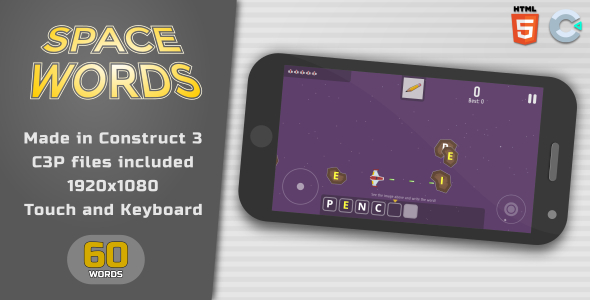
Imagine a spelling game that feels more like an arcade challenge than a classroom exercise. That is exactly the experience Space Words delivers. This HTML5 game, crafted with Construct 3, blends fast-paced meteor-destroying action with vocabulary building. Players see an image at the top of the screen and must identify the correct word. The twist? A meteor shower rains down letters, and your only job is to shoot the meteors bearing the correct letters in the proper sequence. It is a brilliant fusion of hand-eye coordination and cognitive recall that keeps players engaged while they learn. For educators, parents, and game developers, this offers a ready-made, fully customizable educational tool that works flawlessly on any modern browser.
Key Features
Space Words is not just a single gameplay idea; it is a complete, feature-rich package designed for immediate deployment and endless customization. The development team behind this project has prioritized ease of use and performance without sacrificing depth.
- Complete 60-Word Vocabulary Pack: The game comes pre-loaded with 60 unique word and image pairs. This provides a substantial amount of content out of the box, ensuring players have plenty of challenges to work through before an administrator needs to intervene.
- Easy Asset Management: You are not locked into the included content. The game has been designed from the ground up to allow simple swapping of images and text. Whether you are teaching animal names, scientific terms, or foreign language vocabulary, you can replace the assets quickly using the Construct 3 editor.
- Touch & Mouse Controls: The game is fully optimized for both desktop and mobile play. On a PC, players click with the mouse. On a tablet or smartphone, they simply tap the screen. This dual-input support makes it a versatile tool for classrooms using interactive whiteboards or students using personal devices.
- Pure Construct 3 Build: The source file (.C3P) uses no third-party plugins or behaviors. This is a massive advantage for developers. It ensures stability, prevents plugin conflicts, and makes the project easier to understand and modify, even for those relatively new to Construct 3.
- High-Resolution Graphics: The game interface and mechanics are designed around a landscape 1920×1080 resolution. The included images are a high-quality 550×550 pixels, ensuring crisp visuals on modern displays and projectors.
Who Is This For? Use Cases
The versatility of Space Words makes it a valuable asset for various users. It is not simply a toy; it is a functional educational tool with broad application. Here are the primary audiences who will benefit most from this product.
Educators and Teachers
For K-12 teachers, especially those in early education or ESL (English as a Second Language) programs, keeping students focused can be a challenge. Space Words turns spelling drills into a competitive game. Teachers can project the game onto a smartboard for a group activity or assign it on classroom tablets for individual practice. The ability to edit the word list means a teacher can tailor the gameplay to exactly match the weekly spelling list or current science unit. The audio-visual connection between the image and the spelled word reinforces neural pathways much more effectively than rote memorization.
EdTech Startups and Game Developers
If you are developing an educational app or a gaming portal, this source code is a golden asset. Instead of coding a spelling mechanic from scratch—which can take weeks—you can purchase this lightweight, well-structured project and integrate it directly into your suite of games. The lack of third-party dependencies makes it exceptionally clean code to work with. You can rebrand it, change the color schemes, and add new levels quickly. It serves as an excellent addition to any subscription-based learning platform. Furthermore, for developers looking to learn how to build a “shooting/clicking” mechanic in Construct 3, this source file is an excellent learning tool.
Parents and Homeschoolers
Parents seeking to supplement their child’s learning at home will find Space Words to be a guilt-free screentime option. It provides the excitement of a space battle with the educational value of a workbook. Because the difficulty is tied to the words entered, parents can start with simple three-letter words and gradually move to more complex terms. The instant feedback—destroying the wrong letter or missing the correct sequence—teaches problem-solving and encourages attention to detail.
Speech Therapists and Tutors
This game is an engaging resource for speech-language pathologists and private tutors. It can be used as a reward for good behavior or as a direct tool to work on letter recognition and sequencing. The visual nature of the game helps reinforce the spelling of words in a non-stressful environment, making it perfect for one-on-one sessions.
Technical Details & Compatibility
Understanding the technical backbone of your purchase is crucial. Space Words is built for the modern web, ensuring that you do not need to worry about plugin compatibility or heavy installations.
- Engine and Source: The game is constructed using Construct 3, specifically version r234.4. The source file is provided in the standard .C3P format. If you own a Construct 3 license (free or paid), you can open, edit, and export this file as your own.
- Export Format: The package includes the HTML5 game files. These are the final, export-ready files that you can upload to any web server immediately. This is perfect for hosting on your own domain, integrating into an LMS (Learning Management System) via iframe, or distributing on a USB drive for offline use.
- Browser & Device Support: Because it runs on HTML5, the game works on all major browsers including Chrome, Firefox, Safari, and Edge. It is responsive to input types, functioning seamlessly with mouse, trackpad, and touchscreens. This guarantees usability on Windows, macOS, iOS, and Android devices.
- Image Specifications: The game assets are sized at 550×550 pixels. This is a standard square ratio, which makes it easy to source new images. Whether you are using stock photos, illustrations, or custom graphics, ensuring they fit this ratio will maintain the visual integrity and alignment of the game UI.
Pros and Cons
To give you a fair and complete picture, here is a breakdown of the advantages and potential limitations of this game package. Being aware of these details helps you make an informed decision before purchase.
Pros
- High Educational Value: Seamlessly combines entertainment with learning, increasing student engagement and retention.
- Fully Customizable: The included 60 words are just the start. Editing via Construct 3 is straightforward, allowing for unlimited replayability and subject adaptation.
- Blazing Fast Performance: HTML5 ensures there are no lag issues or loading times associated with heavier frameworks. It runs smoothly even on lower-end hardware.
- Clean Source Code: No third-party plugins means fewer headaches regarding updates and compatibility issues.
- Multi-Platform Ready: Works immediately on mobile phones, tablets, and desktops with no additional development work.
- Clear Documentation: The package includes a documentation file to guide you through setup and basic editing processes.
Cons
- Requires Construct 3 for Editing: If you want to change the words or images, you cannot do so via a simple text file. You must open the .C3P file in the Construct 3 editor. While the free version allows viewing, exporting often requires a paid subscription.
- Maximum Length Limit: The game logic supports words up to 10 letters in length. While this covers the vast majority of elementary school vocabulary, it may not be suitable for advanced scientific terminology or compound words.
- No Audio Included: The description does not mention sound effects or voice-over pronunciation for the words. This is a visual/kinesthetic game. If you require audio pronunciation, you may need to add it yourself in the source code.
Frequently Asked Questions
Before you finalize your decision, here are answers to the most common questions buyers have about educational games and Construct 3 files like this one.
Does the game work offline?
Yes, absolutely. Because you receive the HTML5 game files, you can host them locally. If you place the files on a hard drive or a local network server, players can access the game without an internet connection. This is a major advantage for classrooms with unreliable internet access. Keep in mind that if you access the game from a web server, you will need the internet to load the page initially, but once loaded, the game runs entirely on the client-side device.
Can I easily add my own custom words and images?
Yes, but it requires a basic understanding of Construct 3. The documentation included in the download will guide you to the correct “layout” and “event sheet” sections where the word arrays and image sprites are stored. The architecture is designed to be user-friendly, with clear naming conventions. You will locate the image variables and text arrays, then swap the assets with your own. If you are completely new to Construct 3, you may need to spend an hour or two watching basic tutorials on the software, but the structure of this game is clean enough to make the process intuitive.
Is a Construct 3 license required to run this game?
No. You do not need a Construct 3 license to run the game. The package includes the final HTML5 files, which are just JavaScript and HTML. These files run directly in the browser without any external software. However, if you wish to edit the source code (the .C3P file) to change words or graphics, you will need to use the Construct 3 software. You can use the free tier of Construct 3 to open and edit the project, but you will need an active subscription (Personal or Business) to re-export the project as HTML5 files. The free version’s single-use export might be available, but for regular editing, a subscription is recommended.
Final Verdict
Space Words is a standout choice in the realm of educational games on CodeCanyon. It successfully marries the aesthetic and pacing of an arcade shooter with the cognitive rigor of a spelling bee. The seller, trezegamesbr, has demonstrated an understanding of what EdTech consumers need: a robust framework that is easy to populate with custom content. The fact that it arrives with 60 pre-made assets means you can use it immediately, while the clean Construct 3 source allows for future growth. The game presents a professional finish that is suitable for paid educational apps, school districts, and personal family use alike. Its performance on mobile is particularly impressive, making learning accessible on the go.
If you are looking for a reliable, customizable, and fun educational game to add to your portfolio or classroom, Space Words is an excellent investment. It removes the heavy lifting of game logic and design, allowing you to focus entirely on educational content. Whether you are a developer wanting to expand your niche catalog or a teacher seeking a fresh way to engage students, this game delivers. Click the download button, open the source, and start creating an engaging educational experience that your users or students are sure to love. Don’t settle for boring flashcards—bring the meteor shower into your classroom today.