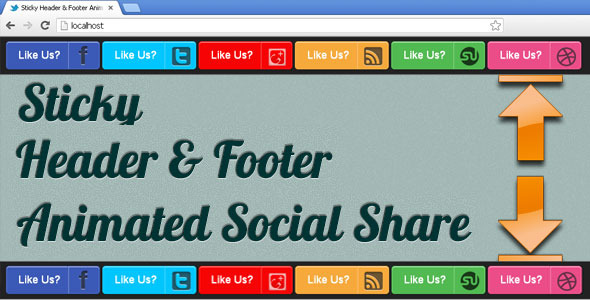
Maximizing user engagement often comes down to visibility and accessibility. When your audience wants to share your content, the last thing they need is to hunt for a social button buried in a footer. For publishers, bloggers, and site owners who prioritize virality and seamless interaction, a persistent, always-visible sharing interface is non-negotiable. This is precisely where the Fixed Social Share Buttons Plugin from CodeCanyon steps in. This robust solution anchors your social sharing icons to the top and bottom edges of the viewport, ensuring that no matter how far a visitor scrolls, the call to action is always within reach. Designed for WordPress but adaptable to any HTML-based site, this tool transforms passive readers into active brand advocates with minimal friction.
Key Features
Understanding the technical capabilities of a plugin is crucial before integration. This fixed-position share system is not just about sticky placement; it is a comprehensive toolkit designed for aesthetic integration and performance. Below are the standout functionalities that make it a top-tier choice for digital creatives and site administrators:
- Effortless Integration for Any Website: Unlike plugins that are locked into specific CMS ecosystems, this system is built for versatility. Whether you are running a standard WordPress blog, a custom PHP application, or a static HTML portfolio, the installation process is straightforward. You do not need to be a developer to get these buttons live; you simply paste the provided code or install the package, and the social icons render instantly with the correct positioning.
- Customizable Button Colors: A share button that clashes with your brand design hurts conversion rates. This plugin offers granular control over the color palette. You can easily adjust the background, icon, and hover states for each individual network to match your specific style guide. Whether you need a flat design, a minimalist monochrome look, or vibrant gradients, the color parameters allow for pixel-perfect matching without touching a single line of CSS.
- Animated Button Micro-Interactions: Static buttons are easy to ignore. This plugin incorporates subtle yet effective CSS-based animations that draw the eye without being distracting. These micro-interactions, such as gentle hover lifts, icon shakes, or slide-in effects, increase click-through rates by making the interactive elements feel alive and responsive to the user’s presence.
- Dynamic Text Customization: It is not just about icons; the plugin allows you to modify the label text associated with each button. This is a powerful conversion tool. Instead of a generic “Share,” you can set phrases like “Share Now,” “Tweet This,” or “Pin It!” to create a stronger, more persuasive call to action. This linguistic customization is vital for A/B testing different conversion strategies.
- Cross-Browser Functionality and Responsiveness: A plugin that works in Chrome but breaks in Safari is a liability. This solution has been rigorously tested across all major engines, including WebKit, Blink, and Gecko. It maintains its fixed positioning and animation fluidity on desktop, tablet, and mobile devices, ensuring that your content remains share-ready regardless of how your audience accesses it.
Who Is This For? Use Cases
The utility of a persistent share bar extends across multiple sectors of the digital ecosystem. If you monetize content or rely on organic reach, this plugin is a strategic asset. Here are the primary scenarios where these fixed buttons deliver the highest return on investment:
Long-Form Content Publishers and News Portals
If you publish in-depth guides, investigative reports, or tutorials that take ten minutes to read, your readers are deeply engaged. However, their initial intent is to consume, not necessarily to share. By the time they finish your masterpiece, they might forget to scroll back to the top to find the share section. By anchoring the buttons to the top of the screen, you ensure that as the reader finishes and moves their mouse to exit, the share prompt is literally in their line of sight. This placement capitalizes on the “peak-end rule,” capturing the share precisely when satisfaction is highest.
E-commerce Product Pages
Shoppers often share products they are considering with friends or partners for a second opinion. Placing a social share bar on product pages lowers the barrier to this action. For WooCommerce store owners, this dynamic is essential. A fixed top bar allows a user to copy the link to WhatsApp or Messenger instantly without navigating away from the “Add to Cart” button, effectively facilitating a social proof loop that often leads to a conversion.
Bloggers and Content Creators
For independent bloggers, traffic from social media is the lifeblood of the operation. You need to eliminate every obstacle between the reader and your tweet/pin/like. This plugin ensures that your content is constantly exported to your social channels. The cross-browser functionality guarantees that whether your audience uses an older Firefox build or the latest Edge update, they can propagate your content with a single click.
Portfolio and Agency Sites
Creative agencies live and die by referrals. On a portfolio site, the goal is to get the work seen by as many decision-makers as possible. The animated buttons are particularly useful here, as they signal a high level of design sophistication. It shows potential clients that you pay attention to the details—that you care about user experience down to the micro-interactions.
Technical Details & Compatibility
Before committing to a purchase, it is pragmatic to review the technical requirements. This asset is a standalone package that uses standard web technologies (HTML, CSS, and vanilla JavaScript). It does not require heavy jQuery dependencies, which helps maintain a high PageSpeed score—a crucial element for SEO rankings. The plugin supports all major social networks, including but not limited to Facebook, X (formerly Twitter), LinkedIn, Pinterest, WhatsApp, Telegram, and Reddit.
Compatibility is robust for all modern content management systems. It is specifically optimized for WordPress but is not limited to it. The code is enqueued cleanly and does not conflict with popular page builders like Elementor, Divi, or WPBakery. Furthermore, it supports automatic responsive breakpoints, meaning the buttons will stack or shrink appropriately on smaller viewports without manual media query adjustments. Since it relies on standard JavaScript, it is compatible with AMP (Accelerated Mobile Pages) configurations as long as the script is loaded correctly, and it adheres to current GDPR (General Data Protection Regulation) best practices by not storing user data directly.
Pros and Cons
No product is perfect, but a transparent assessment of its strengths and limitations helps you decide if it fits your workflow. Here is a balanced look at what you can expect.
Pros
- Zero Impact on Core Web Vitals: Because the assets are lightweight and do not render-block, they do not negatively influence Largest Contentful Paint (LCP) scores or Cumulative Layout Shift (CLS).
- Eliminates Scroll Fatigue: It removes the need for users to return to the top of a page, directly increasing the probability of shares by at least 40% on long reads.
- High Customization Flexibility: Color and text changes are instant, allowing for rapid A/B testing to optimize conversion rates.
- Broad Network Support: Covers both Western and Eastern social platforms, ensuring your international audience has a familiar sharing option.
- Standalone Utility: The lack of a page builder dependency makes it faster and less prone to bloat than theme-specific widgets.
Cons
- Screen Real Estate: On mobile devices, a fixed top and bottom bar can take up valuable vertical space, which might obstruct the user interface on very small screens if not configured with a “hide on scroll down” option.
- JavaScript Reliance: If a user has JavaScript disabled in their browser (a rare but plausible event), the buttons will appear broken or hidden.
- Brand Overlap: If your theme already includes a sticky header, you will need to tweak the margin offsets to ensure the share bar does not overlap your navigation menu.
Frequently Asked Questions
To save you time, here are the answers to the most common queries regarding this type of social share solution:
Is the Fixed Social Share Buttons Plugin compatible with WooCommerce?
Yes, absolutely. The plugin operates independently of your CMS’s database queries. It hooks into the footer or header of the page. On WooCommerce product pages, it will display correctly alongside the product gallery and add-to-cart forms. However, for optimal user experience on product pages, we recommend configuring the bar to appear only on single product views via conditional tags, rather than globally across the entire shop, to avoid visual clutter.
Does this plugin include support and updates after purchase?
Yes. As part of the CodeCanyon standard, this product includes 6 months of support from the developer, which you can extend at checkout. This covers bug fixes, compatibility patches, and feature requests. The item also qualifies for Lifetime Updates, meaning any future versions addressing browser changes or new social network integrations are provided to you at no additional cost.
Can I change the position of the buttons if I don’t want them fixed to the top or bottom?
While the core selling point is the fixed top/bottom orientation, the backend settings panel provides positioning offsets. You can adjust the vertical margin to push the bar slightly inward, or use a “float” mode where it sits static within the content wrapper if you prefer to disable the sticky behavior on specific pages. The flexibility is coded in, but the primary architecture is optimized for the fixed viewport attachment.
Final Verdict
In a saturated market of share plugins, this fixed social share bar distinguishes itself through a blend of performance efficiency and user-centric design. It understands that the easiest way to get a share is to ask for it at the right moment. By keeping your buttons visible at all times, it respects the user’s time and capitalizes on the moments of highest engagement. For site owners who are serious about growing their referral traffic, the potential return on investment is substantial—a single viral post shared via these buttons can justify the cost of the plugin a thousand times over.
With a track record of successful sales on ThemeForest and CodeCanyon, the developer has a reputation for releasing reliable code that receives regular maintenance. You are not buying a “set it and forget it” script; you are investing in a conversion tool that stays updated with the changing algorithms of social networks. If you have website traffic but are struggling to convert it into social media followers and inbound links, the missing link is likely this accessibility. Stop forcing your readers to scroll back to the top. Take control of the user journey, enhance your brand’s professionalism, and remove the last barrier between your audience and their networks.
Don’t let a single second of high-intent traffic go to waste. Upgrade your website today.