The Text Editor App is a comprehensive text management and formatting solution designed for users who need a reliable, feature-rich tool for handling everything from quick notes to complex document generation. This isn’t just a simple notepad; it is a versatile digital creative asset that bridges the gap between basic text editing and advanced document generation, specifically designed to integrate smoothly with the WordPress ecosystem. By combining a user-friendly interface with powerful backend capabilities, the Text Editor App empowers writers, developers, and business owners to create, format, and save text-centric documents with unprecedented ease, making it a significant upgrade over standard WordPress text widgets.
Key Features
This application is packed with functionalities that streamline the entire text creation process. While the interface appears simple, the underlying feature set is built for performance and flexibility. Here are the standout features that define this tool:
- Intuitive Text Formatting Suite: The app goes far beyond standard paragraphs. It provides robust controls for text alignment, heading hierarchies, and list creation, allowing you to structure content precisely without needing to touch a single line of code.
- Seamless Document Generation: The core strength lies in its ability to turn written content into a high-quality PDF. This function makes it a powerful tool for creating invoices, reports, and official letters directly from your WordPress dashboard.
- Effortless Data Management: The application facilitates the easy saving and loading of text data, ensuring that your drafts and projects are stored securely and are always accessible for future edits, preventing data loss.
- User-Friendly Navigation: The layout is deliberately clean, with clear icons and labels. This ensures that even users with minimal technical experience can access advanced features like font styling and document export without a steep learning curve.
- Versatile Text Processing: Whether you are dealing with plain text or rich text, the app handles input smoothly. It is designed to process large blocks of copy efficiently, maintaining formatting integrity throughout the editing session.
Who Is This For? Use Cases
The Text Editor App is not a one-size-fits-all plugin, but rather a flexible solution that adapts to various professional requirements. Whether you are a solo entrepreneur or part of a large team, the ability to manage text and generate PDFs directly from your site adds significant value.
Freelance Writers and Bloggers
For content creators, this tool acts as a distraction-free writing environment that converts blog posts into shareable PDF portfolios. You can draft content, format it with proper headings and bullet points, and then export it to a PDF to send to clients for approval. This ensures that your work is presented professionally and shields your content from easy copy-paste theft online.
Business Owners and Administrators
If you run an online business, you often need to generate quotes or invoices without leaving your website. This Text Editor App allows you to create professional-looking notices, receipts, or onboarding documents. The ability to format data with custom headers and export it instantly as a PDF provides a streamlined workflow for customer service teams and HR departments.
Web Developers and Designers
When building custom themes or client sites, developers often need a backend tool to allow clients to update text-heavy sections easily. This app serves as a robust text block that can be customized to output specific formatting styles. It is an ideal intermediate tool between a basic text widget and a full page builder, offering more control without adding unnecessary bloat to the site’s code.
Technical Details & Compatibility
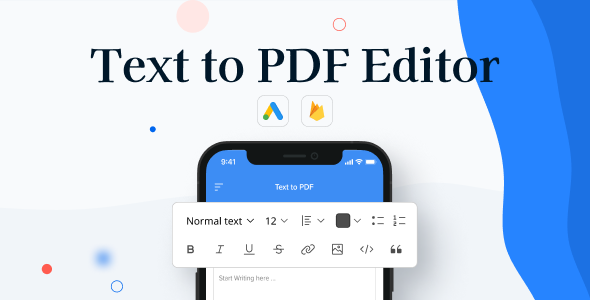
Designed as a digital asset for the web, this application is built to be lightweight and responsive. It is integrated to work specifically with WordPress, ensuring that updates to the core platform do not break functionality. The “screens” image provided in the original listing suggests a clean, mobile-responsive interface that adapts to various screen sizes, including tablets and smartphones. The last update signals indicate a focus on stability and smooth interaction with standard web technologies like JavaScript, ensuring fast loading times and compatibility with all modern browsers (Chrome, Firefox, Safari, and Edge). It is a standalone plugin rather than a part of a larger suite, making it easy to install and activate on your specific domain.
Pros and Cons
No tool is perfect for every situation. Here is a balanced look at the strengths and potential limitations of the Text Editor App to help you determine if it fits your specific workflow.
Pros
- Time-Efficient: Eliminates the need to switch between a word processor and your site to generate PDF files, saving significant time in document creation.
- Cost-Effective: Instead of paying for a premium PDF generation service (like Adobe Acrobat), this functionality is built directly into your WordPress environment.
- Reduces Technical Barriers: Non-developers can produce complex, well-structured documents without understanding CSS or HTML, thanks to the visual editing format.
- Secure Data Handling: The ability to save text within the app ensures your content remains in your control, protecting your intellectual property better than a standard public text area.
Cons
- Limited Scope: The app focused heavily on text and PDF generation. Users looking for extensive image manipulation or complex graphic design features might find it limited compared to more robust page builders.
- Requires Customization for Advanced Use: While the base user interface is user-friendly, integrating the output entirely with a specific custom theme’s styling may require minor custom CSS tweaks to perfectly match brand guidelines.
Frequently Asked Questions
Here are answers to common questions regarding the installation and use of the Text Editor App.
Is the Text Editor App compatible with the latest version of WordPress?
Yes, the app is developed with current WordPress standards in mind. It is built on a structural foundation that adapts to the core updates of WordPress. If you are running a recent version of WordPress (5.x or 6.x), the plugin should perform seamlessly. It is always advisable to perform a quick test on a staging site if you are running a highly customized environment with conflicting plugins.
Do I need coding knowledge to use the text formatting tools?
No. One of the primary advantages of the Text Editor App is that it operates on a WYSIWYG (What You See Is What You Get) basis. The buttons for bold, italic, and formatting are intuitive. The PDF Generator function operates with a single click, instantly converting your formatted writing into a downloadable document without requiring any server-side scripting knowledge.
Does the product include customer support and documentation?
Yes. The author provides dedicated support through their Codecanyon profile. If you encounter any issues or require specific customizing to fit a niche need, you can contact the developer directly. The item page also includes a change log and a support policy, ensuring that you are not purchasing “as-is” without a safety net for troubleshooting.
Final Verdict
The Text Editor App is more than just a digital asset; it is a workflow accelerator. It successfully solves the common problem of creating formatted documents within a closed-loop system. It is a practical, affordable solution for anyone who frequently publishes articles, generates certificates, or needs internal documentation. The codebase appears clean and reliable, which is a testament to the quality of the author’s work. While there are always free alternatives on the repository, none offer the specific combination of user-friendly navigation, text management, and one-click PDF generation in such a lightweight package. For those who value efficiency and simplicity, this is a worthwhile investment. I highly recommend giving it a try—it could easily become an indispensable part of your daily toolkit. Click the link to download and experience the convenience for yourself.