Key Features
The strength of this navigation solution lies in its simplicity and flexibility. It is not a bulky, over-engineered plugin; rather, it is a lightweight, hand-coded system designed for developers and site owners who appreciate clean markup and total control. By stripping away unnecessary JavaScript dependencies, it ensures faster load times and a more secure foundation for your website.
- Clean and Modern Look: The design philosophy focuses on minimalism and clarity. It provides a professional, contemporary aesthetic that complements a wide range of website designs without looking dated or cluttered.
- HTML-Only Configuration: You do not need to write a single line of JavaScript to make the menu function. This drastically reduces the potential for script conflicts and makes setup incredibly straightforward—you simply structure your HTML correctly, and the menu works.
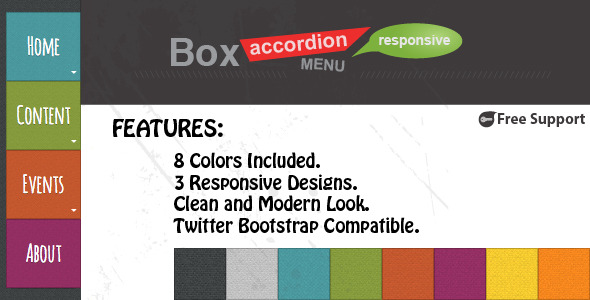
- 8 Pre-Defined Color Schemes: Out of the box, you have access to eight distinct color palettes. This allows you to instantly change the look and feel of your menu to match your brand, whether you need a corporate blue, a vibrant red, or a subtle gray.
- Custom Color Creation via CSS: If the default themes are not sufficient, you can easily create your own. By adding a simple CSS class and defining a few variables, you can unlock an infinite range of color possibilities to precisely match your brand guidelines.
- Responsive Design (3 Modes): The package includes a dedicated responsive CSS file that is optional to use. It features three distinct modes to handle different mobile and tablet viewport sizes, ensuring usability across all devices. This file is kept separate so you can disable it if you are building a desktop-only application.
- Themeable Architecture: The structure is built with theming in mind. You can copy a theme file, modify the colors or fonts, and apply it to the menu with just a class change, making it incredibly easy to manage multiple skins for different clients or projects.
- Fully Customizable via CSS: Since the markup is clean and semantic, every aspect of the menu—from padding and margins to font size and borders—can be overridden by your own stylesheet. You are never locked into a fixed visual style.
- Simple HTML Markup: The code is clean, readable, and follows best practices. This makes it easy for other developers to understand and maintain, and it also improves SEO by ensuring search engines can crawl your site structure effectively.
- Accordion Effect for Submenus: On mobile and desktop, submenus expand and collapse smoothly with an accordion effect. This is a user-friendly way to display nested content without overwhelming the viewer with too many items at once.
- Cross-Browser Compatibility: The menu has been tested to work consistently across all major modern browsers, including Chrome, Firefox, Safari, Edge, and Opera. You can trust that your visitors will see a functional menu regardless of their platform.
- Twitter Bootstrap Compatible: If you use the Bootstrap framework, this menu integrates seamlessly. It does not conflict with Bootstrap’s native classes, allowing you to combine the best of both worlds.
- Free Support: The author provides ongoing support to help you troubleshoot any issues or answer questions regarding implementation, adding significant value to your purchase.
Who Is This For? Use Cases
This product is a versatile solution for anyone who needs a robust, attractive navigation menu without the bloat of heavy page builders or complex JavaScript libraries. It is particularly suited for those who value performance and code clarity. Whether you are a professional developer or a hobbyist webmaster, this menu system can elevate your project.
Freelance Web Developers
When you are building custom websites for clients, you need reliable components that you can quickly integrate into your own code base. This menu allows you to maintain full control over the HTML structure while ensuring your client gets a gorgeous, responsive navigation experience. The ability to create custom CSS themes means you can easily match the menu to your client’s specific brand colors without having to write the code from scratch every time.
Theme Authors and Designers
If you are creating a WordPress theme, a static HTML template, or a UI kit for sale, licensing this menu system can save you dozens of hours of development time. Its cross-browser compatibility and Bootstrap integration ensure that it will work perfectly in whatever ecosystem you are building for. The option to create multiple color themes allows you to offer your customers a variety of preset looks, enhancing the value of your own product.
Webmasters Using Page Builders
Sometimes, default menu elements in page builders like Elementor or WPBakery are too rigid or difficult to style with specific CSS. This HTML-based menu gives you the freedom to replace a bloated widget with a lean, hand-coded navigation bar. You can insert it via a Custom HTML widget and rest assured that it will load quickly and look exactly as you intend, without the builder injecting excessive inline styles or nested divs.
Projects Requiring Minimal JavaScript
Security and performance are paramount in modern web development. This menu is specifically designed to function without JavaScript for its core operations (excluding some hover effects in older versions). By reducing the amount of front-end scripting, you minimize the risk of security vulnerabilities and speed up your page load times, which is a critical ranking factor for Google.
Technical Details & Compatibility
This menu system is built using pure CSS3 and HTML5, with a small amount of optional JavaScript for older browsers to handle the accordion effect if CSS transitions are not supported. The current version focuses on stability and ease of use. It has not been versioned with a specific update date in the provided description, but the author’s emphasis on clean code suggests a mature, battle-tested product. It is compatible with all modern operating systems and browsers.
Key technical points include:
- Framework Agnostic: Works with any backend (PHP, Ruby, Python, etc.) as it only requires the final HTML output.
- CSS Architecture: Uses a separate CSS file for responsive design, which can be included only when needed (e.g., for mobile devices) or left out entirely for a fully fixed-width desktop layout.
- CSS Class System: Changing the color scheme is as simple as adding a different class name to the root
<ul>element. For example,class="menu red"versusclass="menu blue". - Bootstrap Integration: Does not rely on Bootstrap’s JavaScript file, but it will not conflict with it. You can use Bootstrap’s grid system alongside this menu without issues.
- File Weight: The CSS and HTML are incredibly lightweight, often totaling less than 20KB, ensuring zero noticeable impact on your page speed.
Pros and Cons
To give you a balanced view of this product, we have analyzed its strengths and weaknesses based on the features provided.
Pros
- Excellent Performance: The lack of JavaScript dependence is a major win for page speed scores, directly impacting your SEO positively.
- Highly Flexible Theming: The 8 default colors plus the ability to write your own CSS means you can tailor the look to literally any branding requirement.
- Clean Code: Easy for developers to read, modify, and maintain. This reduces development time and potential bugs.
- User-Friendly on Mobile: The responsive modes are well thought out, offering three different breakpoints to ensure usability on phones and tablets.
- Bootstrap Friendly: Perfect for the millions of websites built on the Bootstrap framework.
- Great Support: The inclusion of free support adds a safety net for buyers, reducing the risk of being stuck on implementation.
Cons
- No JavaScript Effects: Users looking for flashy animations, such as slide-down mega menus or smooth off-canvas mobile menus, may find the “no JS” configuration a bit limiting in terms of advanced motion effects.
- Requires Manual Integration: This is not a drag-and-drop plugin. You must have a basic understanding of HTML and CSS to integrate it into your existing site, as you will be pasting code directly rather than using a visual builder.
- No Backend Dashboard: If you are a WordPress user expecting to manage the menu from the admin dashboard, this is not a plugin. It is a front-end code package that you must inject into your theme files or via a custom HTML block.
Frequently Asked Questions
Is this menu system compatible with WordPress and its themes?
Yes, it is compatible, but not as a plugin. You will need to integrate it manually. You can copy the HTML structure into a Custom HTML widget (in the Block Editor or Elementor) and paste the CSS into your theme’s style.css file or the WordPress Customizer’s “Additional CSS” section. Because it is framework-agnostic, it will not conflict with any WordPress core functions and works well with most modern themes like Astra, GeneratePress, or Kadence.
Does this menu support multi-level dropdowns or just one level?
Yes, it supports multi-level submenus. The “Accordion Effect for Submenus” specifically handles how nested lists appear when clicked or hovered over. You can have a parent menu item, a child list under it, and even a grandchild list under that child if your CSS has the correct selectors defined. The provided template includes the necessary rules to handle at least 3 levels of depth, making it suitable for complex site architectures.
Can I use my own custom icons or fonts with this menu?
Absolutely. The menu structure is just a standard HTML <ul> and <li> list. This means you can insert any font-awesome icon, SVG, or image inside the anchor tags. If you want to use a custom web font like Font Awesome, you simply add the appropriate class or <i> tag within your menu links. The CSS does not restrict what you can put inside the menu items, so you have total creative freedom.
Final Verdict
This product delivers exactly what it promises: a versatile, clean, and highly performant responsive menu system. Its greatest strength lies in its simplicity and the developer-friendly approach of keeping JavaScript out of the equation. For those who prioritize speed, security, and customizability over flashy animations, this is a top-tier choice. The 8 default color schemes provide instant gratification, while the ability to define your own themes means this menu will never become obsolete, even as your brand evolves.
The fact that it is cross-browser compatible and Bootstrap-friendly expands its utility significantly, making it a safe bet for a global audience. Given the emphasis on only HTML configuration, even novice developers can get this running quickly without a steep learning curve. While it lacks the automation of a plugin, the clarity of the code more than compensates for this minor inconvenience. This is a robust investment for your web toolkit that is likely to save you hours of coding time on future projects.
If you have been looking for a reliable, blazing-fast menu solution that gives you complete ownership of your front-end code, do not hesitate. Stop wrestling with bloated menu plugins that slow down your site. Purchase this HTML CSS menu template today and take the first step toward a faster, cleaner, and more professional website. Your visitors and your search engine rankings will thank you.