Social icons are the silent workhorses of modern web design. They guide users to your extended digital footprint, build brand recognition, and offer a subtle signal of your site’s credibility. For designers and developers, these small graphics are often the first interactive elements a visitor touches. Yet, for many, the social icon remains static—a passive link that fails to engage or delight.
The difference between a standard icon and a memorable one lies in the micro-interaction. A well-executed hover effect transforms a simple navigation element into a tactile part of the user experience. It provides instant feedback, signals that the element is interactive, and adds a layer of polish that reflects your attention to detail. This is precisely where the Social Icons Ultimate CSS3 Hover Effects collection steps in.
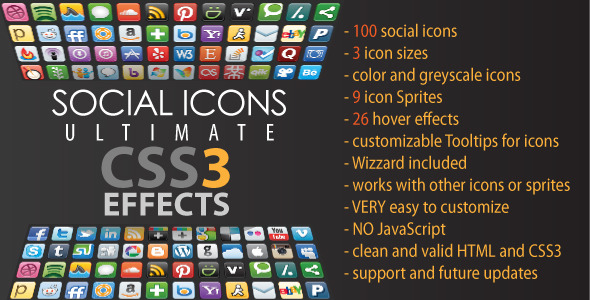
This isn’t just a pack of images; it’s a comprehensive toolkit engineered to elevate your design workflow. Built for developers who value efficiency without sacrificing aesthetic complexity, this collection solves the tedious problem of coding unique hover animations from scratch. It offers a library of 26 distinct, pure CSS3 effects that snap directly into your existing layout, ensuring that your social links are not just visible, but impossible to ignore.
Key Features
The feature set of this collection is designed to give you maximum creative freedom with minimal technical overhead. Here is a breakdown of what makes this bundle a robust asset for any project:
- 26 Unique Hover Effects: Move beyond the standard fade or slide. This collection includes a diverse range of animations, from 2D transformations to complex 3D rotations. Whether you need a subtle lift or a dramatic flip, you have the options to match your site’s personality.
- Extensive Icon Library: Access to 100 social icons ensures you are covered for virtually every platform you can think of, including niche networks. This eliminates the need to scour the web for missing assets.
- 3 Icon Sizes + Vector Files: The included icons come in three distinct raster sizes for immediate deployment, but the inclusion of vector files (SVG/EPS) means you can scale them infinitely for any resolution, including retina displays and large-format print.
- Color and Greyscale Variants: You have the flexibility to present icons in full brand color or a uniform greyscale. This is perfect for maintaining a monochromatic design scheme while still offering a vibrant color pop on hover.
- 9 Icon Sprites: To optimize performance, the icons are organized into CSS sprites. This reduces HTTP requests and speeds up page load times—a critical factor for both user experience and SEO.
- Customizable CSS Tooltips: Enhance usability by adding descriptive tooltips to your icons. These are completely customizable via CSS, allowing you to match them to your site’s typography and color palette.
- CSS Wizard Included: This is the standout utility. A dedicated “Wizard” tool allows you to visually select the icons you need, test different effects in real-time, customize tooltip text, and then instantly generate the HTML body code and CSS classes required for your specific list. It turns a manual coding task into a two-step process.
- 100% Native CSS3: The animations utilize CSS3 transitions and transforms. This means no JavaScript or jQuery is required for the core functionality, resulting in cleaner code and faster rendering.
Who Is This For? Use Cases
This product is engineered for creatives who demand control and efficiency. It bridges the gap between high-end aesthetics and practical implementation.
Freelance Web Designers
When you are juggling multiple client projects, time is money. This collection allows you to skip the tedious process of writing unique animation code for every client. You can quickly generate a polished, interactive social block that feels custom-tailored, allowing you to spend more time on other critical aspects of the design. The wizard ensures you deliver a professional result in minutes, not hours.
UI/UX Developers and Agencies
For teams working on complex builds, consistency is key. The Social Icons Ultimate CSS3 Hover Effects collection provides that standardized, code-savvy approach. Because the effects work with custom icons or sprites, you can apply the same interactive language across different components of a site or even a brand’s entire web presence. Agencies will appreciate the cross-browser stability and the clean, valid HTML output that passes strict development standards.
WordPress and Theme Developers
Given that the strict licensing terms allow for integration into a ThemeForest item with an extended license, this is a goldmine for theme authors. You can bundle these effects as a premium feature in your theme. Instead of offering static icons, you give users dynamic animations that increase the perceived value of your product.
Marketing Professionals and Portfolio Sites
Although the tool is technical, a marketing lead or brand manager can commission a developer to set this up. For personal portfolios or corporate “About Us” pages, these effects add a professional sheen. The ability to switch between greyscale and color is particularly useful for portfolios where a muted color palette allows the work to shine until the user interacts with the social links.
Technical Details & Compatibility
Understanding the technical foundation is crucial before integration. This collection is built on the modern web standards of today.
- Core Technology: The animations are driven entirely by CSS3 transitions and 3D transforms.
- Browser Support: Designed to work seamlessly on IE 10+, Firefox 16+, Chrome 23+, Safari 5.1+, and iOS Safari 3.2+. Opera 12.1 is supported, with the exception of specific 3D transform effects.
- Compatibility Rating: At the time of release, this setup was compatible with over 72% of internet browsers in use, making it a safe bet for the vast majority of your audience.
- Updates and Maintenance: The item details indicate a consistent update schedule (notably February 5th updates that added two new tooltip positions and improved tooltip quality), suggesting the author is committed to supporting the product and are aware of current trends.
- Wizard Utility: The included Wizard is powered by JavaScript/jQuery, but it is only a code generator. The output it produces relies purely on CSS3 for the hover effects.
Pros and Cons
To help you make a fully informed decision, here is a balanced look at the strengths and limitations of this collection.
Pros
- Massive Time-Saver: The Wizard and pre-built sprites drastically reduce development time compared to coding manually.
- No JavaScript Dependency: Pure CSS3 animations are smoother and lighter than JS-driven effects, directly benefiting page speed and performance.
- High Versatility: The ability to apply effects to your own icons means you aren’t locked into the 100 provided icons. You can pair the CSS classes with any custom vector art.
- Clean Code Output: Outputs valid HTML and CSS, which is crucial for maintaining standards compliance and avoiding conflicts with other frameworks.
- Vendor Support: The author (Tudor) has provided updated features and historically offers support for the product, which is vital for troubleshooting.
Cons
- Legacy Browser Gaps: While support is broad, IE 9 and below are not compatible. If you are targeting a demographic that exclusively uses legacy browsers, you will need a static fallback.
- 3D Transform Limitations: Some effects require the 3D transforms, which are unavailable in certain Opera versions. You must test your specific effect choices against your user base’s browser stats.
- Learning Curve for Customization: While extensively customizable, users unfamiliar with CSS variables and transform syntax may need a few minutes to adjust the animation styles beyond the presets.
Frequently Asked Questions
Here are answers to the most common queries regarding this plugin and its usage:
Is the Social Icons Ultimate CSS3 Hover Effects collection compatible with WordPress?
Yes, but it is not a specific plugin plugin. Because it produces clean HTML and CSS3, you can paste the generated code directly into a “Custom HTML” widget, a theme’s template file, or a hosting-specific code block to render the icons anywhere in your WordPress layout. It works independently of the CMS, so it will not conflict with your core theme files.
Can I use my own custom SVG icons with these hover effects?
Absolutely. The product is designed to be icon-agnostic. You can apply the CSS classes provided to any link wrapping your custom image or inline SVG. The transforms and transitions will trigger on the container or the image within, regardless of its source. Just ensure your custom icon is sized appropriately to fit the dimensions of the social block.
Does this item work without JavaScript and will it affect my site speed?
The hover effects themselves are 100% CSS3 and require zero JavaScript to run. The only JS present is in the “Wizard” tool which is used solely for generating the code during the setup process; you can delete that file from your production environment after copying the necessary classes. This ensures your final output is lightweight and incredibly fast.
Final Verdict
In a saturated market of icon packs, the Social Icons Ultimate CSS3 Hover Effects collection distinguishes itself through sheer utility and depth. It is not just a tool to place links; it is a mechanism to add a “premium feel” to your UI. The combination of 100 icons, 26 distinct animations, and the time-saving Wizard makes this an excellent return on investment for any serious creatives.
It removes the technical barrier to high-end interactivity. Regardless of the theme or platform you are building on, these effects are robust enough to enhance your design without bloat. The positive updates and support from the author reinforce that you are buying a maintained product, not a dead-end script.
If you are ready to stop scrolling past static links and start building a user experience that feels alive, then look no further. Take control of your design workflow today. Get the Social Icons Ultimate CSS3 Hover Effects collection from CodeCanyon, and turn your social proofs into dynamic, interactive elements that your visitors will remember.