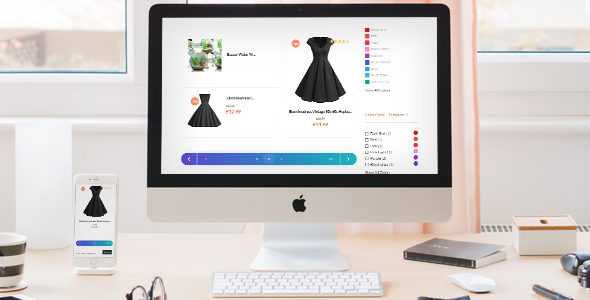
Navigating through long lists of blog posts, categories, tags, or eCommerce product pages should be intuitive and visually seamless. The default pagination systems in WordPress and WooCommerce often feel clunky, lack styling flexibility, and can confuse users. Custom Pagination (CP) solves this issue by offering a robust, easy-to-integrate solution that transforms how visitors browse your site. Designed specifically for WordPress and WooCommerce, this plugin, available on CodeCanyon, empowers site owners to implement a tailored pagination experience without touching a single line of code. Whether you manage a sprawling blog, a content-rich news portal, or a high-traffic WooCommerce store, the ability to control navigation aesthetics and functionality directly impacts user engagement and conversion rates.
By automating the replacement of default pagination on key pages—including search results, archives, category listings, and tag archives—the plugin ensures a consistent, polished look across your entire site. With over 10 pre-built templates and the ability to tweak visual properties, you can match pagination to your brand’s identity. This article dives deep into the capabilities of the Custom Pagination plugin, exploring its features, ideal use cases, technical compatibility, and why it stands out as a premium upgrade for any WordPress or WooCommerce site.
Key Features
- Automated Integration: The plugin automatically applies custom pagination to WordPress blogs, search results, archives, categories, tags, and WooCommerce product list pages. This eliminates manual coding and ensures site-wide consistency.
- 10+ Ready-to-Use Templates: Choose from a diverse library of pagination styles, ranging from minimalist to bold. Each template is fully customizable, allowing you to change colors, borders, hover effects, and typography to align with your brand.
- Full Responsiveness: Every pagination template is designed to adapt seamlessly to desktops, tablets, and mobile devices. Navigation elements reflow and resize to maintain usability across all screen sizes.
- Cross-Browser Compatibility: Rigorously tested to function flawlessly on modern browsers including Chrome, Firefox, Safari, Edge, and Opera. Users experience a consistent interface regardless of their browser preference.
- WooCommerce Optimization: Specifically optimized for WooCommerce product archives and shop pages. The plugin enhances product navigation, reducing friction and encouraging users to browse more products.
- Flexible Styling Controls: Adjust colors, font sizes, spacing, border radius, and active state indicators directly from the plugin settings panel. No CSS knowledge is required to achieve a unique look.
- Lightweight & Performance-Focused: The plugin is built with clean, efficient code that adds minimal overhead to your site. This ensures fast load times and a smooth user experience without compromising speed.
- Easy Setup Process: Install and activate the plugin, and it immediately replaces default pagination. Advanced customization options are available from a dedicated settings page, making it beginner-friendly yet powerful.
Who Is This For? Use Cases
Blog Owners and Content Publishers
Blogs with extensive archives often suffer from high bounce rates when pagination is confusing or unattractive. The Custom Pagination plugin improves reader retention by providing clear, clickable navigation at the bottom of each page. Bloggers can instantly enhance the browsing experience, making it easier for visitors to jump between pages of articles. This is particularly valuable for niche blogs with hundreds of posts, where a well-designed pagination system can increase page views per visit.
WooCommerce Store Managers
eCommerce stores rely on product discovery. Default WooCommerce pagination can feel generic and fail to guide customers through inventory. By replacing it with a visually appealing, responsive pagination system, store owners can reduce friction during product searches. This is crucial for large catalogs where customers browse multiple pages of products. The plugin’s templates can be styled to match product cards, creating a cohesive shopping experience that encourages further exploration and ultimately boosts sales.
News and Magazine Websites
High-traffic news sites need pagination that supports rapid navigation through categories and tags. The plugin’s automated implementation ensures that news archives, author archives, and tag pages all benefit from the same upgraded navigation. This consistency reduces cognitive load on readers who frequently switch between sections. Editors and site managers save hours of development time by avoiding custom coding for each archive page.
Membership Sites and Online Communities
Membership platforms and community forums often feature paginated lists of topics or posts. A clean, custom pagination system reinforces brand professionalism and helps members navigate discussions efficiently. The plugin’s flexibility allows community managers to match pagination aesthetics with existing membership themes, creating a seamless user interface that retains subscribers.
Agencies and Freelance Developers
Web developers and agencies managing multiple client sites can benefit from a single, reliable pagination solution. The plugin’s easy setup and wide compatibility reduce the time spent on repetitive styling tasks. Clients appreciate the improved user experience, and developers can offer pagination as a value-added service during site builds or redesigns.
Technical Details & Compatibility
The Custom Pagination plugin is built for modern WordPress environments. It supports WordPress versions 4.0 and above, ensuring compatibility with both legacy and the latest 5.x and 6.x releases. The plugin is fully integrated with WooCommerce 3.0 and later versions, covering all major WooCommerce updates. It works flawlessly with popular page builders like Elementor, WPBakery, Beaver Builder, and Divi, as well as with caching plugins such as W3 Total Cache and WP Rocket. The plugin’s code adheres to WordPress coding standards and is optimized for PHP 7.0 through 8.2, making it suitable for servers running modern PHP versions.
Responsiveness is handled via CSS media queries, ensuring that pagination buttons and numbers scale properly on touchscreen devices. The plugin is tested for accessibility compliance, including proper ARIA labels for screen readers. Updates are provided regularly by the developer (aa-team) to maintain compatibility with WordPress core and WooCommerce releases. A last update indicator suggests ongoing maintenance, giving users confidence in long-term stability.
Pros and Cons
Pros
- Instantly improves visual appeal of site navigation without coding
- Replaces pagination on multiple page types automatically
- Over a dozen templates to suit various design styles
- Fully responsive and mobile-friendly layouts
- Optimized for WooCommerce product archives
- Lightweight code that won’t bloat your site
- Cross-browser tested for consistency
- Beginner-friendly with straightforward settings panel
- Regular updates and developer support included with purchase
Cons
- Limited to predefined templates; full custom template creation requires CSS edits
- May conflict with themes that have heavily customized pagination logic
- No built-in option for infinite scroll or AJAX pagination
- Does not support pagination on custom post types unless explicitly configured
- Requires a one-time purchase fee (no free version)
Frequently Asked Questions
Is Custom Pagination compatible with WooCommerce?
Yes, the plugin is specifically built to work with WooCommerce product pages, archives, and shop pages. It automatically replaces default WooCommerce pagination with your chosen template, improving the browsing experience for customers. It supports all modern WooCommerce versions (3.0 and above) and works seamlessly alongside popular WooCommerce themes and plugins.
Does the plugin include customer support after purchase?
Yes, purchasing the plugin from CodeCanyon includes access to developer support via the item’s support forum. The aa-team provides timely assistance for setup, troubleshooting, and compatibility questions. Support is typically available for six months from the purchase date, with options to extend coverage.
Can I customize the pagination colors without writing code?
Absolutely. The plugin includes a built-in settings panel where you can adjust colors, fonts, spacing, borders, and hover effects using visual controls. No CSS knowledge is required. For users who want further customization, the plugin also allows you to add custom CSS directly from the settings page.
Final Verdict
The Custom Pagination plugin by aa-team is a powerful yet simple tool for any WordPress or WooCommerce site owner seeking to enhance navigation. With over 10 templates, full responsiveness, and automatic integration across blogs, archives, and product pages, it addresses a common pain point—default pagination that looks outdated or works poorly on mobile devices. The plugin’s lightweight code ensures your site remains fast, while its WooCommerce-specific optimizations make it an excellent choice for online stores looking to reduce bounce rates and improve product discovery. Since its release, it has earned positive feedback from users praising its ease of use and visual impact. If you value user experience and want to upgrade your site’s navigation in under five minutes, this plugin delivers exceptional value. Purchase Custom Pagination today from CodeCanyon and give your visitors a navigation experience they’ll appreciate.