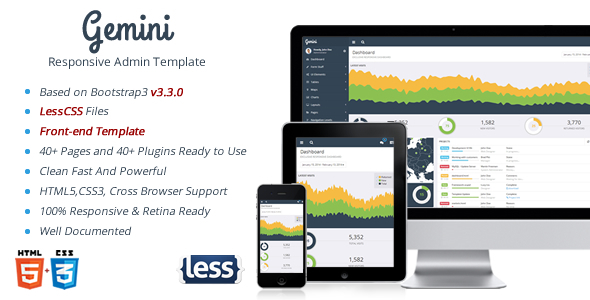
Gemini is a responsive admin template built on Bootstrap 3 and sold on ThemeForest by the developer Aqvatarius for $16. It packages a dashboard interface, a wide set of pre-built pages, and a large collection of third-party jQuery plugins into a single downloadable HTML/CSS/JavaScript bundle. It suits developers and small agencies that need a ready-made back-office shell for a web application and are comfortable working directly with HTML, Less and jQuery rather than a modern component framework. With 310 sales recorded on the marketplace, Gemini Admin Templates occupy a modest but established niche among budget dashboard kits.
What Gemini Admin Templates Actually Include
The core of the package is a set of static HTML pages styled with Bootstrap 3, covering the screens most administrative interfaces need: a dashboard with charts and widgets, profile, gallery, search and FAQ sample pages, pricing tables and blocks, a portlet system, and a front-end template added in version 1.4. Because these are plain HTML files rather than a templating engine, they can be dropped into a PHP, Rails, Django or static build with relatively little adaptation, and the markup is readable enough to restructure when a project’s information architecture diverges from the demo.
Styling is handled through Less, and the vendor ships the LessCss source files alongside the compiled CSS. That matters more than it might sound: it means a developer can change the base colour palette, typography scale and spacing variables in one place and recompile, instead of hunting through thousands of lines of generated CSS. For teams already using a Less build step, Gemini Admin Templates fit naturally into that pipeline. Teams standardised on Sass will need to either keep the compiled CSS as-is or port the variables manually, since no Sass version is provided.
The plugin inventory is unusually broad for a template at this price point. It includes DataTables for sortable, searchable grids, Fullcalendar for scheduling views, Flot and Rickshaw for charting, jVectorMap for geographic visualisation, Select2 and TagsInput for richer form controls, Summernote and CodeMirror for text and code editing, Dropzone with a PHP uploader file for drag-and-drop uploads, Plupload, Validation Engine, masked input, iCheck, a Bootstrap wizard, a date range picker, nestable lists, a file tree, ImgAreaSelect and a custom content scroller. A table export plugin arrived in version 1.4. In practice this means most of the interactive furniture of an admin panel is already wired up and demonstrated on a page, which shortens the time between starting a project and having something clickable to show a stakeholder.
Responsiveness is handled at the framework level, so the layout reflows for phones and tablets. The changelog shows navigation bugs on desktop and mobile being addressed specifically in version 1.4, which suggests the mobile menu had genuine rough edges in earlier releases and is worth testing against the current build rather than assuming it works from the demo alone.
Where Gemini Fits and Where It Does Not
Gemini Admin Templates are a reasonable fit for internal tools, client back-offices, CRM or reporting dashboards, and prototype work where a team needs a credible interface quickly and intends to integrate it into an existing server-rendered application. Freelancers quoting fixed-price projects benefit most, because the pre-built pages reduce the hours spent on layout and form styling. Agencies maintaining several small client dashboards can reuse the Less variables to give each deployment a distinct look without rebuilding the component layer.
The template is a poor choice for anyone building a single-page application on React, Vue or Angular. There is no component library, no npm package and no module structure to speak of — the JavaScript is jQuery-based and organised as page-level plugin initialisation. Retrofitting it into a modern build would mean discarding most of the integration work and keeping only the CSS. It is equally unsuitable for projects that require accessibility compliance out of the box, since the source listing makes no accessibility claims and Bootstrap 3-era markup and plugins are not reliable on that front without auditing. Finally, teams that need long-term vendor support with a published roadmap should look elsewhere; the last update recorded is from November 2014, and the vendor does not state a support policy beyond a general 24/7 availability line.
Strengths and Limitations
Strengths
- Broad plugin coverage out of the box, including DataTables, Fullcalendar, Dropzone, Select2, Summernote and several charting libraries, all demonstrated on working pages rather than merely bundled.
- Less source files make systematic restyling practical, which is rare in templates that ship only compiled CSS.
- Static HTML structure integrates cleanly with server-side frameworks and does not impose a JavaScript architecture on the project.
- Sample pages for profile, gallery, search, FAQ, pricing and front-end views reduce the amount of scaffolding a developer has to write from scratch.
- A documented changelog across five releases shows the template received real maintenance during its active period, with navigation and chart-resizing bugs explicitly fixed.
- At $16, the cost is low enough that a single reused page layout can justify the purchase.
Limitations
- The last recorded update is 7 November 2014. That means Bootstrap 3.3.0, jQuery of that era, and plugin versions that predate numerous security and compatibility fixes. Any production deployment needs a dependency audit.
- Bootstrap 3 is not compatible with Bootstrap 4 or 5 class conventions, so migrating an existing modern Bootstrap project into this template is not a drop-in operation.
- No Sass version is included; teams using Sass must port the Less variables or maintain the compiled CSS by hand.
- There is no build tooling, module bundler or package manifest. Everything is loaded through script tags, which makes dependency management manual.
- The vendor’s claim of 24/7 support is a single line in the listing with no stated response time, channel or scope, so it should not be treated as a service-level commitment.
- Accessibility is not addressed anywhere in the product information, and the plugin set includes controls that typically need manual ARIA work.
How Gemini Compares With the Admin Template Category
Admin templates generally fall into three groups: static Bootstrap kits, framework-specific component libraries, and full application starters with backend code included. Gemini Admin Templates sit firmly in the first group. Compared with framework-specific options, they offer far less integration convenience but considerably more portability — the same markup works whether the backend is PHP, Python or .NET. Compared with application starters that bundle authentication, database schemas and API layers, Gemini provides none of that, which is a limitation for teams wanting a complete foundation but an advantage for those who already have a backend and only need the presentation layer.
Within the static Bootstrap category, the differentiator is breadth of plugin integration and the presence of Less source. Templates that ship only compiled CSS are faster to start but harder to rebrand consistently. Templates built on newer Bootstrap versions will feel more current and carry fewer dependency concerns, but often cost more and may assume a build pipeline the project does not have. Gemini’s position is therefore a value one: a large amount of pre-wired functionality at a low price, in exchange for dated dependencies and no ongoing development.
Frequently Asked Questions
Is Gemini still usable in a new project in 2025?
Yes, with caveats. The HTML, CSS and jQuery code will still run in current browsers, and the layout logic remains sound. The real risk is dependency age: Bootstrap 3.3.0 and the bundled plugins have known issues that later releases fixed. A new project should plan to audit and selectively upgrade libraries before going to production.
Does Gemini work with React, Vue or Angular?
Not in any integrated way. There is no npm package, no component definitions and no module system. The JavaScript is jQuery-based and initialised per page. A team could reuse the compiled CSS inside a modern framework, but the interactive behaviour and plugin wiring would need to be rewritten as native components.
Can the colour scheme and typography be changed easily?
Yes, if the project uses Less. The vendor includes the LessCss source files, so base colours, fonts and spacing can be adjusted through variables and recompiled. Projects without a Less build step will need to either add one or override the compiled CSS, which is messier but workable for small changes.
What kind of support comes with the template?
The listing states that support is available 24/7, but it does not specify a channel, response time or scope, and the item has not been updated since November 2014. Buyers should treat support as best-effort and rely on the documentation and changelog rather than assuming an active maintenance relationship.
Verdict on Gemini Admin Templates
Gemini Admin Templates are worth buying for developers who need a static, Bootstrap 3-based dashboard shell with a large amount of pre-wired plugin functionality and who are willing to manage dependency upgrades themselves. The Less source files and the breadth of the plugin set give it more practical value than its age and price suggest, and the changelog shows it was genuinely maintained while active. Buyers should avoid it if the project targets a modern JavaScript framework, requires accessibility compliance, or depends on a vendor with a current release cadence — the 2014 timestamp is the deciding factor in those cases. For internal tools, prototypes and small client dashboards where the presentation layer is the main deliverable, the trade-off is reasonable.