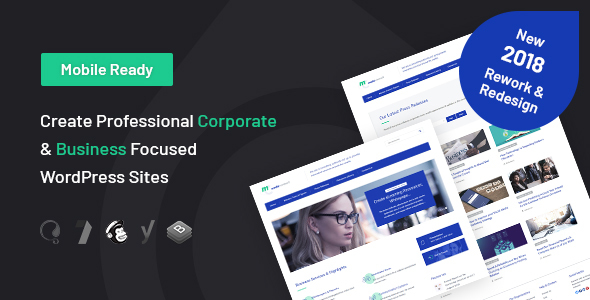
Media Consult is a business WordPress theme built for consultancies, agencies and corporate publishers who need to present documents as well as pages. Its defining feature is a Resource Library that lets you publish annual reports, whitepapers and ebooks alongside ordinary blog content, and it ships with Elementor support, a live customiser and two starter skins. If your website has to sell expertise rather than products, this Media Consult business theme is worth a close look — provided you can live with a codebase that has not been touched since early 2019.
What the theme actually lets you build
The Resource Library is the reason most buyers land here. Instead of treating a PDF as an afterthought buried in a blog post, the theme gives documents their own content type, with a dedicated widget that surfaces your latest resources wherever you place it. For a firm that publishes quarterly reports, research papers or gated downloads, that structure saves you from bolting on a third-party plugin and styling it from scratch.
Layout control is handled through the WordPress Live Customizer rather than a separate options panel. You get unlimited colour selection through pickers, a global switch for left or right sidebars, and a per-page override so individual pages can break from the site-wide rule. Two starter skins — light orange and dark blue — give you a starting palette, though the colour pickers mean neither is a constraint.
Elementor compatibility matters more than it sounds. It means you can build page layouts visually and drop the theme’s shortcodes into Elementor sections, rather than being locked into a proprietary drag-and-drop builder that only works with this theme. The theme ships with more than 30 shortcodes covering the usual business-page furniture: buttons, columns, pricing blocks, testimonials and so on.
Navigation is deliberately simple: two menu locations, one in the header and one in the footer. That is a sensible constraint for a corporate site, where sprawling menu structures usually signal unclear information architecture. A slider is included that pulls your latest posts from a category you nominate, which is a practical way to keep a homepage fresh without manual curation.
Three custom widgets come bundled — category posts, latest blog posts and latest resources — and there is a team members page that opens biographies in a lightbox, so a long bio does not push the rest of the page down. Contact Form 7 handles forms, Google Fonts handle typography, and the theme is WPML and translation ready if you need a multilingual site.
The vendor also claims search engine optimisation work: titles, headings and structure, including schema markup for rich snippets, were written with search engines in mind. Treat that as a reasonable starting point rather than a substitute for an SEO plugin — schema output still needs validating against your own content.
Where this theme fits, and where it does not
The strongest fit is a small or mid-sized consultancy that publishes thought leadership. If your business model depends on people downloading your research before they call you, the Resource Library plus the resources widget gives you a coherent publishing workflow out of the box. Marketing agencies, accountancy firms, law practices and corporate communications teams all sit in the same territory.
It also suits freelancers building a client site on a fixed budget. At $39 with one-click demo import, you can have a presentable corporate site running in an afternoon and spend your remaining hours on content rather than layout debugging.
Where it fits less well is anything that needs to feel visually current. The theme’s last update was January 2019. Design trends have moved on, and a 2019 business theme will read as a 2019 business theme unless you put real work into typography and spacing. If a client is paying for a distinctive brand experience, you will be fighting the defaults.
It is also the wrong choice for a shop. There is no WooCommerce integration in the feature list, and the resource-focused structure is aimed at documents, not products. If you need to sell anything directly, look elsewhere.
Technical details at a glance
| Specification | Detail |
|---|---|
| Developer | CelestialThemes |
| Marketplace | ThemeForest |
| Category | Business |
| Price | $39 |
| Last updated by vendor | 8 January 2019 |
| Page builder compatibility | Elementor |
| Form compatibility | Contact Form 7 |
| Translation | WPML ready, translation ready |
| Layout system | CSS Grids, fully responsive |
| Menu locations | Header and footer |
| Included skins | Light orange, dark blue |
| Shortcodes | Over 30 |
| Documentation | Online and offline |
The vendor does not state a minimum WordPress or PHP version in the listing, and there is no published changelog detail beyond the version 5.0 Resource Library introduction.
Strengths and limitations
What works well
- The Resource Library is a real differentiator. Most business themes treat downloadable documents as blog attachments. Giving them a dedicated content type and widget is the kind of structural decision that saves ongoing maintenance work.
- Elementor support keeps you flexible. You are not locked into a theme-specific builder, so switching page builders later does not mean rebuilding the site.
- Per-page sidebar control. A global sidebar setting plus a per-page override is more granular than many themes at this price offer.
- One-click demo import. You can see the intended structure immediately rather than reverse-engineering it from documentation.
- Proven sales volume. Nearly 1,900 sales on ThemeForest suggests the theme has been used widely enough that common problems are likely documented in support threads.
Where it falls short
- No update since January 2019. This is the single biggest concern. WordPress has changed substantially since then, and an unmaintained theme carries compatibility risk with newer PHP versions and current plugin releases. Check the support forum’s recent activity before buying.
- Only two menu locations. Header and footer is fine for a simple corporate site, but a large organisation with mega-menu needs will run out of room quickly.
- No e-commerce integration listed. If selling products or paid downloads is on your roadmap, you will need to add and style that yourself.
- Design defaults date the site. The two skins and the underlying layout reflect 2019 conventions. Budget time for typography and spacing adjustments.
- SEO claims are unverifiable from the listing. The schema and heading structure may be sound, but you should test the output rather than assume it.
Frequently Asked Questions
What is the Resource Library in Media Consult?
It is a dedicated content type for documents such as annual reports, whitepapers and ebooks, introduced in version 5.0. Rather than attaching PDFs to blog posts, you publish them as structured resources and display them through a bundled widget. That gives downloadable material its own archive and makes it easier for visitors to browse everything you have published.
Is Media Consult compatible with Elementor?
Yes. The theme is listed as Elementor ready, so you can build page layouts in Elementor and use the theme’s shortcodes inside Elementor sections. That combination gives you visual editing without locking the site to a proprietary builder. You should still test your specific Elementor version against the theme before committing to a live build.
Is Media Consult still maintained?
The vendor’s last update was 8 January 2019, so the theme has not received changes for several years. It may still work on current WordPress installations, but you should verify compatibility with your PHP version and plugins yourself. Check the ThemeForest support tab for recent buyer reports before purchasing.
Can I use Media Consult for a multilingual website?
Yes. The theme is WPML ready and translation ready, so it can support a multilingual corporate site. You will need a WPML licence or an equivalent translation plugin, since those are separate purchases. Strings in the theme are prepared for translation, though any custom content you add will need translating through your chosen plugin.
The verdict
Buy Media Consult if you are building a consultancy, agency or corporate publishing site where downloadable documents are central to how you win business, and you want a working structure without paying for custom development. The Resource Library genuinely earns its place, and at $39 the risk is low. Skip it if your project needs current design trends, e-commerce, or a theme with active maintenance — the 2019 last-update date is a real constraint, not a formality. If you are unsure, install it on a staging site first and test it against your current WordPress and PHP versions before you commit. View the live demo and full feature list to see whether the Resource Library matches how your firm actually publishes.