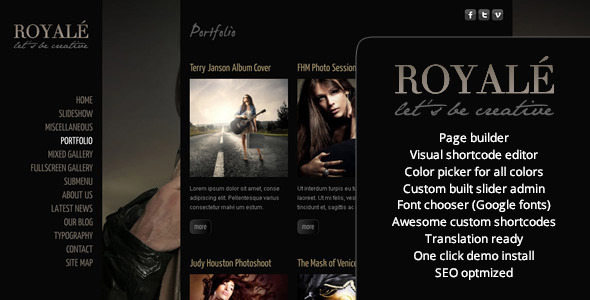
Royale creative is a WordPress theme sold on ThemeForest by the developer ZoomIt, priced at $44, built for photographers, videographers and visual studios that want a full-screen, image-led portfolio. It ships with five portfolio layouts, a custom admin panel for sliders and theme options, more than twenty shortcodes, a child theme and the PSD source files. Buyers evaluating it today should weigh its design strengths against the fact that the last vendor update landed in January 2020.
The theme has accumulated 457 sales on ThemeForest, which places it in the long-tail rather than the bestseller bracket, and it is aimed squarely at creative professionals who want a finished-looking site without commissioning custom development.
What Royale Creative Actually Delivers
The core proposition is full-bleed visual presentation. Royale supports full-screen background images and a full-screen background slideshow that can run as the entire page or sit behind regular content. For a photographer or a film studio, that means a landing page where the work fills the viewport immediately, without a grid of thumbnails standing between the visitor and the images.
Media handling goes beyond static images. The theme includes HTML5 video with a Flash fallback and a custom-built player, plus embedding support for Vimeo and YouTube. There is also a thumbnail slider with tooltips, which suits a portfolio index where each thumbnail needs a caption or project name on hover. The vendor does not state specific performance figures for these components, so load behaviour on media-heavy pages has to be tested on the target host rather than assumed.
Portfolio management is handled through custom post types rather than standard WordPress posts. Five distinct portfolio setups are included, and a sortable portfolio option was added in an early update, letting visitors reorder items by category. That is a meaningful feature for agencies presenting work across several disciplines, because it turns a static gallery into something closer to a filterable index.
On the editing side, Royale bundles a custom admin panel covering sliders, the contact form, fonts and general theme options. The slider admin includes a drag-and-drop multi-uploader. A visual shortcode editor is also provided, which matters because the theme ships more than twenty shortcodes covering video, layout, sliders, galleries, toggles, testimonials, Google Maps, accordions and tabs. A visual editor means those shortcodes do not have to be typed and remembered by hand.
Two smaller but practical inclusions are worth noting. The theme is translation ready with .mo and .po files supplied, and from update 1.2 onward it exposes per-page and per-post SEO description and keyword fields, which also feed the share description used by Facebook and other networks. Social buttons for tweets, likes and +1 can be positioned through theme options rather than hard-coded into templates.
The package itself is more generous than many ThemeForest listings. Alongside the theme and a child theme for developer customisation, buyers get documentation, instructional videos, sample data XML with slider configuration, and PSD files for mockups. The sample data is designed to let a buyer clone the demo and edit from there rather than build from an empty install.
Where Royale Creative Fits, and Where It Does Not
This theme is a reasonable fit for a solo photographer, a small film or video production company, an architecture practice, or a fashion label that needs a lookbook-style site. The vendor tags point at exactly those segments, and the full-screen slideshow plus portfolio custom posts map cleanly onto them. A freelancer building a first portfolio site for a creative client would also find the sample data and PSD files useful, since they shorten the gap between purchase and a presentable draft.
It is a poor fit for a content-heavy publication, a membership site, or anything that depends on a modern block-based editing workflow. Royale predates the WordPress block editor era in its architecture; its page-building approach centres on shortcodes and a bundled page builder added in version 3.00, not on native blocks or full site editing. A site that needs complex editorial layouts, e-commerce, or tight integration with contemporary plugins will fight the theme rather than benefit from it.
The clearest case against buying is a project with a long lifespan. The most recent update in the changelog is version 4.00, dated 1 February 2020, and before that the previous entry is from 2014. Anyone building a site intended to run for five or more years should treat that gap as a material risk, particularly around PHP version compatibility and WordPress core changes.
Strengths and Limitations
Strengths
- Full-screen background imagery and slideshow support give image-led portfolios an immediate visual impact without custom coding.
- Five portfolio setups plus custom post types and a sortable option cover a range of presentation styles within one purchase.
- More than twenty shortcodes with a visual editor reduce the amount of raw markup a non-developer has to write.
- Custom admin panels for sliders, contact form, fonts and theme options keep routine edits out of template files.
- The package includes a child theme, PSD files, sample data and documentation videos, which is more than the $44 price typically buys.
- Per-page SEO description and keyword fields, added in update 1.2, give basic on-page control without a separate plugin.
Limitations
- The last recorded update is from January 2020. The vendor does not state current compatibility with recent WordPress or PHP releases, and buyers should verify this before purchase.
- The design language is tied to the full-screen slideshow aesthetic of the early 2010s. Sites built on it risk reading as dated unless the typography and imagery are handled carefully.
- The editing model is shortcode and custom-page-builder based rather than block based, which creates friction with modern WordPress workflows and with plugins that assume native blocks.
- Media-heavy full-screen backgrounds can be slow; the vendor provides no stated optimisation, lazy-loading or image-compression tooling.
- The update process described in the documentation involves downloading the package, unpacking it, and copying a folder over FTP, then reinstalling a database table from theme settings. That is a manual, error-prone routine compared with standard theme updates.
- Sales sit at 457, so third-party troubleshooting resources, tutorials and community answers are thin compared with a mainstream theme.
How It Compares With the Wider Creative Theme Market
Creative portfolio themes generally split into two camps: multipurpose themes that bundle a page builder and dozens of demo sites, and single-purpose themes like Royale that commit to one visual idea. Multipurpose options offer more flexibility and a larger support community, but they also carry more configuration overhead and often produce sites that look interchangeable. Royale sits in the second camp, and its value depends on whether the buyer wants its specific full-screen, slideshow-driven presentation.
Against themes sold on active maintenance, Royale’s position is weaker. A buyer comparing on capability alone will find that newer alternatives offer block-based editing, performance tooling and regular compatibility updates as standard. Against themes judged purely on the finished look of a photography or video portfolio, Royale remains competitive on design and on what is included in the package. The trade-off is straightforward: more control over the final aesthetic and a richer asset bundle, in exchange for an older technical foundation and an uncertain update path.
Frequently Asked Questions
Is Royale creative theme still being updated?
No, the last update recorded by the vendor is version 4.00, dated 1 February 2020. Before that, the previous changelog entry is from 2014, so the theme has been effectively dormant for years. Buyers should confirm current WordPress and PHP compatibility directly with the author before purchasing.
Does Royale work with the WordPress block editor?
Largely no. Royale was built around shortcodes and its own bundled page builder, added in version 3.00, rather than native Gutenberg blocks. Shortcodes still render inside block-based pages, but the editing experience is not block-first, and layouts are managed through the theme’s own tools rather than the standard editor.
What portfolio layouts are included in Royale?
Five portfolio setups ship with the theme, all built on custom post types rather than standard posts. A sortable portfolio option was added in an early update so visitors can reorder items, and the portfolio component was later replaced with the developer’s ZoomFolio system, which includes its own generator.
Can Royale be translated into another language?
Yes. The theme is internationalisation ready and the package includes .mo and .po translation files, so a site can be localised using standard WordPress translation tooling. The vendor does not state which languages are pre-translated, so any non-English build will require preparing a translation file.
Verdict on Royale Creative
Royale creative suits a photographer, videographer or small studio that wants a full-screen, image-first portfolio and is comfortable working with shortcodes and a custom admin panel. The inclusion of PSD files, sample data, a child theme and documentation videos makes the $44 price reasonable for that narrow use case. It does not suit anyone building a long-term site that needs current WordPress compatibility, block-based editing, or an active support community, because the update history stops in 2020 and the vendor gives no indication of ongoing maintenance. Buyers who need the theme’s specific aesthetic and accept the manual update process will get a workable portfolio; everyone else is better served by a theme with a current release cycle.