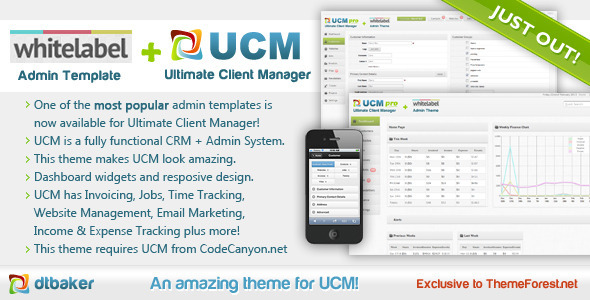
UCM Theme: White Label is a front-end skin for the Ultimate Client Manager, a self-hosted client and customer management system sold separately. It replaces the default UCM interface with an alternative admin design and adds a small set of dashboard widgets, and it is aimed at freelancers or small agencies already running UCM who want a different look without rebuilding their workflow. Anyone who has not licensed UCM itself has no use for this product, because the theme cannot run on its own.
The listing sits in the ThemeForest CMS themes category, was built by BakerWebDev, and sells for $20. It has been purchased 644 times, which is a modest but not trivial figure for a companion add-on of this kind. The most important thing to establish up front is what the product is not: it is not a rebranding tool. The vendor states plainly that re-branding the UCM system is handled inside the core application, so buying this theme purely to change logos or naming would be a mistake.
What the UCM Theme: White Label actually adds to a UCM install
The theme is a visual layer. Installing it does not unlock new modules, alter database behaviour, or change what the underlying client manager can do. Its value sits in three areas: the dashboard, the layout, and the customisation controls.
Dashboard widgets that surface operational data
The headline addition is a set of dashboard widgets. These present a summary of the system at a glance rather than requiring navigation into individual modules. Two things stand out from the vendor description. First, a graph showing weekly earnings and expenses from the previous period, which turns the dashboard into a lightweight financial overview rather than a static landing page. Second, notifications for jobs that are coming due and for customers who have uploaded new files. For a solo operator juggling several clients, that second item is arguably the more useful of the two, because file uploads and deadline slippage are exactly the things that get missed when everything lives in a list view.
The vendor does not specify how many widgets are included, how the graph is configured, or whether the date range is adjustable. Those are reasonable questions to raise before purchase, and the online demo is the sensible place to answer them.
A responsive layout with a collapsing menu
The theme uses a fluid responsive layout, and the menu collapses out of the way at smaller screen sizes. This matters more than it might first appear. Client management systems are frequently used on tablets while travelling or on a phone between meetings, and a default admin interface that assumes a desktop viewport becomes genuinely painful at those sizes. A theme that adapts is not a cosmetic upgrade in that context; it changes whether the system is usable away from a desk.
In-interface customisation of colours, fonts and spacing
Common layout properties — colours, typography, sizes and spacing — can be adjusted from within the interface rather than by editing stylesheets. That is a meaningful convenience for anyone who wants the admin area to sit comfortably alongside a brand palette without hiring a developer. The vendor also notes that advanced users can drop into the CSS directly, which is the right escape hatch: preset controls cover the common cases, and hand-editing covers the rest.
Full compatibility with existing UCM functionality
The theme is stated to work with every existing UCM feature, including customer management, invoicing and finances, website management, encrypted fields, customer notes, user permissions and file uploads. It is also compatible with both UCM Lite and UCM Pro, so the choice of UCM edition does not restrict the theme. That breadth of compatibility is the main reason the product is low-risk: it layers on top rather than replacing anything.
Licence-based installation and automatic updates
Installation runs through the UCM upgrade screen rather than through file uploads or template editing. The process is: install UCM, purchase the theme, retrieve the licence code, add it under Settings > Upgrade, click upgrade, then enable the theme under Settings > Theme. Because the theme is delivered through the licence system, it updates automatically in future. Vendors rarely make this explicit, and it is worth noting as a genuine operational benefit — no manual re-uploading after each release.
Where UCM Theme: White Label fits, and where it does not
The clearest fit is an existing UCM user running a service business with recurring client work: web agencies, freelance developers, consultants, or small studios managing invoices, files and deadlines in one place. If the default UCM interface feels dated or if the dashboard does not surface the numbers that matter day to day, this theme addresses both problems for $20. It also suits anyone who wants the admin area to visually match a client-facing brand without commissioning custom CSS.
It is a poor choice in two scenarios. The first is anyone who does not already own a UCM licence — the theme is inert without it, and the vendor says so directly. The second is anyone expecting the theme to handle white-label rebranding. Despite the product name, re-branding is a core UCM feature, and the vendor explicitly advises against buying the theme for that purpose. A buyer who reads only the title and skips the description will be disappointed.
A third, softer mismatch: organisations that need a heavily customised admin experience with bespoke workflows will find a theme layer too shallow. This changes appearance and adds dashboard widgets; it does not restructure how the system works.
Strengths and limitations of this UCM admin theme
Strengths
- Low cost relative to the workflow it touches, at $20 against a system that likely handles billing and client records.
- Non-destructive: it layers over UCM rather than replacing core files, and the vendor confirms compatibility with all existing features.
- Dashboard widgets add real operational value, particularly due-diligence notifications and the earnings/expenses graph.
- Responsive layout with a collapsing menu makes the admin usable on tablets and phones.
- In-interface control over colours, fonts, sizes and spacing, with CSS access for edge cases.
- Licence-based installation means automatic updates, avoiding the manual re-upload cycle common to ThemeForest items.
- Works with both UCM Lite and UCM Pro, so it does not force an edition upgrade.
Limitations
- The last vendor update was February 2013. That is a long time in web software, and buyers should treat the theme as a legacy item rather than an actively developed one. Whether it remains compatible with current UCM releases is not stated in the listing.
- It requires a separate UCM purchase. The $20 is an add-on cost, not a total cost, and the true entry price is higher.
- The name is misleading. “White Label” suggests rebranding capability that the vendor explicitly says lives in the core system, not in this theme.
- Customisation is limited to appearance. Layout structure, module arrangement and workflow logic are not configurable through the theme.
- The vendor provides no information on widget count, graph configuration, or browser support specifics, so the demo is the only way to verify those details.
- Support runs through a dedicated UCM ticket system rather than ThemeForest comments, which is fine but adds a step for buyers used to marketplace support.
How UCM Theme: White Label compares with other CMS themes
The comparison that matters here is not against other ThemeForest CMS themes in general, because most of those are standalone templates for building a site from scratch. This product is an add-on with a hard dependency, and judging it against general-purpose admin templates would be misleading. A general admin template might offer more components, more page layouts and a broader design system, but it would also require integration work to connect to an existing application — work that this theme avoids entirely by being purpose-built for one system.
Against other UCM add-ons, the differentiator is scope. This is a presentation layer plus dashboard widgets, not a functional extension. Buyers comparing it to UCM modules that add features should understand they are shopping in a different aisle. The relevant question is simply whether the default UCM interface is good enough; if it is, this theme adds little beyond aesthetics and a handful of widgets.
Where it does hold an advantage over generic alternatives is installation effort. Because it installs through the UCM licence system, there is no template integration, no stylesheet conflict resolution and no manual update path. For a non-technical UCM user, that alone can justify the price against a cheaper but more labour-intensive alternative.
Frequently Asked Questions
Do I need to buy Ultimate Client Manager to use this theme?
Yes. UCM Theme: White Label is an add-on for the Ultimate Client Manager and cannot function independently. The vendor requires that UCM Lite or UCM Pro be purchased and installed first, and installation runs through the UCM upgrade screen using a licence code. Without an active UCM installation, the theme has nothing to attach to.
Does this theme let me white-label or rebrand the UCM system?
No, and the vendor says so explicitly. Re-branding the UCM is handled inside the core system, so purchasing this theme purely to change branding is unnecessary. What the theme provides is an alternative visual design plus extra dashboard widgets. The product name refers to the design it is based on, not to a rebranding capability.
Will UCM Theme: White Label work with UCM Lite as well as UCM Pro?
Yes. The vendor confirms compatibility with both editions, so the choice between UCM Lite and UCM Pro does not affect whether the theme can be installed. The theme is also stated to work with all existing UCM features, including invoicing, customer management, file uploads, encrypted fields and user permissions, regardless of which edition is running.
Is the theme still maintained and updated?
The listing shows the last vendor update as February 2013, so it has not been actively revised for a very long time. Installation through the licence system does mean future theme updates install automatically once released, but whether new releases are still being issued is not stated. Buyers should verify current compatibility with their UCM version before purchasing.
Verdict on UCM Theme: White Label
This is a narrow product with a clear purpose: it makes an existing Ultimate Client Manager installation look better and puts useful information on the dashboard. For a current UCM user who finds the default interface dated or wants earnings, expenses and due-job notifications visible at login, the $20 price is easy to justify, and the 644 sales suggest a reasonable number of buyers have reached the same conclusion. The licence-based install and automatic updates are genuine conveniences that reduce the usual maintenance overhead of a marketplace theme.
The case against buying is equally clear. Anyone without a UCM licence should stop here. Anyone expecting white-label rebranding has misread the product. And anyone concerned about long-term maintenance should weigh the 2013 update date carefully, since the vendor does not state whether the theme keeps pace with current UCM releases. UCM Theme: White Label Cms Themes of this type are best treated as a finishing touch on an existing setup, not as a foundation — and on that basis, it does the job it advertises.