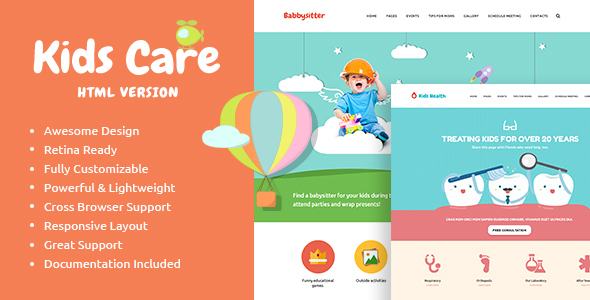
KidsCare Children is a static HTML5 and CSS3 website template built for organisations that work with young children — childcare centres, day care providers, kindergartens, nurseries, preschools, paediatric departments and children’s education or activity businesses. It ships with a large set of pre-built pages, a responsive layout and bundled HTML documentation, and it is sold on ThemeForest for $17 under the axiomthemes label. It suits buyers who want a ready-made front end they can hand to a developer or fill with their own content, and it is a poor fit for anyone expecting a WordPress theme, a CMS-driven site or ongoing feature updates.
What the KidsCare Children template actually gives you
The core proposition is breadth of pre-made pages. Rather than a single demo homepage with a handful of subpages, the template includes a wide spread of layouts covering the typical structure of a childcare or education website: landing pages, service or programme descriptions, staff or team sections, galleries, pricing or fee tables, contact and enquiry forms, and the usual supporting pages. For a small centre with no design budget, that spread matters more than any single feature, because it removes the need to invent a page structure from scratch.
The markup is hand-written HTML5 with CSS3 styling, which has two practical consequences. First, the pages are lightweight — there is no CMS layer, no database queries and no plugin overhead, so a static host or a cheap shared plan is sufficient. Second, search engines can crawl a clean semantic structure without the rendering problems that sometimes affect heavier page builders. The vendor explicitly describes the template as optimised for search engines, and the underlying markup supports that claim, though no specific SEO features beyond clean HTML are documented.
Responsiveness is handled through a fluid layout rather than a fixed-width design with a separate mobile stylesheet. In practice this means the same set of pages adapts across desktop, tablet and phone widths, which is the minimum expected of any template sold in this category — parents researching a nursery are overwhelmingly doing so on a phone.
The vendor also emphasises consistency across pages, and this is worth taking seriously. Templates assembled from disparate demo pages often drift in typography, spacing and button styling once a buyer starts editing. KidsCare’s pages share a common component set, so swapping colours, fonts or imagery propagates predictably. Customisation is done by editing the CSS and the HTML directly; there is no visual options panel.
Finally, the download includes HTML documentation covering installation and configuration. It is written for someone comfortable opening a code editor, not for a non-technical owner.
Where the KidsCare Children template fits, and where it does not
The strongest fit is a single-location childcare business, nursery or kindergarten that needs a brochure-style web presence: a handful of pages describing the setting, the staff, the daily routine, fees and how to get in touch. A freelance developer or small agency building that kind of site on a tight budget can use KidsCare Children as a starting point and cut the front-end build time considerably.
It also works for adjacent organisations with similar content needs — a children’s art and craft school, a tutoring or training centre, a primary school, or a paediatric clinic’s informational pages. These all share the same structural requirements: trust signals, programme descriptions, staff credentials and a clear contact path.
There is a second, less obvious use case: prototyping. An agency pitching to a childcare client can assemble a convincing mock-up in an afternoon and use it to agree a direction before committing to a bespoke build.
Where it is the wrong choice is equally clear. Anyone who needs to publish content regularly — news posts, blog articles, event listings, staff updates — should not buy this. There is no admin interface, no content model and no editorial workflow. Every text change means editing HTML and re-uploading files. A centre that intends to post weekly updates will find that constraint intolerable within a month, and a WordPress or other CMS-based theme would serve far better. The same applies to anyone needing multi-language support, user accounts, booking systems or e-commerce for fee payments; none of these are part of the package.
Strengths and limitations of this children’s site template
Strengths
- A genuinely broad set of pre-made pages, which is the main reason to buy a template of this type rather than starting from a blank stylesheet.
- Clean, valid HTML5 and CSS3 markup that keeps page weight low and hosting requirements minimal.
- Consistent component styling across the page set, so global changes to colour and typography behave predictably.
- Responsive layout suited to the mobile-first way parents actually search for childcare.
- Semantic structure that gives search engines something clean to index.
- Bundled HTML documentation covering setup and configuration.
- Low entry price at $17, with 303 sales recorded on ThemeForest, which indicates a reasonable number of buyers have taken it on.
- Written by axiomthemes, an established ThemeForest author.
Limitations
- The last vendor update was January 2016. The template has not been refreshed in the years since, so it will not reflect current design conventions, and any browser quirks discovered after that date remain unaddressed.
- It is a static HTML template, not a CMS theme. There is no admin panel, no database and no way for a non-technical staff member to edit content.
- Customisation requires direct editing of HTML and CSS. Buyers without front-end skills will need to hire someone, which changes the real cost of the project.
- No stated support for page builders, JavaScript frameworks or modern build tooling such as a Sass pipeline or bundler.
- The documentation is HTML-based and aimed at developers; the vendor does not state that any video walkthroughs or extended support resources are included.
- Because the demo pages date from 2016, image assets and iconography may look dated and will likely need replacing.
- No accessibility conformance is claimed anywhere in the listing, so buyers with WCAG obligations should audit the markup themselves rather than assume compliance.
How it compares with the wider category
Templates for children’s and childcare websites broadly fall into three groups: static HTML templates like this one, CMS themes (most commonly WordPress), and site builders with hosted infrastructure. KidsCare Children sits firmly in the first group, and that placement determines everything about how it compares.
Against CMS-based alternatives, the trade-off is control versus convenience. A static template gives faster load times, simpler hosting, fewer security surfaces and no plugin maintenance. A CMS theme gives non-technical editing, extensibility and a plugin ecosystem. For a five-page brochure site that changes twice a year, static wins on cost and simplicity. For anything that needs regular publishing, the CMS route is the only sensible option, and no amount of markup quality compensates for the missing admin interface.
Against site builders, the difference is ownership and portability. A builder locks the site into a proprietary platform; a static template produces files that can be hosted anywhere and handed to any developer. That portability is a real advantage for agencies that want to avoid platform lock-in for their clients.
Within the static HTML group specifically, KidsCare Children competes mainly on the number and variety of pre-made pages and on the tidiness of its markup. Its weakness relative to newer entrants in that group is age. Templates released in the years since typically ship with more modern CSS approaches, better accessibility defaults and more current visual design. Buyers comparing on design currency alone will likely find fresher options; buyers comparing on price and page count will find this one competitive.
Frequently Asked Questions
Is KidsCare a WordPress theme or an HTML template?
It is a static HTML5 and CSS3 template, not a WordPress theme. There is no PHP, no database and no admin dashboard. Content is edited by opening the HTML files directly and changing the markup, then uploading the files to a web host. Anyone expecting to log into a CMS and edit pages through a browser will be disappointed.
Can a non-developer build a website with this template?
Only with difficulty. The template requires comfort with HTML and CSS to change text, swap images, adjust colours and add or remove page sections. A technically confident business owner can manage it; most others will need to hire a front-end developer. That labour cost should be factored in alongside the $17 purchase price when assessing total project cost.
Is the KidsCare Children template still updated and supported?
The vendor’s most recent update was in January 2016, and the listing shows version 1.0 as the only release. Buyers should treat it as a finished, frozen product rather than one receiving ongoing maintenance. Any bug fixes or compatibility work needed after purchase become the buyer’s responsibility, not the author’s.
What kinds of websites is this template designed for?
It targets organisations built around young children: childcare centres, day care providers, preschools, kindergartens, nurseries, children’s art and craft schools, education and training centres, primary schools and paediatric departments. The page structures suit brochure-style sites that present programmes, staff, facilities and contact details rather than sites that publish content frequently.
Verdict on the KidsCare Children template
Buy KidsCare Children if the project is a small, largely static brochure site for a childcare or early-years education business, the budget is tight, and someone involved is comfortable editing HTML and CSS. The page count, clean markup and low price make it a reasonable starting point, and the 303 recorded sales suggest it has found a workable audience.
Do not buy it if the site needs regular content updates, a blog, event listings, multi-language support, bookings or payments, or if the person maintaining it is not technical. The absence of a CMS layer is a hard constraint, not an inconvenience.
The 2016 last-updated date is the deciding factor for many buyers. Treat the purchase as acquiring a static design foundation to be modernised, not a current, maintained product. Priced at $17, that is a defensible proposition for the right project — and a frustrating one for the wrong project.