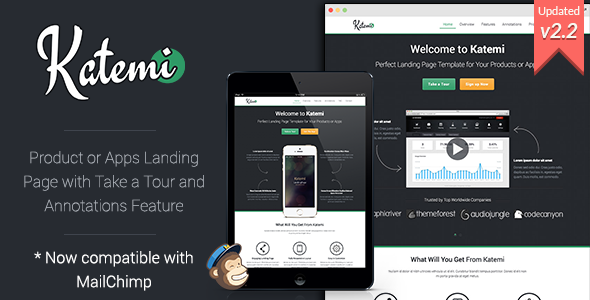
Katemi is a static HTML landing page template sold on ThemeForest for $19, aimed at startups and small teams that need a single promotional page for a product, service or mobile app. It is built on Bootstrap 3 and ships with two features that are unusual for a template at this price point: a guided “Take a Tour” overlay and clickable image annotations. Anyone comfortable editing raw HTML and CSS should consider it; anyone expecting a WordPress theme or a drag-and-drop builder should not.
The template has been on sale since 2013 and carries 382 sales, which is a modest but not negligible figure for a niche landing page product. It was written by the developer trading as xwisnux and last received an update in June 2015.
What Katemi Landing Pages Actually Include
The core of the package is a one-page scrolling layout. Sections stack vertically and are reached either by scrolling or through the navigation, which is the standard structure for product marketing pages and requires no configuration beyond editing the markup. The layout was designed with the area above the fold treated as a priority, so the headline, supporting copy and primary action sit within the first viewport on a typical desktop screen.
The two features that distinguish Katemi Landing Pages from the mass of generic Bootstrap templates are the tour and annotation systems. The Take a Tour plugin walks a visitor through numbered steps overlaid on the page, which suits software products where the value is easier to demonstrate than to describe. Image annotations let a screenshot carry labelled hotspots that reveal explanatory text on click or hover, so a product screenshot can point out individual interface elements without a separate feature list. Both are presentation tools rather than functional integrations, but they change what the page can communicate.
Forms are functional rather than decorative. The contact and subscribe forms include client-side validation, and the subscribe form is wired to MailChimp, so an email address captured on the page can be pushed into an existing list. The vendor does not state which MailChimp API version the integration targets, and given the 2015 update date, that is a detail worth verifying before relying on it.
The supporting elements are conventional but complete: a FlexSlider carousel used for testimonials and general content, a toggle-based FAQ accordion, icon fonts, and prettyPhoto for lightbox images and embedded video. CSS animations and hover states are defined for the interactive elements. The markup is HTML5 with CSS3, and the vendor describes the code as mobile-first and structured for search engines — meaning semantic headings and a logical document order rather than any on-page SEO tooling.
Where Katemi Fits and Where It Does Not
The strongest fit is a software or app launch page where the product needs visual explanation. A SaaS tool, a mobile app, a browser extension or a developer library all benefit from the tour and annotation features, because those formats let a visitor understand a workflow without reading a wall of text. A freelancer building a fixed-scope marketing page for a client is also a reasonable buyer: the price is low enough that the template is cheaper than the hours it would take to build the same structure from scratch.
It also works for a single-product e-commerce brand that wants a focused page separate from a full storefront, provided the actual transaction happens elsewhere. Katemi is a presentation layer, not a commerce system.
The wrong choice is any project that needs a content management system. Katemi is an HTML template, not a WordPress theme, and the vendor states this explicitly in the listing. A site owner who wants to publish blog posts, manage multiple pages through an admin dashboard, or hand editing duties to a non-technical colleague will find this template actively obstructive. The same applies to anyone who needs a multi-page site: Katemi is a one-page layout, and stretching it across several pages means building the additional structure manually. Projects that require server-side functionality — user accounts, checkout, dashboards — are also outside its scope.
Strengths and Limitations
Strengths
- The tour and annotation features give the page a way to demonstrate a product visually, which most templates in this price bracket do not offer at all.
- Bootstrap 3 provides a familiar grid and class system, so anyone with prior Bootstrap experience can restyle the template without learning a proprietary framework.
- Forms include validation and the subscribe form connects to MailChimp, removing two small but fiddly build tasks.
- Semantic HTML5 markup and a sensible heading hierarchy give a clean starting point for on-page SEO work.
- At $19 the cost is low relative to the hours saved on layout, sliders, lightboxes and form handling.
- A documented update history exists, including a Bootstrap version bump and a prettyPhoto security update, which indicates the developer maintained the product during its active period.
Limitations
- The last update was in June 2015. The template runs Bootstrap 3.3.5, which is several major versions behind current Bootstrap, and no newer release has been published since.
- There is no page builder, no visual editor and no admin interface. Every text change, image swap and colour adjustment happens in the source files.
- Because it is a static template, there is no CMS, no database and no plugin ecosystem. Adding dynamic functionality means writing it or integrating a third-party script by hand.
- The MailChimp integration is embedded in the template’s own form handling, and the vendor gives no detail on how it behaves if MailChimp changes its API or requires authenticated requests. It should be tested before launch.
- Dependency versions matter here: prettyPhoto and jQuery-era lightbox scripts have known histories, and a buyer should check what the template currently bundles rather than assuming the 2015 security note covers everything.
- No accessibility work is described. Focus management for the tour overlay, keyboard operation of the annotations and contrast ratios are all unaddressed in the listing and would need auditing.
How Katemi Compares to Other Landing Page Options
The landing page category splits roughly into three groups: static HTML templates, CMS themes, and hosted page builders. Katemi Landing Pages sits firmly in the first group, and that placement determines most of the trade-offs.
Against other static HTML templates, Katemi’s differentiator is the tour and annotation pair. Most templates at this price offer a hero section, a features grid, a testimonial slider and a contact form — a structure that is essentially interchangeable between products. Katemi adds two interactive presentation layers on top of that baseline, which is a genuine functional difference rather than a cosmetic one. The trade-off is that the template has not been refreshed since 2015, so a buyer comparing it against a recently released HTML template is choosing between better presentation features and a more current dependency stack.
Against CMS themes, the comparison is not really about quality. A theme gives a non-technical owner the ability to edit content, add pages and install plugins; Katemi gives none of that. A theme also carries its own overhead in hosting, updates and security surface. For a single marketing page that will not change often, the static approach is leaner and faster to deploy. For anything that will grow, the theme wins by default.
Against hosted page builders, the difference is control and cost. Builders remove the need to touch code and usually include hosting, but they lock the page into a subscription and a platform. Katemi is a one-time purchase that produces files the buyer owns outright and can host anywhere. Teams without any HTML capability should not choose it on that basis alone.
Frequently Asked Questions
Can Katemi be installed on WordPress?
No. Katemi is a static HTML template, not a WordPress theme, and the vendor states this directly in the product listing. The HTML files can be edited and then uploaded to any web host, or the markup can be adapted into a custom WordPress theme by a developer, but there is no install-and-activate path through the WordPress dashboard.
What is the Take a Tour feature in Katemi Landing Pages?
It is an overlay system that walks visitors through numbered steps positioned over the page content. Each step highlights a region and displays explanatory text, so a product’s interface or workflow can be demonstrated in sequence rather than described in prose. It is a presentation tool built into the template, not a separate plugin that needs to be purchased.
Does Katemi work with MailChimp out of the box?
The subscribe form is integrated with MailChimp according to the vendor’s update notes, and the form includes validation. However, the listing does not specify which MailChimp API version is targeted or how credentials are configured. Because the last update was in 2015, the integration should be tested against a live MailChimp account before the page goes live.
Is Katemi still maintained?
The most recent update recorded in the listing is dated 29 June 2015, which bumped Bootstrap to 3.3.5, updated prettyPhoto and improved the responsive layout. No release has been published since. The template remains functional as a static HTML product, but buyers should expect to handle dependency updates and browser compatibility themselves.
Verdict
Katemi Landing Pages is worth buying for a specific kind of project: a single promotional page for a software product or app, built by someone who is comfortable in HTML and CSS, where the tour and annotation features will actually be used to demonstrate the product. At $19 with 382 sales behind it, the risk is low and the time saved on layout, sliders and form handling is real.
It is the wrong purchase for anyone who needs a CMS, a visual editor, a multi-page site, or a template with a current dependency stack. The 2015 update date is the single most important fact in the listing, and it should shape expectations more than any feature bullet. Buyers who need ongoing vendor support or regular releases should look at actively maintained alternatives instead.