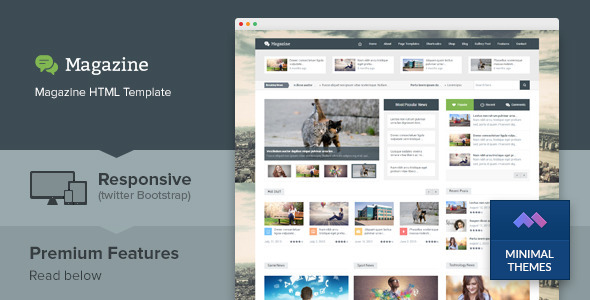
Magazine is a responsive multipurpose HTML template sold on ThemeForest for $19, built by the developer minimalthemes for news, magazine and blog-style publishing sites. It ships with more than 30 ready-made page templates, a Bootstrap grid, an optional shop and cart flow, and a set of custom widgets, and it is aimed at freelancers and small agencies who want a static front-end they can hand off or wire into their own CMS rather than a WordPress theme.
The listing has accumulated 455 sales since its last update in May 2016, which tells a buyer something important before they spend anything: this is a mature, widely downloaded template rather than a new release, and the codebase has not moved with the times. That single fact shapes most of the assessment below.
What the Magazine business template actually gives you
The core value here is breadth of pre-built layouts. The 30-plus templates cover the usual editorial furniture — a homepage, a second homepage variant, archive, single post, contact, full-width and default pages — alongside gallery layouts in two, three and four column configurations. For a Magazine business site that publishes across categories, that spread means most of the structural work is already done before any design decisions are made.
Beyond the editorial pages, the template includes a small commerce path: shop, shop detail, cart, checkout and order pages. This is a static HTML implementation, not a working store. The markup and styling exist so a developer can connect them to a payment processor or an e-commerce back end, but nothing in the package processes a transaction on its own. Buyers who read “ecommerce template” in the tag list and expect a functioning shop will be disappointed.
The utility and component pages are more interesting than they first appear. Accordion, tabs, buttons, headings, tables, columns, dropcaps, blockquotes and warning pages function as a living style guide. A developer extending the template can copy proven markup instead of inventing patterns, which shortens the build on content-heavy sites considerably.
On the interactive side, the template bundles a news ticker, headline news block, slider content areas, a responsive slide menu, a rating system placeholder and social share buttons. It also integrates Flexslider, BXSlider, prettyPhoto, idTabs, jPages, TouchSwipe and simplyscroll — a fairly typical mid-2010s JavaScript stack. Google Fonts and Google Maps are wired in, and the markup is described as HTML5 and CSS3 with semantic, SEO-friendly structure.
Five custom widgets ship with the package: a gallery box, recent posts by category, tabbed content, social media and Twitter updates. The Twitter widget in particular reflects the era — the platform’s API and embed behaviour have changed substantially since 2016, so that component should be treated as decorative rather than functional.
Support and updates are offered for life through the developer’s ticket system. That promise is worth reading literally: updates are free forever, but the last recorded update was 2016, so a buyer should not expect new features or modern browser fixes to arrive on request.
Where a Magazine business template like this fits, and where it does not
The strongest fit is a publisher, blogger or small media operation that wants a fast static site with no database, no CMS overhead and no plugin maintenance. A freelance writer building a personal archive, a niche news site with a few dozen evergreen articles, or a marketing team that needs a landing hub for editorial content can all deploy this quickly. Agencies may also find it useful as a starting scaffold when a client wants a bespoke build and the team would rather not start from an empty stylesheet.
It also suits developers converting a design to a custom CMS. Because the markup is plain HTML with a Bootstrap grid, porting the templates into a templating language or a headless setup is straightforward, and the component pages give a reference for every UI pattern the site will need.
The wrong fit is anyone who wants to publish without touching code. There is no admin panel, no content editor and no database. A site owner who expects to log in and write a post will need to add a CMS, which means either hiring a developer or choosing a CMS theme instead. Similarly, anyone building a storefront should look elsewhere: the shop pages are cosmetic, and retrofitting real commerce onto a 2016 static template is more work than starting from a modern e-commerce theme.
A third poor fit is a project with strict accessibility or performance budgets. The template predates current expectations around Core Web Vitals, lazy loading and WCAG conformance, and nothing in the listing claims compliance with any of them.
Strengths and limitations of the Magazine business template
Strengths
- Thirty-plus page templates cover editorial, gallery, utility and shop layouts, so most structural pages exist before design work starts.
- The component pages — accordion, tabs, tables, buttons, headings — act as a usable internal style guide for anyone extending the build.
- Bootstrap-based responsive grid makes the layout predictable and easy to modify for developers already familiar with the framework.
- Semantic HTML5 markup and an SEO-friendly structure give a reasonable starting point for on-page optimisation.
- At $19 with 455 sales, the price-to-scope ratio is strong for a static template, and the lifetime support ticket system is a genuine inclusion.
- Clean separation between markup and styling means the template can be ported into a custom CMS or headless stack without fighting the framework.
Limitations
- The last vendor update was May 2016. The template has not been refreshed for modern browser behaviour, current CSS features or contemporary performance practices, and buyers should assume no further development.
- The bundled JavaScript libraries — Flexslider, BXSlider, prettyPhoto, idTabs, jPages and others — are the versions current at the time of release and carry the maintenance and security baggage of that period.
- The Twitter updates widget depends on an API integration that has changed substantially since the template shipped; treat it as non-functional.
- The e-commerce pages are static mockups. No cart logic, payment handling or product management is included despite the “ecommerce template” tag.
- Demo imagery is Shutterstock-licensed and replaced with placeholders in the package, so the site will not look like the preview without additional image licensing.
- No accessibility statement, no performance benchmarks and no stated browser support matrix are provided in the listing.
- Documentation depth is not described by the vendor, which is a risk for less experienced buyers.
How it compares with other options in the category
Against modern HTML templates sold on the same marketplace, Magazine competes on scope and price rather than currency. Newer multipurpose templates typically ship with a build toolchain, a Sass or Tailwind setup, current JavaScript frameworks and documented accessibility support. Magazine offers none of that. What it does offer is a large, coherent set of pages at a very low price, and a codebase simple enough that a developer can read the whole thing in an afternoon.
Against CMS themes — WordPress magazine themes in particular — the comparison is about workflow rather than features. A CMS theme gives non-technical editors a publishing interface out of the box; Magazine gives a developer complete control over markup with no runtime overhead. For a content team that publishes daily, the CMS route is almost always the better decision. For a developer building a bespoke front end, the static template removes a layer of abstraction.
Against custom design and build, the trade-off is time versus uniqueness. Magazine will look like a template unless it is restyled, and restyling a 2016 Bootstrap layout has its own costs. The honest framing is that this is a starting point, not a finished product, and its value depends entirely on how much of the structure a buyer would otherwise have to build themselves.
Frequently Asked Questions
Is Magazine a WordPress theme or an HTML template?
It is a static HTML template, not a WordPress theme. The package contains HTML, CSS and JavaScript files that render in a browser without a database or CMS. A WordPress version is not included, and the vendor does not state that one is planned. Converting it to WordPress would require a developer to build a theme around the existing markup.
Can the shop and checkout pages process real payments?
No. The shop, cart, checkout and order pages are static layouts only. They contain the markup and styling for a storefront but no cart logic, payment gateway integration or product database. Using them commercially means connecting them to a back end such as WooCommerce, Shopify or a custom checkout, which is a development project in itself.
Does the template still receive updates and support?
Support is advertised as lifetime through the developer’s ticket system, but the last recorded update was May 2016. Buyers should treat the template as frozen: support tickets may still be answered, but no modernisation, browser fixes or new features should be expected. Anyone needing ongoing maintenance should budget for it separately.
Is the Magazine business template suitable for a high-traffic news site?
It can be, provided a developer handles performance and hosting. The template is lightweight by modern standards because it carries no framework runtime, but it also lacks lazy loading, modern image handling and current performance optimisations. A high-traffic deployment would need auditing, asset optimisation and probably a CDN before launch.
Verdict
Buy Magazine if you are a developer or agency who needs a broad set of editorial page templates at a low price and is comfortable working with a 2016-era Bootstrap codebase. The 30-plus layouts, component style guide and semantic markup make it a reasonable scaffold for a bespoke Magazine business build, and the lifetime support ticket system adds some reassurance. Do not buy it if you need a CMS you can publish from without code, a working storefront, or a template that receives ongoing updates — the shop pages are cosmetic, the JavaScript stack is dated, and the vendor has not shipped a release in years. At $19 the downside is small, but the buyer should go in expecting a starting point rather than a finished site.