Enhancing user experience and providing contextual information without cluttering your interface is a cornerstone of effective web design. The jQuery Tooltips Plugin addresses this need directly, offering developers and designers a lightweight, highly customizable solution for adding elegant tooltips to any element on a page. This plugin transforms simple mouseover interactions into opportunities for guidance, clarification, and engagement, making it an essential asset for anyone building professional websites on platforms like WordPress, Joomla, or custom-coded projects. Its pure CSS-based design and extensive feature set provide a level of polish and performance that stands out in a crowded marketplace.
Key Features
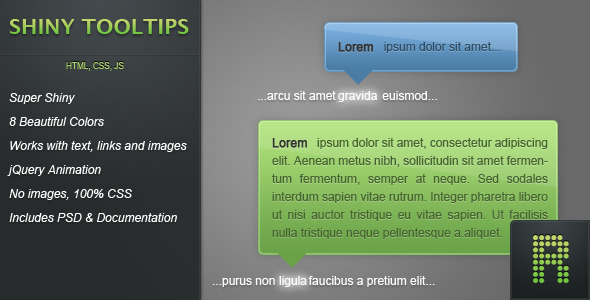
- 8 Pre-Styled Color Schemes: Instantly apply tooltips in green, yellow, orange, red, pink, dark blue, light blue, and white to match any site design or branding requirement.
- Universal Element Support: Attach tooltips seamlessly to text, hyperlinks, images, and buttons, ensuring consistent user feedback across all interactive components.
- Smooth jQuery Animations: Tooltips appear and disappear with refined animations, enhancing the user experience with a professional, polished feel.
- Image-Free, Pure CSS Design: All visual elements, including gradients, shadows, and arrows, are rendered with CSS. This results in faster load times, easier customization via a stylesheet, and perfect scalability on retina displays.
- Comprehensive Documentation & PSD File: The plugin includes detailed documentation with numerous examples for quick implementation, plus a Photoshop (PSD) file for designers who wish to preview or customize the tooltip aesthetics visually.
- HTML5 Valid Data Attributes: Uses the
data-textattribute for tooltip content, ensuring your code passes modern HTML5 validation standards. - Flexible Positioning: Offers options to position tooltips relative to the target element, including a centered positioning feature for optimal layout control.
- Rich Content Support: Tooltips can contain not just plain text, but also formatted text and images, allowing for more informative and visually rich hints.
Who Is This For? Use Cases
The versatility of this jQuery Tooltips plugin makes it a valuable addition to the toolkit of various web professionals. It’s particularly suited for those who prioritize clean code, ease of use, and visual fidelity.
WordPress & CMS Theme Developers
Developers creating themes for ThemeForest or client work can bundle this plugin to offer advanced tooltip functionality out-of-the-box. It’s perfect for adding elegant hints to form fields, dashboard options, or interactive elements within a theme demo, significantly enhancing the perceived value and user-friendliness of the product.
Web Designers and Front-End Developers
For professionals building custom websites, this plugin eliminates the need to code tooltips from scratch. It allows for rapid prototyping and deployment of consistent tooltips across an entire site. Designers will appreciate the included PSD for mocking up interfaces, while developers benefit from the minimal, optimized files that won’t bog down site performance.
eCommerce Store Owners
On product pages, tooltips can be used to clarify sizing charts, shipping policies, or specific product features without navigating away from the page. This reduces customer confusion and can directly lower support requests and cart abandonment rates.
Web Application & SaaS UI Designers
In complex applications, tooltips are indispensable for onboarding new users and explaining interface functionality. This plugin can be used to create a cohesive system of hints and explanations, improving the overall usability and learnability of the software.
Technical Details & Compatibility
This is a standalone JavaScript plugin built on the jQuery library. The core implementation involves including just two minified files in your site’s <head> section: tooltips.min.css and tooltips.min.js. It requires jQuery to be loaded on the page, which is standard for over 70% of all websites.
Browser Compatibility is robust, with specific attention given to legacy systems. The plugin uses CSS3 for modern gradients and shadows but employs IE filters to ensure gradient backgrounds render in Internet Explorer. It has been explicitly tested and fixed for bugs in IE6 and IE7, a level of legacy support that is rare and valuable for projects with broad audience requirements. The changelog also notes compatibility with Chrome 7 and 8, indicating a development history focused on cross-browser consistency. The latest update (version 1.1.0) optimized the code for jQuery 1.7, ensuring efficient performance with modern jQuery versions.
The use of pure CSS for graphics means the tooltips are resolution-independent and will look sharp on any device. While not a mobile-specific touch tooltip, the hover effects translate well to tap interactions on tablets and hybrid devices.
Pros and Cons
Pros
- Exceptional Performance: With only two minified files and no image HTTP requests, the plugin adds negligible overhead to page load times.
- Easy to Customize: The pure CSS styling allows developers to change colors, sizes, and effects by simply editing the stylesheet, without touching JavaScript.
- Strong Legacy Browser Support: Detailed fixes for IE6 and IE7 make this a safe choice for projects that must cater to users on older corporate systems.
- Clean, Valid HTML5 Output: The use of
data-*attributes keeps markup semantic and validation-friendly. - Great Documentation: The inclusion of detailed docs with examples drastically reduces integration time and developer frustration.
Cons
- Dated Codebase: The last update visible in the changelog is from 2012. While the code is stable and functional, it may not leverage the latest JavaScript performance optimizations or CSS features.
- No Native Touch Support: As a hover-based plugin, the interaction model is primarily designed for mouse users. On touch-only mobile devices, tooltips may require additional scripting to trigger on tap.
- Limited Built-in Effects: The plugin focuses on core, reliable functionality. Developers seeking a vast library of extravagant entrance/exit animations might need to extend the CSS themselves.
- jQuery Dependency: For projects moving towards vanilla JavaScript or lighter frameworks, requiring jQuery could be seen as a drawback, though it remains a widely used standard.
Frequently Asked Questions
Is this jQuery Tooltips plugin compatible with the latest version of WordPress?
Yes, absolutely. This is a front-end JavaScript and CSS library. It operates independently of WordPress’s core PHP code. You can enqueue the provided CSS and JS files in your theme’s functions.php file or via a plugin, and it will work seamlessly with any modern WordPress version. Its compatibility is with the user’s browser, not the CMS backend.
Does the plugin include support or updates?
As a digital asset purchased from a marketplace like CodeCanyon, support and updates are typically provided by the author for a defined period (often six months) after purchase. Given the changelog shows activity through 2012, the plugin is considered feature-complete and stable. For critical issues related to newer jQuery versions, checking the item’s comment section on its marketplace page is advised to see if the author or community has provided patches.
Can I use these tooltips on elements generated dynamically by Ajax or JavaScript?
The standard implementation will work on elements present in the initial page load. For dynamically added elements, you would need to re-initialize the tooltip plugin or use event delegation after the new content is injected into the DOM. This is a common pattern in modern web development and is achievable with a small amount of additional jQuery code, as outlined in the plugin’s documentation.
Final Verdict
The jQuery Tooltips Plugin represents a focused, high-quality solution for a common web design need. Its strengths lie in its simplicity, performance, and exceptional cross-browser compatibility, including legacy Internet Explorer versions. The pure CSS approach future-proofs the visuals and makes customization straightforward for any developer. While the codebase is not recently updated, its stability and completeness are evident in the detailed changelog and lack of critical outstanding issues.
For freelancers, agencies, and product developers on platforms like ThemeForest, this plugin offers reliable functionality that enhances projects without introducing bloat. It solves the problem elegantly and gets out of the way. If your requirement is for lightweight, customizable, and professional tooltips that work everywhere, this plugin delivers significant value. Consider integrating it into your next project to improve user guidance and interface polish with minimal development effort.