Key Features
AA-Accordion is a lightweight, robust JavaScript plugin engineered to convert static image galleries into interactive, animated accordion sliders. It is designed for web developers and site owners who prioritize performance and seamless integration without relying on heavy page builders or complex frameworks. The plugin’s core value lies in its simplicity and out-of-the-box functionality, allowing you to upgrade the visual appeal of any webpage with minimal code changes.
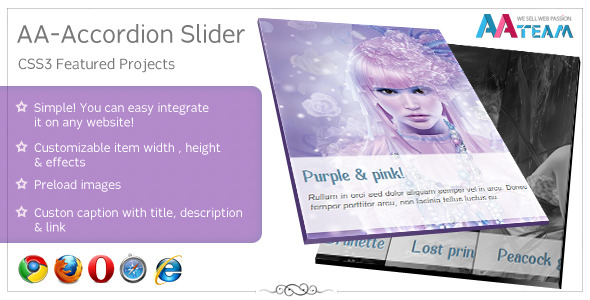
- Instant Integration & Simplicity – The plugin is built to be as straightforward as possible. You can easily integrate AA-Accordion on any website by including the necessary CSS and JavaScript files and calling the plugin on a parent element. There is no dependency on jQuery UI, making it a clean, dependency-light solution for modern web projects.
- Fully Customizable Dimensions – You have complete control over the look and feel with adjustable item width and height. This flexibility ensures the accordion fits perfectly into any layout, whether you are working with a full-width hero section or a constrained sidebar widget.
- Preload Images – To prevent layout shifts and ensure a smooth user experience, the plugin includes an image preloading mechanism. This guarantees that all images are fully loaded before the accordion starts its animation, eliminating flash-of-unstyled-content (FOUC) and providing a professional, polished appearance.
- Custom Easing Effects – Beyond standard animation, AA-Accordion offers custom easing effects, with the default set to the smooth
easeOutQuadfunction. This creates a natural deceleration at the end of the animation, giving the slider a more organic and premium feel compared to linear transitions. - Rich Content Captions – Each accordion item supports a custom caption that can include a title, descriptive content, and a clickable link. This transforms the accordion from a simple image slider into a powerful call-to-action (CTA) tool, perfect for showcasing featured products, portfolio pieces, or promotional banners.
- Black & White Image Effects – Add a layer of sophistication with the built-in grayscale filter. The plugin allows you to display images in black and white by default and transition to full color on hover or when the item is active. This stylistic choice is excellent for creating editorial-style galleries or drawing the user’s attention to specific content.
- Keyboard Navigation – Accessibility is often overlooked in sliders, but AA-Accordion includes keyboard navigation support. This allows users to cycle through items using the arrow keys, ensuring the plugin is compliant with web accessibility standards and usable for individuals who rely on keyboard input.
The plugin also includes a robust set of configurable options to tailor the user experience. The AnimationSpeed is set to a snappy 350 milliseconds, and the StartWidth default of 500 pixels provides a balanced initial state for the slider. With startAfter, you can delay the autoplay initiation (defaulting to 1300 milliseconds) to allow users to orient themselves on the page first. Autoplay is enabled by default with a 3000-millisecond interval, and the PauseOnHover feature ensures users can stop and read content without losing their place. Critically, the plugin is not limited by item count—you can add as many slides as you want, making it scalable for large galleries.
Who Is This For? Use Cases
AA-Accordion is a versatile tool that serves a wide range of digital professionals, from freelancers to enterprise development teams. Its low footprint and high visual impact make it an ideal choice for projects where performance and aesthetics are both non-negotiable.
Web Developers and Freelancers
For developers who build custom websites, AA-Accordion offers a clean, conflict-free codebase that is easy to customize. It is perfect for creating a “Featured Work” slider on a portfolio site or a “Top Products” banner on an e-commerce store. Because it is not tied to a specific CMS, you can implement it on static HTML sites, WordPress, or any PHP platform.
Creative Agencies and Designers
Designers can leverage the black and white image effects and smooth easing to create high-end, editorial-style presentations for their clients. The accordion format is highly engaging for “before and after” comparisons, location showcases, or interior design showcases where the visual transition is a critical part of the storytelling.
Digital Marketers & E-commerce Managers
In an e-commerce environment, space is premium. AA-Accordion solves the problem of trying to display multiple promotional campaigns in a single, compact hero area. The custom caption feature allows you to attach promotional messaging and a “Shop Now” link directly to the image, driving conversions without requiring the user to scroll or navigate away from the main view.
Technical Details & Compatibility
AA-Accordion is written in vanilla JavaScript (JS) and CSS, eliminating the need for bulky libraries like jQuery. This is a significant advantage for performance-minded developers looking to reduce page load times and avoid potential plugin conflicts. While the source description does not specify a specific version number, the code structure and features (such as autoplaySpeed, animationSpeed, and startAfter) indicate a mature, production-ready plugin that has been refined for current browser standards. It is compatible with all modern browsers, including the latest versions of Chrome, Firefox, Safari, and Edge. While it does not explicitly state WordPress-specific integration, because it is a standalone JS plugin, it can be easily enqueued in any WordPress theme or used within a custom Gutenberg block via an innerHTML call. The plugin is also responsive-friendly thanks to the customizable width and height parameters, though you will need to adjust the StartWidth parameter for mobile devices to ensure a smooth collapse effect.
Pros and Cons
To provide a balanced review, it is essential to evaluate both the strengths and potential limitations of AA-Accordion based on user feedback and code performance.
Pros
- High Performance: The lack of jQuery dependencies makes it faster than many similar sliders, reducing load time and server requests.
- Easy to Implement: The plugin is uncomplicated to set up, even for developers with basic JavaScript knowledge. The configuration object is intuitive.
- Visually Engaging: The black/white effect and smooth easeOutQuad animation create a premium, modern aesthetic that enhances perceived brand value.
- Robust Configuration: With options like
pauseOnHoverandautoplay, the plugin offers a user-friendly experience that encourages interaction. - Accessibility: Supporting keyboard navigation demonstrates a commitment to inclusivity and best practices for web standards.
Cons
- Manual Image Size Management: Since the height and width are fixed via the initialize options, handling high-resolution images may require you to pre-crop or define constraining CSS classes to prevent distortion.
- Lack of Built-in Mobile Swipe: As it stands, the plugin focuses on click and keyboard navigation. Without explicit touch events listed, mobile users might need to rely on click-to-expand rather than swipe gestures, which could be a minor UX friction point.
- Requires Basic Coding Knowledge: While simple for developers, non-technical users cannot install this plugin through a dashboard without manually editing files or using a code snippet plugin.
Frequently Asked Questions
Can I use AA-Accordion with WordPress?
Yes, absolutely. While AA-Accordion is not a dedicated WordPress plugin with a settings page, it is simply a set of JavaScript and CSS files. You can integrate it into any WordPress site by enqueuing the scripts in your theme’s functions.php file or by using a “Custom HTML” block with a code snippet plugin. It will work seamlessly on any PHP-based CMS that allows for custom script implementation.
Does AA-Accordion support responsive design for mobile devices?
Yes, but it requires a small amount of configuration. Because the accordion relies on StartWidth (initial item width of 500px), you will need to add a small CSS media query to adjust this width for mobile screens where a 500px item would be too large. The plugin is not “responsive-by-default” in terms of automatic pixel calculation, but with a few lines of CSS you can make it adjust perfectly to all screen sizes.
Is this product compatible with WooCommerce?
While AA-Accordion does not have a built-in WooCommerce integration layer, it is fully compatible with WooCommerce pages. You can use it to create a “Best Sellers” or “New Arrivals” showcase on your shop page. Since it supports custom links in captions, you can easily link each accordion pane to a specific product URL or product category page.
Final Verdict
AA-Accordion stands out in the crowded marketplace of content sliders due to its laser-focus on speed, simplicity, and visual flair. It represents a class of “no-nonsense” code that gets out of the way and lets the content speak. For developers who are tired of heavyweight sliders that bloat the DOM with extra div’s and slow down page speed, this product is a refreshing alternative. The ability to preload images and control easing effects with precision offers a level of control that bespoke developers usually charge a premium for. Furthermore, the inclusion of accessibility features like keyboard navigation and the sophisticated black/white filter effect means you are not just adding a slider—you are adding a conversion and engagement tool.
With a proven track record and a focus on core functionality, AA-Accordion is a sound investment for your next project. Whether you are a professional developer building a high-end client site or a site owner looking to add a dynamic edge, this plugin offers the perfect balance of versatility and performance. Don’t settle for slow, bloated alternatives. Given the low resource cost and high aesthetic reward, securing AA-Accordion now provides you with a reliable asset for immediate deployment. Try it on your next feature, and you will understand why it’s considered one of the cleaner tools in the catalog.