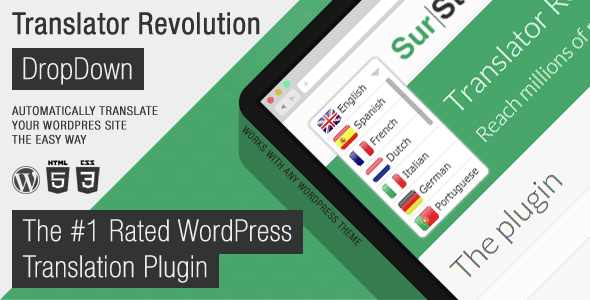
Multilingual websites are no longer a luxury; they are a necessity for reaching global audiences and expanding market reach. However, the traditional route of manually translating every page, post, and widget is a logistical nightmare that drains time and resources. The Ajax Translator Revolution DropDown WP Plugin by SurStudio offers a pragmatic solution. This tool is designed for WordPress site owners who need a fully functional, multi-language version of their site without the technical headaches associated with coding or the tedious process of manual translation. It provides an automated, efficient path to making your content accessible to a worldwide audience, allowing you to focus on growing your business rather than managing language files.
Key Features
The Ajax Translator Revolution DropDown WP Plugin is packed with features that prioritize ease of use and broad compatibility. Here are the core elements that set it apart from standard translation tools:
- Rapid One-Minute Setup: The plugin is engineered for speed. You can have the translation system running and your site converted into multiple languages within a single minute, eliminating the steep learning curve associated with complex multilingual setups.
- Automatic Translation Engine: Say goodbye to manual copying and pasting. This plugin leverages automatic translation services to convert your content instantly, saving countless hours of manual work.
- Universal Content Compatibility: Unlike plugins that only translate standard posts and pages, this tool handles content from sliders, grids, pop-ups, calendars, forms, and portfolios. It does not require all sources to be built strictly to the WordPress Codex for internationalization, ensuring that virtually everything on your site gets translated.
- Extensive Language Library: With support for 103 languages, you can reach audiences across the globe, from major languages like Spanish and Mandarin to niche dialects like Frisian and Yoruba.
- Granular Control (93 Settings): The plugin offers a high level of customization. You can exclude specific pages, posts, or categories, or precisely select which sections of a web page to translate.
- Flexible Display Options: Choose to show language flags and names, only flags, or only names. You can also adjust the display based on the device’s screen resolution to ensure a responsive design.
- Translation Memory & Editing: You are not locked into machine output. The plugin allows you to edit cached translations and manage them through an integrated admin panel, giving you control over the final quality.
- Advanced Developer Tools: For those who need more control, it includes options to define custom JavaScript callbacks, specify concurrent calls to balance server load, and utilize a template system to customize the HTML structure.
Who Is This For? Use Cases
The Ajax Translator Revolution DropDown WP Plugin is built for a diverse range of users, from beginners to advanced developers. Its design philosophy focuses on removing barriers, making it a versatile asset for any WordPress project.
For E-commerce and Retail Stores
If you run a WooCommerce store or any online shop, language barriers are direct obstacles to sales. This plugin allows international customers to browse your products in their native tongue. Because it can translate content from plugins and widgets, it ensures that product descriptions, cart messages, and checkout buttons are all localized, which significantly boosts conversion rates and reduces cart abandonment among non-English speakers.
For Agencies and Web Developers
When managing multiple client sites, efficiency is key. This plugin allows you to deliver multilingual capabilities to clients without needing to manually code translation files. The ability to exclude specific sections or pages is vital for maintaining brand consistency. For instance, you might want to keep your legal pages in English only, or you might need to translate your portfolio but not your blog. The granular control makes it a professional-grade tool for client work.
For Content Creators and Bloggers
Expanding your readership globally is a primary goal for bloggers. This plugin breaks down the language barrier, allowing your content to be read by a global audience. The automatic translation feature means that even if you publish new posts frequently, they will be instantly available in all 103 supported languages without any extra effort on your part.
For Non-Profit and Community Sites
Organizations that serve diverse communities or need to disseminate information across different regions can use this plugin to ensure their message is accessible to everyone. Whether it is public safety information, community event calendars, or educational resources, the ability to offer content in multiple languages is critical for inclusivity and reach.
Technical Details & Compatibility
Understanding the technical backbone of a plugin is crucial before making a purchase. The Ajax Translator Revolution DropDown WP Plugin is designed to be robust yet flexible.
- Integration: The plugin integrates directly with the WordPress Admin System, featuring tabbed panels and organized settings with integrated help.
- Translation Services: It supports the SurStudio Translate API, which acts as a gateway to Google Translate and is free for buyers for life. For those who prefer to use their own keys, it also supports the paid Google Translate API.
- Placement: By default, it functions as a widget. If your theme lacks a suitable widget area, the custom positioning settings allow you to place the language dropdown anywhere on the page.
- User Experience: The plugin remembers the visitor’s selected language, ensuring a seamless browsing experience as they navigate through your site.
- Data Management: Includes import/export functions and a panel for online backups of settings and cached translations, protecting your configuration.
- Recent Updates: The developer consistently improves the product. Recent updates have added 12 new languages, a user-role permission system for editing translations, and options to load arbitrary JavaScript before initialization.
Pros and Cons
To provide a balanced view, here is a breakdown of the strengths and potential limitations of this plugin.
Pros
- Time Efficiency: The one-minute setup and automatic translation process are major time-savers compared to manual translation methods.
- Comprehensive Coverage: The ability to translate dynamic elements like sliders and pop-ups is a distinct advantage over many competitors that only handle standard posts and pages.
- Value for Money: At $25.00, the plugin is competitively priced, especially considering the lifetime free access to the SurStudio Translate API.
- High Customizability: With 93 settings, users have fine-grained control over the translation process, display, and exclusions.
- Proven Track Record: With over 5,181 sales, the plugin has a substantial user base, indicating reliability and community trust.
Cons
- Automatic Translation Quality: While the plugin automates the process, the initial output is machine-generated. You may need to manually edit cached translations for nuance and brand-specific terminology.
- Dependency on External APIs: The automatic translation relies on external services. While the SurStudio API is free for buyers, its speed and uptime are dependent on a third-party service.
- Potential Resource Usage: Translating large pages with many elements can consume browser resources, though the plugin does offer settings to control the number of concurrent calls to mitigate this.
Frequently Asked Questions
Is the Ajax Translator Revolution DropDown WP Plugin compatible with WooCommerce?
Yes. The plugin is designed to translate content from various sources, including plugins. Since it does not strictly require all sources to follow the WordPress Codex for internationalization, it can translate product pages, cart messages, and other WooCommerce-generated content without requiring additional configuration, making it a practical solution for e-commerce sites.
Does the plugin work with any WordPress theme?
Yes, it is theme-agnostic. The plugin outputs a standard widget by default, which any WordPress theme should support. If your theme does not have a widget area in your desired location, the plugin includes custom positioning settings that allow you to place the translator dropdown anywhere on your site using a shortcode or PHP function.
Do I need to pay for a separate translation API key?
No, you do not need to pay to get started. The plugin includes access to the SurStudio Translate API, which is a gateway to Google Translate and is provided free for buyers for life. This allows you to use the plugin’s full functionality without incurring additional costs. Alternatively, if you prefer, you can connect your own paid Google Translate API account.
Final Verdict
The Ajax Translator Revolution DropDown WP Plugin stands out as a powerful and practical solution for WordPress users seeking to go multilingual. Its primary strength lies in its ability to automate a traditionally complex and time-consuming process. The fact that it can translate dynamic content—which often breaks other translation plugins—makes it a reliable choice for modern websites built with page builders and sliders. With 5,181 sales, SurStudio has demonstrated a strong track record and commitment to customer satisfaction, backed by a support system that prioritizes direct and timely assistance. The inclusion of the free SurStudio Translate API further sweetens the deal, offering significant value at the $25.00 price point.
If you are looking to expand your website’s reach and break down language barriers without the technical hassle, this plugin offers a compelling, cost-effective path forward. It bridges the gap between the need for global reach and the practical constraints of time and technical skill. For site owners ready to tap into international markets, the Ajax Translator Revolution DropDown WP Plugin is a smart investment that delivers immediate results.