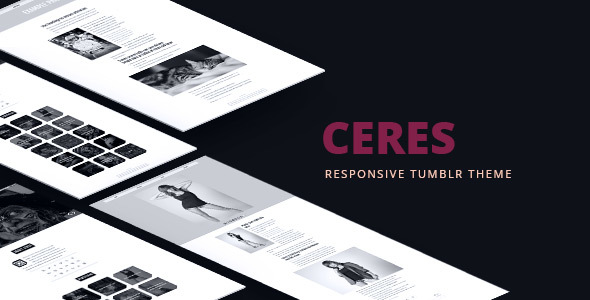
Ceres Blogging is a Tumblr theme sold on ThemeForest for $24, built by the developer adraft to turn a standard Tumblr blog into a visual portfolio. It supports four post types — Photo, Photoset, Text and Video — and layers on a slideshow, an optional infinite scroll, a filterable portfolio grid and more than 80 customisation settings. It suits photographers, illustrators and designers who want a gallery-led presence on Tumblr without writing code, and it is a poor fit for anyone who needs audio posts, long-form editorial layouts or a platform they control outright.
The theme has been on sale since 2013 and last received an update in September 2016, which is the single most important fact about it. That age shapes everything below: what it does well, what it cannot do, and who should still consider it.
What Ceres Blogging actually gives a Tumblr user
The core proposition is a portfolio layer that Tumblr does not provide out of the box. Tumblr’s native themes render posts as a chronological stream; Ceres adds a separate portfolio section, reachable from the main navigation, that presents selected work as a grid of thumbnails. A setting added in version 1.12 lets that section be hidden on the home page only, so the portfolio can live on its own page while the blog stays clean.
Above the portfolio sits a full-width slideshow supporting up to six slides, each with its own description text and outbound link. That is enough for a handful of hero images or featured projects, and the vendor added an option to remove the slideshow arrows for a cleaner look. The slideshow is the first thing a visitor sees, so it functions as the theme’s de facto landing page.
Post presentation is deliberately narrow. Photo and Photoset posts get thumbnails that are cropped and centred, with an option to display images at full size inside the caption area. Text and Video posts are supported, and version 1.10 added thumbnails to Text posts and improved video rendering. Anything outside those four types — audio, quotes, links, chat — is not styled, which matters because Tumblr users routinely publish those formats.
Customisation is handled through theme options rather than a child theme or CSS edits. The vendor counts over 80 settings, covering custom colours, Google Fonts, an optional transparent navigation bar, optional logo image, removal of dividers, removal of the avatar and RSS link, centring of description text, and a choice of five preloaders. There are up to eight categories and up to twenty social profile slots, plus social sharing buttons on posts and Disqus for comments. Google Analytics can be wired in from the options panel.
Two smaller pieces round out the package. An “Ask” contact form gives visitors a way to make contact without leaving Tumblr, and custom pages let the owner build standalone pages such as an about or services page. Optional infinite scrolling loads further posts as the visitor descends, which suits image-heavy streams but removes the pagination landmarks some visitors rely on.
The download includes the theme files, a PSD file for the design, and documentation. The vendor states that the demo photography is not included, so a buyer needs their own imagery before the theme looks like the preview.
Where Ceres Blogging fits, and where it does not
The clearest fit is a working photographer or visual artist who already has a Tumblr audience and wants the blog to read as a portfolio rather than a diary. The slideshow-plus-grid combination does the job of a lightweight portfolio site while keeping Tumblr’s social plumbing — reblogs, likes, follows — intact. Freelance illustrators and motion designers posting video reels fall into the same bracket, since Video is one of the four supported types.
A second fit is a side project where budget and setup time matter more than longevity. At $24 with documented options and no coding required, Ceres is a cheap way to get a presentable portfolio online in an afternoon. Someone migrating a body of work from a defunct personal site into Tumblr could use it as the destination theme.
The wrong choice is any project where the blog itself is the product. Writers, podcasters and publications need post formats Ceres does not style, and they need reading typography that a gallery-first theme does not prioritise. Anyone building a commercial site with SEO obligations, structured data or accessibility requirements should look elsewhere: Tumblr themes of this vintage rarely ship semantic markup, and the vendor does not document accessibility conformance. Finally, anyone who needs ongoing support or compatibility with Tumblr’s current feature set should treat a 2016 last-update date as a warning rather than a footnote.
Strengths and limitations of this Tumblr portfolio theme
Strengths
- The portfolio grid and six-slide slideshow together produce a genuinely gallery-led homepage, which is more than most Tumblr themes attempt.
- Roughly 80 theme options mean most visual changes happen without touching code — colours, fonts, navigation transparency, dividers, avatars and preloaders are all switchable.
- Disqus, Google Analytics, Google Fonts and social sharing are integrated rather than left as manual additions.
- The PSD file and written documentation give a buyer a starting point for further customisation.
- 370 sales and a long changelog from 2013 to 2016 indicate the theme was actively maintained through its peak and is not an untested one-off.
Limitations
- Only Photo, Photoset, Text and Video post types are styled. Audio, quote, link and chat posts will not match the theme’s design.
- The last vendor update was September 2016. Tumblr’s platform and its API have changed considerably since, and the vendor does not state current compatibility.
- Infinite scrolling is all-or-nothing in the options; there is no documented way to keep pagination for visitors who prefer it.
- Category and social profile counts are capped at eight and twenty respectively, which is generous for a personal blog but restrictive for anything larger.
- The demo images are licensed to a third-party photographer and are not included, so the preview overstates how the theme looks with average content.
- No accessibility features, schema markup or performance benchmarks are documented by the vendor.
How Ceres Blogging compares with the wider Tumblr theme market
Tumblr themes broadly fall into three groups: free themes from Tumblr’s own directory, premium multipurpose themes, and niche portfolio themes like this one. Free themes cost nothing and are usually updated alongside platform changes, but they rarely include a portfolio grid or a slideshow with per-slide links. Premium multipurpose themes offer far more post-format coverage and layout variety, and their developers tend to keep them current — at the cost of a steeper options panel and a design that has to serve many use cases at once.
Ceres sits in the niche group and competes on focus. It does one thing — image-led portfolio presentation on Tumblr — with more polish than a free theme and less breadth than a multipurpose one. The trade-off is maintenance: a niche theme from 2016 has no obvious successor and no stated update path, whereas a multipurpose theme bought today is more likely to still be supported next year. Buyers weighing the two should decide whether they are optimising for the next six months or the next three years.
Frequently Asked Questions
Is Ceres Blogging still compatible with Tumblr in its current form?
The vendor does not state current compatibility, and the last update was September 2016. Tumblr has changed its post editor, API and dashboard considerably since then, so some features may behave differently or not at all. Buyers should test on a live Tumblr blog before committing, and should not assume the vendor will patch issues.
Which Tumblr post types does this theme support?
Four: Photo, Photoset, Text and Video. Those are the only formats the theme styles, so audio, quote, link and chat posts will render with default or broken styling. Anyone whose blog relies on those formats should either avoid the theme or accept that a portion of their archive will look inconsistent with the rest.
Do I need to know how to code to customise Ceres Blogging?
No. Customisation runs through roughly 80 theme options covering colours, Google Fonts, navigation transparency, dividers, avatars, preloaders and the slideshow. A PSD file and documentation are included for anyone who wants to go further. Editing the underlying theme files is possible but not required for the documented settings.
Are the images in the Ceres demo included with the purchase?
No. The vendor states plainly that the demo images are not part of the package and credits photographer Piotr Zawistowski for them. Buyers need to supply their own photography or licensed imagery. Until they do, the theme will not resemble the preview, since the design leans heavily on large, high-quality images.
Verdict on Ceres Blogging
Buy Ceres Blogging if the goal is a cheap, attractive Tumblr portfolio for photography or video work, the four supported post types cover the content, and there is no expectation of vendor support or future updates. The slideshow, portfolio grid and options panel deliver real value at $24, and 370 sales suggest it found its audience.
Do not buy it if the blog needs audio or link posts, if accessibility and structured data matter, if the site is commercial and long-lived, or if a broken feature six months from now would be a serious problem. In those cases a currently maintained multipurpose theme, or moving off Tumblr entirely, is the more sensible route. The honest summary is that Ceres is a well-executed theme from a specific era of Tumblr, and it should be bought with that era in mind.