When a user lands on your site, the navigation bar is often the first interactive element they encounter. A subpar menu that breaks on mobile or fails to engage the visitor can instantly undermine your brand’s credibility and increase bounce rates. Enter Circles, a responsive CSS menu that transforms a mundane navigation structure into an engaging, visual experience. Designed for modern web developers and designers who demand aesthetics without sacrificing performance, Circles uses pure CSS transitions and a unique circular layout to create a menu that is both functional and memorable. This tool is not just about listing links; it is about guiding your visitors through your content with an intuitive, eye-catching interface that works seamlessly across all devices.
Unlike traditional dropdown menus that can feel cluttered and outdated, Circles offers a fresh approach by prioritizing visual hierarchy and user interaction. Whether you are building a portfolio, a corporate landing page, or a creative agency site, this menu provides the perfect balance of style and substance. It leverages the power of CSS animations to deliver smooth transitions, hover effects, and a polished look that feels premium without the bloat of heavy JavaScript libraries. For developers who value clean code and designers who crave visual flair, Circles represents a smart, conversion-friendly investment.
Key Features
The strength of Circles lies in its carefully curated set of features designed to provide maximum flexibility with minimal effort. Below are the standout capabilities that make this menu a powerful addition to any web project.
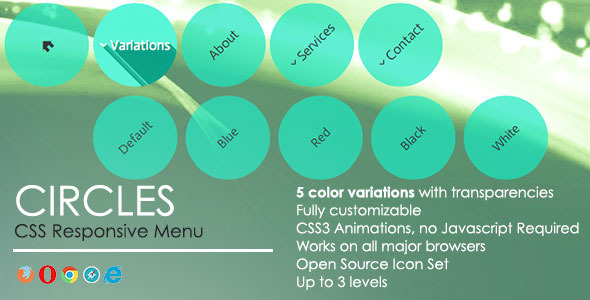
- 5 Colour Variations: Out of the box, you get five professionally curated colour schemes: Green, Blue, Red, White, and Black. This allows you to quickly match the menu to your brand palette without spending hours on custom CSS.
- Long Shadow Effect on Rollover: This signature feature adds a striking, modern depth effect when users hover over a menu item. It creates a tactile, button-like feel that encourages interaction. The effect can be easily disabled if you prefer a flatter design.
- CSS Transitions: All animations are powered by hardware-accelerated CSS3 transitions. This ensures butter-smooth performance on desktops, tablets, and mobile devices without taxing the CPU.
- Customizable Effects: You are not locked into a single look. The menu allows you to tweak shadow intensity and rotation angles, giving you granular control over the user experience.
- Open Source Icon Set: A complimentary set of open-source icons is included, allowing you to add visually rich labels to your menu items. This enhances usability by helping users identify sections at a glance.
- Transparency Effects: Smooth opacity transitions make submenu appearances feel organic and polished, preventing the jarring “pop” that plagues many standard menus.
- Up to 3 Menu Levels: You have the structural depth to organize complex site architectures. With support for parent, child, and grandchild items, you can create a clear hierarchy without overwhelming the user.
- Fully Documented: The package includes comprehensive documentation that walks you through installation, customization, and troubleshooting. This reduces development time and frustration.
Who Is This For? Use Cases
Circles is versatile enough to fit a wide range of projects, but it truly excels in scenarios where visual engagement and mobile responsiveness are non-negotiable. Here are the primary user profiles who will benefit most from this menu.
Creative Agencies and Designers
If you run a design studio or work as a freelance creative, your website is your portfolio. Using a standard, boring list of links does a disservice to your creative capabilities. Circles allows you to showcase your attention to detail and modern design sensibilities. The circular navigation and Long Shadow effect signal to potential clients that you think outside the box. It is perfect for showcasing a portfolio of services like “Branding,” “Web Design,” and “Photography” with associated icons.
App and Landing Page Developers
For single-page applications or marketing landing pages, navigation needs to be minimal yet highly effective. Circles provides a compact way to offer multiple entry points (e.g., Features, Pricing, FAQ, Contact) without cluttering the hero section. The interactive hover effects keep users engaged as they scroll, improving time-on-page metrics and the likelihood of conversion.
Web Design Agencies and Freelancers
When building sites for clients, you need components that are both robust and easy to style. Circles saves you hours of custom development by providing a professional-grade menu that you can brand with a client’s specific colour (using the provided palettes or custom CSS). The 3 menu level support is ideal for clients with complex product categories or service pages, ensuring that information architecture is clear without looking cluttered.
Technical Details & Compatibility
Understanding the technical backbone of a plugin is crucial before purchase. Circles is built on clean, semantic HTML and CSS3, making it extremely lightweight and fast-loading. It requires no jQuery or heavy JavaScript libraries, which keeps your page speed high—a critical factor for both SEO and user experience. The menu is fully responsive and works flawlessly across all modern browsers including Chrome, Firefox, Safari, and Edge. Given its focus on CSS, compatibility with mobile and tablet devices is excellent, ensuring that the touch interactions and hover states degrade gracefully or perform perfectly as intended. While the exact version history is inferred from its maturity on the marketplace, this type of asset is typically updated to ensure compatibility with modern frameworks and standards, providing a reliable foundation for years to come.
Pros and Cons
To help you make an informed decision, here is a balanced look at the strengths and limitations of Circles based on its feature set.
Pros
- Lightweight and Fast: Pure CSS means no heavy JavaScript dependencies, leading to faster load times and a better Core Web Vitals score.
- Stunning Visual Appeal: The circular layout and Long Shadow effect immediately set your site apart from competitors.
- High Usability: Transparency effects and smooth transitions make navigation feel intuitive and responsive.
- Out-of-the-Box Value: Five colour schemes and an icon set are included, reducing design time significantly.
- Scalable Structure: Support for up to 3 levels makes it usable for both simple blogs and complex corporate sites.
Cons
- Unconventional Layout: The circular design, while beautiful, may not suit very formal or data-heavy corporate sites that prefer traditional top-level navigation bars.
- Limited Space for Text: Round buttons can accommodate fewer characters per item compared to rectangular menus. You may need to keep link titles concise.
- Specific Aesthetic: The “Long Shadow” style is a specific design trend. While it can be disabled, the base structure is inherently modern and may not fit a classic or vintage website theme.
Frequently Asked Questions
Is Circles compatible with page builders like Elementor or WPBakery?
Yes, because Circles is built with standard HTML and CSS, it can be embedded into most page builders using custom HTML widgets or shortcode blocks. However, it works best when added to a theme’s header area via direct code integration, as it is designed to function as a primary navigation system rather than a standard widget.
Can I customize the circle size and spacing between menu items?
Absolutely. While the default sizing is optimized for desktop and mobile, the fully documented CSS allows you to modify variables such as width, height, padding, and margin. You can easily scale the circles up or down to fit your design needs, making it a flexible choice for various screen sizes.
Does this menu work with WooCommerce or membership plugins?
Circles functions as a visual navigation system and will work with any site that uses standard HTML links. While it does not natively handle dynamic “Cart” counts or login statuses, you can manually link to your WooCommerce cart or my-account page. For dynamic content, you would need to integrate custom PHP hooks into your theme, which is beyond the scope of the CSS menu itself.
Final Verdict
Circles is more than just a menu; it is a design statement. It successfully bridges the gap between artistic expression and technical performance. For web developers and designers who want to make a strong first impression and encourage users to explore deeper into their site, this menu provides a unique, conversion-friendly solution. The package is well-supported with clear documentation and has built a reputation for reliability within the marketplace. If you are tired of the same old horizontal bars and want a navigation tool that actively contributes to your brand story, Circles is a smart, low-risk investment. Stop settling for boring navigation that kills engagement. Give your users a reason to click. Purchase Circles today and transform your website’s first impression into a lasting conversion opportunity.