Colio Galleries is a WordPress portfolio plugin sold on ThemeForest for $19 that builds responsive, filterable grids of portfolio items, with the distinctive twist that each item’s details open in a sliding viewport placed before, after, or inside the grid itself. It is aimed at freelancers, small studios and agencies who want a self-hosted portfolio on a WordPress site without paying for a full theme or a subscription-based gallery service.
The plugin is developed by a single ThemeForest author and has been maintained through a series of releases, with the most recent changes listed in the source data dating to September 2014. It is a lightweight, single-purpose tool rather than a page builder: it registers its own post type, ships a shortcode, and leaves the surrounding site design to the existing theme.
What Colio Galleries Actually Does Beyond a Basic Grid
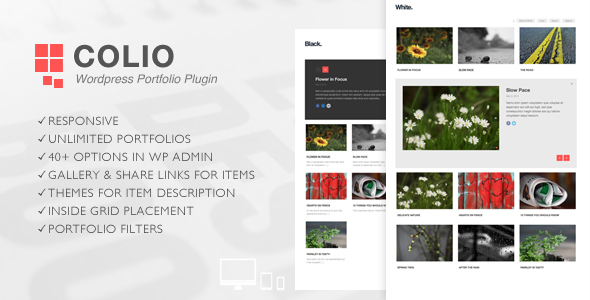
At its core the plugin registers a separate post type for portfolio items, so projects live independently of blog posts and pages. Each item can carry a featured image, a description, extra photos, and social sharing links drawn from a set of twenty icons. A shortcode then drops a grid of those items anywhere a shortcode can run, and the plugin supports unlimited separate portfolio instances on the same site, each with its own configuration. That matters for agencies running a single install for several clients or a studio splitting work into categories such as print, web and motion.
The grid is percentage-based and configurable between two, three, four or five columns, with a choice of normal or masonry layout. Masonry is the more interesting option here, because it lets items of differing image heights sit together without awkward gaps, which suits photography and design work where aspect ratios vary. Filtering is handled through the Isotope library, and the filter menu can render either as clickable labels or as a select dropdown — the dropdown being the more practical choice on narrow screens where a long row of labels would wrap awkwardly.
The headline feature is the details viewport. Instead of sending visitors to a separate project page, Colio Galleries expands an item’s details in place, sliding the panel down either before the grid, after it, or inside it. Placing the viewport inside the grid is the most unusual of the three and produces an effect closer to an expanding tile than a modal window. Two visual themes are included for the detail panel — a black and a white variant — and extra photos attached to an item can be shown either as a scrolling feed or as a slider.
Several capabilities were added after the initial release and are worth noting because they affect how the plugin behaves in practice. Ajax loading means the detail content is fetched without a full page reload, pagination was added for grids with many items, and deeplinking allows a specific item to be linked to directly, so a portfolio entry can be shared or bookmarked as its own URL. Transition duration for the filtering and resizing animation is adjustable, and the plugin uses the imagesLoaded library to trigger layout only once images have actually loaded, which avoids the collapsed or overlapping grids that plague naive masonry implementations.
For developers, the plugin exposes WordPress filters and action hooks for modifying output, and the PHP is described as commented and structured for customization. Translation is supported through .po and .mo files, and the markup is described as valid HTML. Admin settings run to more than forty parameters, covering column count, title font size, button colour and similar presentation details, and a copy button in the admin allows an existing portfolio instance to be duplicated rather than rebuilt from scratch.
Where Colio Galleries Fits, and Where It Does Not
The strongest fit is a WordPress site that already has a theme the owner is happy with and simply needs a portfolio section bolted on. A freelance photographer, an illustrator, a small architecture practice or a wedding videographer can install the plugin, create items, drop a shortcode into a page and have a working, filterable portfolio without changing themes. The in-place detail viewport also suits sites where the goal is to keep visitors on one page rather than scattering them across dozens of thin project pages.
It also suits developers building for clients, because the hooks and filters allow output to be reshaped without forking the plugin, and the unlimited instances mean one licence can serve a multi-section portfolio. The deeplinking support is a genuine requirement for anyone who needs individual projects to be linkable from a CV, a proposal or a social post.
Where it is the wrong choice is on a site that needs the portfolio to be the entire experience. Colio Galleries is a component, not a theme: it does not provide page layouts, typography systems, header designs or the surrounding visual language. Anyone expecting a complete portfolio site out of the box will be disappointed, and anyone who wants a drag-and-drop visual builder to lay out project pages will find the shortcode-and-settings model restrictive. It is also a poor fit for stores or catalogues with hundreds of items and complex taxonomy, where a dedicated e-commerce or directory plugin would be more appropriate.
Strengths and Limitations of This Portfolio Plugin
Strengths
- The in-place expanding viewport is a genuinely different interaction model from the lightbox-plus-separate-page approach most portfolio tools use, and the three placement options give real control over how that interaction reads.
- Unlimited portfolio instances with independent settings make it viable for multi-section or multi-client installs on a single licence.
- Masonry layout combined with imagesLoaded handling avoids the most common visual failure of grid plugins, where items overlap or collapse before images arrive.
- Deeplinking, Ajax content loading and pagination cover the practical requirements that basic grid plugins usually omit.
- Developer hooks, filters and translation files mean the plugin can be adapted rather than merely configured.
- At $19 it is a one-off cost with no subscription, which is a meaningful difference from hosted portfolio services billed monthly.
Limitations
- The plugin depends on bundled third-party libraries — Isotope, FlexSlider and Fancybox — and the source data shows Isotope being updated to version 2.0.0 during the 1.2 release. Users inherit responsibility for those dependencies, and their own update cycles are outside the plugin author’s control.
- The most recent changes documented in the listing date to September 2014. The vendor does not state current WordPress compatibility, so anyone running a recent WordPress version should verify compatibility before purchase rather than assume it.
- No sales count or rating is disclosed in the source data, so there is no independent signal of how widely the plugin has been adopted or how it has held up for other buyers.
- Presentation options are extensive but the plugin does not integrate with the WordPress block editor or the customizer in any way the listing describes; configuration lives in its own admin screens and a shortcode.
- Two detail themes is a narrow set. Sites with a strong existing visual identity may need to write CSS against the plugin’s markup to make the viewport match.
- Documentation is described as present but the listing gives no indication of its depth, so the learning curve for the forty-plus settings is unquantified.
How Colio Galleries Compares With the Wider Portfolio Plugin Category
Portfolio plugins generally fall into three groups. The first is the simple grid shortcode plugin: drop in a grid, click a lightbox, done. These are easy but usually stop there, with no filtering, no deeplinking and no in-place detail view. The second is the full portfolio theme, which bundles layouts, typography and a portfolio system together — more complete, but it forces a site redesign and locks the portfolio to that theme. The third is the hosted portfolio service, which handles hosting and design but charges recurring fees and keeps the content off the user’s own domain.
Colio Galleries sits between the first two. It offers more than a basic grid — filtering, masonry, pagination, Ajax detail loading, deeplinking, multiple instances — while remaining theme-agnostic and self-hosted. The trade-off is that it does not solve design. A buyer comparing it against a portfolio theme is really choosing between paying once for a component that fits an existing site and paying more for a complete look that replaces it. Against hosted services, the comparison is one-off cost and full data ownership versus convenience and ongoing support.
Frequently Asked Questions
Does Colio Galleries work with any WordPress theme?
It is designed as a theme-agnostic plugin, so it can be used alongside any theme that supports shortcodes and standard WordPress post types. Because the detail viewport and grid are styled by the plugin’s own CSS, some themes with aggressive global styling may require small CSS overrides to look correct. The vendor does not list specific tested themes.
Can portfolio items be linked to directly?
Yes. Deeplinking support was added in version 2.2, which means an individual portfolio item can be opened via its own URL rather than only through interaction with the grid. This allows a specific project to be shared, bookmarked or referenced from an external document without the visitor needing to find it in the grid first.
How many portfolio grids can be created on one site?
The plugin supports unlimited portfolio instances, each with its own settings and its own set of items. An admin copy button also allows an existing instance to be duplicated as a starting point. This makes it practical to run several distinct portfolios — for example by discipline, by year or by client — from a single installation.
Is Colio Galleries compatible with the latest WordPress version?
The vendor does not state current WordPress compatibility in the available product data, and the most recent documented changes date to 2014. Buyers running a modern WordPress installation should confirm compatibility with the author before purchasing, since an unmaintained plugin can produce errors or security exposure on current releases.
Verdict
Colio Galleries is worth buying for WordPress users who already have a theme they like and need a capable, self-hosted portfolio grid with filtering, masonry, pagination and an in-place detail viewport that most competitors do not offer. Developers who want hooks, filters and translation support in a $19 one-off purchase will find it a reasonable fit. It is not the right purchase for anyone who needs a complete portfolio website design, a visual builder workflow, or a plugin with a documented recent update history. The absence of disclosed sales figures and current compatibility information means the decision should rest on the feature set and a compatibility check with the author, not on social proof. Buyers who need long-term maintenance guarantees should look at actively maintained alternatives instead.