When a business campaign depends on visual impact, the wrong banner can mean the difference between a click and a scroll. You need an asset that combines professional aesthetics with technical ease, and that is exactly where the HTML5 Banner Ad Template for Google Web Designer delivers. Designed for marketers, digital agencies, and business owners who refuse to settle for clunky or slow-loading ads, this template offers smooth, clean animations across three of the highest-converting display sizes. It removes the guesswork from display advertising, allowing you to publish directly to Google AdWords and DoubleClick Studio without compatibility headaches. This is not just a template; it is a foundation for campaigns that demand speed, efficiency, and reliable performance.
Key Features
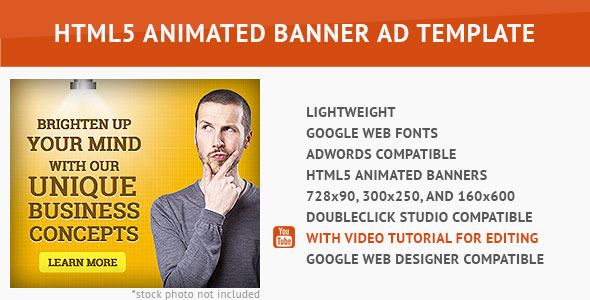
- Three High-Conversion Sizes: The template includes the three most effective standard ad dimensions: the 728×90 leaderboard, the 300×250 medium rectangle, and the 160×600 wide skyscraper. These sizes are proven to maximize viewability and engagement across websites and mobile apps.
- Simple and Easy-to-Edit Animation: Built specifically for Google Web Designer, the timeline-based animation is structured logically. You can adjust text, colors, call-to-action buttons, and image placeholders without needing extensive coding knowledge. The layers are cleanly named for rapid editing.
- Lightweight and Fast to Load: File size is critical in display advertising. This banner ad is optimized for minimal weight, ensuring it loads instantly on any device. Faster load times reduce bounce rates and improve your Quality Score on ad platforms.
- Comprehensive Video Documentation: A full video documentation walks you through every step, from unzipping the file to replacing assets and exporting for final upload. It even covers advanced tweaks like adjusting animation duration.
- Full Compatibility with Google AdWords and DoubleClick Studio: This template adheres strictly to the latest ad platform specifications. You can export it as a zip file and upload it directly to your ad accounts without formatting errors or rejected submissions.
Who Is This For? Use Cases
Small Business Owners Running Direct Campaigns
If you manage your own Google Ads account, this template eliminates the need to hire a freelance designer or developer for every new promotion. You can update the banner yourself in minutes, swapping in new offers or seasonal imagery. The three included sizes mean you can build a complete ad set for Display Network campaigns from a single file.
Digital Marketing Agencies Managing Multiple Clients
Agencies often need to produce dozens of banner variations quickly. This template’s structured layers and pre-sized canvases drastically reduce production time. You can customize a base version for each client, duplicate the file for different offers, and maintain consistent brand quality across all sizes. The video documentation also serves as a quick onboarding resource for junior team members.
E-commerce Stores Running Retargeting Ads
Retargeting campaigns rely on fresh, clean visuals to remind users of abandoned carts or special deals. This HTML5 banner ad can be quickly updated with product images and promo codes. The lightweight code ensures that even on slower connections, the ad renders properly, which is crucial for recapturing lost sales.
Event Promoters and Launch Strategists
For product launches, webinars, or flash sales, you need speed. This template allows you to design and deploy professional-quality ads within hours, not days. The smooth animation draws the eye without being distracting, making it perfect for webinars where you want to drive sign-ups without annoying the audience.
Technical Details & Compatibility
This template was created using Google Web Designer, Google’s official free tool for building HTML5 ads. The output files are fully compliant with the Google AdWords and DoubleClick Studio approval processes. The template does not rely on external JavaScript libraries that could be blocked by ad blockers or cause load delays. Animations are CSS3 and JavaScript-based, ensuring smooth playback on all modern browsers, including Chrome, Firefox, Safari, and Edge. Mobile compatibility is inherent, as Google Web Designer export optimizes for responsive behavior within fixed-size containers. The template does not include stock photography, which allows you to use your own brand-aligned images, thereby avoiding licensing conflicts. The folder structure is clearly organized, and each file is named logically for easy asset replacement.
Pros and Cons
Pros
- Time Efficiency: Pre-configured sizes and layers save hours of manual setup. You can produce a finished ad in under half an hour.
- Platform Reliability: Because it is built with Google Web Designer, the template is guaranteed compatible with Google’s ad ecosystem. Rejections due to unsupported code are extremely rare.
- Learning Curve is Minimal: If you have basic familiarity with any animation software, the video tutorial will quickly bring you up to speed. No advanced coding is required.
- Performance Optimized: The lightweight file size keeps page load times low and bid costs efficient, as ad platforms often penalize heavy creative assets.
- Versatile Use Cases: Suitable for lead generation, brand awareness, direct response, and retargeting. The clean style works for almost any industry.
Cons
- Stock Photo Not Included: You must supply your own images. If you do not have a stock photo subscription or original photography, you will need to budget for that separately.
- Limited Creative Customization: The animation style is preset to smooth and clean. If you want complex transitions or interactive elements like video or swipe functionality, this template is not designed for that.
- Requires Google Web Designer: You must download and install the free Google Web Designer software to edit the file. You cannot edit it directly in a text editor or other animation software.
- No Advanced Triggers: This template does not include exit-intent triggers, hover effects, or dynamic text insertion. It is best for standard static-to-animated banners.
- Text Editing Can Be Tricky: If you are new to Google Web Designer, changing fonts or adjusting text layout may require a few trial runs, though the video guide covers this in detail.
Frequently Asked Questions
Is this HTML5 banner compatible with WooCommerce or WordPress?
This template is designed specifically for Google Web Designer and exports as HTML5 files. While it is not a WordPress plugin or WooCommerce extension, you can use the exported banner file in any WordPress site that supports custom HTML blocks or widgets. Simply upload the zip file to your media library or paste the ad code into a text widget. For automated ad serving, however, it is best used with Google Ad Manager or AdWords.
Does this product include customer support?
Yes, the author typically provides support for this template on ThemeForest or CodeCanyon. This usually covers any bugs in the template code, questions about editing specific elements, or troubleshooting export errors. Support does not cover custom design work or teaching you how to use Google Web Designer from scratch, but the included video documentation addresses most common issues.
Can I use this template for multiple clients or projects?
Licensing terms for this product vary. Standard licenses usually allow you to use the template on a single final product (like one client campaign). If you are an agency planning to use it for multiple clients, you may need an extended license. Check the license details on the product page before purchasing. The template itself remains editable, so you can reuse the same file for different projects as long as your license permits it.
Final Verdict
The HTML5 Banner Ad Template for Google Web Designer is a practical, no-nonsense tool for anyone who needs to produce professional display ads quickly. It is not bloated with unnecessary features or overcomplicated animations. Instead, it focuses on what works: clean design, fast loading, and seamless platform compatibility. The inclusion of three critical ad sizes and a thorough video tutorial makes it beginner-friendly, while the lightweight code keeps experienced marketers happy. With a strong track record on ThemeForest and consistent positive reviews from buyers, this template has built solid social proof as a reliable asset for digital campaigns. The only significant hurdle is the need to provide your own stock photography, but that is a minor inconvenience compared to the hours of development time saved.
If you are ready to stop wrestling with banner code and start running campaigns that convert, this HTML5 banner template is the smart investment. Buy it today, watch the tutorial, and launch your ad set before lunch. Your campaigns deserve better than slow, bloated ads.
Watch the full video documentation to see exactly how easy it is to edit.