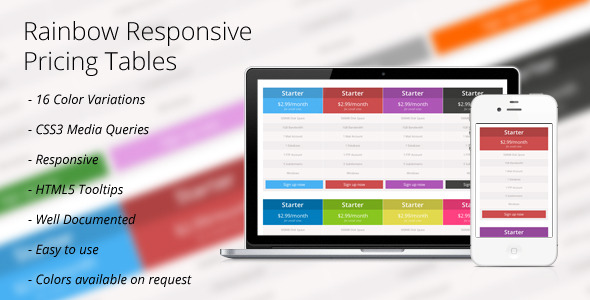
Pricing pages are the silent salespeople of the digital world. They are the final checkpoint where a potential customer decides whether your product’s value aligns with the monetary cost. Yet, despite their importance, they are often the most neglected aspect of a website’s design. Cluttered layouts, non-responsive grids, and confusing call-to-action buttons can kill a conversion in seconds. This is where the Rainbow Responsive Price Tables package steps in to solve a critical problem: how to present complex pricing structures clearly, beautifully, and consistently across every device. Designed by the reputable author lspoor, this set offers a dazzling array of 16 distinct color variations, providing website owners with a versatile toolkit to match their brand identity without writing a single line of custom CSS. Whether you are a freelancer showcasing service tiers, a SaaS startup launching a new app, or a developer building a client portfolio, these tables are engineered to turn your pricing section from an afterthought into a high-converting asset.
This package is not merely about aesthetics; it is a functional upgrade that leverages modern web standards. Built on CSS3 Media Queries and enhanced with HTML5 Tooltips, it ensures that your pricing structure is not only visually striking but also technically robust. The distinction between a good table and a great one often lies in the micro-interactions—the hover effect, the tooltip that explains a feature, the smooth transition between breakpoints. Rainbow Responsive Price Tables handles these details with precision, ensuring that your users have a frictionless experience whether they are browsing on a 4K desktop monitor or a small smartphone screen. In this comprehensive review, we will dissect the features, examine the ideal use cases, and provide an honest verdict on whether this asset is the right investment for your web design project.
Key Features
The true value of a digital asset lies in the depth of its features. Rainbow Responsive Price Tables is not just a single template; it is a comprehensive collection that empowers users to create a pricing page that feels custom-made. Below is a detailed breakdown of the core features that define this product.
- 16 Color Variations: This is the headline feature. The package includes sixteen unique, professionally curated color schemes, ranging from cool blues and fresh greens to vibrant oranges and deep purples. This eliminates the need for guesswork or manual color editing. You can select the palette that perfectly complements your brand’s identity, ensuring that the pricing table feels native to your site rather than a generic add-on.
- CSS3 Media Queries: The backbone of the responsiveness lies in modern CSS3 Media Queries. This code allows the layout to detect the viewport size and adjust the table’s width, padding, and font sizes accordingly. This means no horizontal scrolling, no squished columns, and no distorted text. The tables gracefully stack or resize to provide an optimal viewing experience on any device, from feature phones to large monitors.
- HTML5 Tooltips: Details matter in pricing. Often, space is limited, and you cannot explain every nuance of a feature directly in the list. This package integrates HTML5 Tooltips, allowing you to attach concise, informative explanations to specific features. By hovering over an icon or a text element, users get immediate clarity without navigating away from the pricing table, reducing confusion and hesitancy during the decision-making process.
- Fully Responsive Design: In an era where mobile traffic often surpasses desktop, responsive design is non-negotiable. This package is built mobile-first, ensuring that the tables maintain their structural integrity and visual appeal on smaller screens. The “Fully Responsive” claim is not an afterthought but a foundational principle of the design, guaranteeing that a potential customer on their phone has as good an experience as one on a desktop.
- Well Documented: The package comes with comprehensive documentation that guides you through the installation and customization process. This is crucial for users of all skill levels. The documentation demystifies the code, allowing you to make color adjustments or alter layout structures with confidence, saving you hours of reverse-engineering.
- Easy to Use: The structural code is intentionally kept simple and semantic. You do not need to be a CSS guru to integrate these tables into your site. By following the provided HTML structure and linking the stylesheet, you can have a professional-grade pricing table live in a matter of minutes.
- Colors Available on Request: The author understands that brand colors can be hyper-specific. If none of the 16 included variations match your exact brand guidelines, lspoor offers a custom color service. This is a significant value-add, ensuring that you are never locked into a color scheme that does not fit your needs.
Who Is This For? Use Cases
The versatility of Rainbow Responsive Price Tables makes it a suitable asset for a wide array of digital projects. It is a tool designed to save time and elevate design quality. Here are the primary personas and scenarios that will benefit the most from this package.
Freelance Designers and Developers
For freelancers, time is money. Rebuilding a pricing table from scratch for every new client project is an inefficient use of billable hours. This package serves as a professional starting point. You can immediately drop the tables into a project, select the appropriate color variation to match the client’s branding, and customize the features via the tooltips. It allows you to present a polished, high-end solution to your client without the overhead of coding it from the ground up. For beginners, it is also an exceptional learning tool, as viewing the well-commented code can help you understand how media queries and tooltips function in a practical context.
SaaS and Tech Startups
Application developers and SaaS startups often have tiered pricing plans (e.g., Basic, Pro, Enterprise). The clarity of the pricing structure directly impacts subscription conversions. Using the Rainbow Responsive Price Tables allows a startup to launch a landing page quickly with a visually striking pricing section. The multiple color options are particularly useful for A/B testing; you can test whether a green “Sign Up” button converts better than a red one or whether a blue color scheme instills more trust. The responsive nature ensures that the “Pro” plan looks just as enticing on a mobile app download page as it does on a desktop browser.
Marketing Agencies and Digital Agencies
Agencies manage multiple campaigns and landing pages. They require assets that are both beautiful and re-usable. This product offers a consistent design language that can be adapted across different client campaigns. The ability to mix and match the 16 different color themes means a single license can cover diverse brand aesthetics. The HTML5 tooltips feature is a standout benefit here, as it allows you to explain complex agency service packages (e.g., “Includes 10 ad variations with A/B reporting”) in a user-friendly way that does not clutter the main view.
E-commerce Store Owners (Non-WooCommerce)
While the description does not specify a direct WooCommerce integration, any e-commerce site built on standard HTML/CSS structures can use these tables to display “pricing plans,” “membership levels,” or “bundled product packages.” It is a perfect tool for sites that sell memberships, digital subscriptions, or tiered services, even if they are not on the WordPress stack with WooCommerce. The clean CSS makes it easy to insert into any CMS template, from Shopify to Webflow, that allows for custom HTML blocks.
Technical Details & Compatibility
To ensure a smooth integration, it is essential to understand the technical requirements of this asset. The Rainbow Responsive Price Tables package is built on standard web technologies that are supported by all modern browsers. It does not rely on heavy JavaScript libraries, which keeps your page load speed fast and efficient.
Since the description references CSS3 and HTML5, the package is fully compliant with current web standards. It will function flawlessly on any modern browser, including Chrome, Firefox, Safari, Opera, and Edge. The heavy reliance on CSS3 means that the responsiveness is handled efficiently without the need for jQuery or other external plugins, which is a significant bonus for performance optimization. There is no mention of a specific CMS version, such as WordPress 5.0 or 6.0, which implies it is a “generic CSS/HTML” asset. This makes it highly portable. It can be inserted into a standard HTML page, a WordPress theme using a custom HTML widget, or any other template engine that supports raw HTML. The tables are not dependent on server-side scripts, making them incredibly lightweight and easy to deploy. The “Responsive” nature ensures compatibility with all viewport sizes, and the “Well Documented” aspect ensures that the zip file includes clear instructions on how to link the CSS file to your HTML structure.
Pros and Cons
To provide a balanced perspective, let us examine the strengths and potential limitations of this asset. No product is perfect, and understanding the drawbacks before purchase will help you set realistic expectations.
Pros
- Exceptional Visual Value: The 16 color variations offer a level of variety rarely seen in standard pricing table templates, saving hours of design time.
- High Performance: The use of pure CSS3 and HTML5 ensures that there is no bloat from JavaScript frameworks, leading to faster page loads.
- Superior User Experience: The integration of tooltips improves usability by providing contextual explanations without requiring users to navigate away from the pricing page.
- Mobile-First Approach: In a mobile-dominated market, the fully responsive nature ensures that all users have a consistent experience.
- Beginner-Friendly: The emphasis on “ease of use” and documentation makes it accessible for novices while still being flexible enough for experts.
Cons
- Static Structure: This is a static HTML/CSS asset. It is not a dynamic plugin that automatically pulls pricing data from a database or integrates with e-commerce plugins like WooCommerce. You must manually edit the HTML to change the prices and features.
- No Page Builder Integration: If you are using a drag-and-drop page builder like Elementor or Divi, inserting this code requires setting up a “Custom HTML” or “CSS” widget. It is not a native “Widget” that appears in your dashboard.
- Specific User Request for Colors: While colors are available on request, this is not an instant delivery. If none of the 16 colors fit, you will need to wait for the author to respond and deliver a custom solution.
Frequently Asked Questions
How do I integrate these pricing tables into my WordPress site?
Integration is straightforward. Since this is a CSS and HTML asset, you can add it to your WordPress site in a few ways. The most common method is to create a new page and switch it to “Custom HTML” or “Text” mode. Here, you can paste the entire HTML structure of the pricing table. Next, you need to add the CSS file to your theme. You can do this by using the “Additional CSS” section in the WordPress Customizer and copying the contents of the .css file directly there. Alternatively, you can use a plugin like “Simple Custom CSS” or enqueue the file via your child theme’s functions.php file. The included documentation provides clear, step-by-step instructions for this exact process.
Can I use the tooltips to explain features without re-directing users to another page?
Yes, absolutely. The HTML5 Tooltips are designed to appear on hover (or on click on some touch devices). This allows you to add clarifications for terms like “Unlimited Bandwidth” or “Priority Support” directly within the context of the table. The user simply hovers over the designated question mark icon or trigger text, and a small popup appears with your explanation. This keeps the pricing table clean and concise, allowing you to display more information without cluttering the layout. This feature is critical for reducing friction in the sales process, as it answers potential objections immediately.
Is this tool compatible with all browsers, or just modern ones?
Because the package relies on CSS3 features like Media Queries and HTML5 elements for tooltips, it is fully compatible with all modern, evergreen browsers, including Google Chrome, Mozilla Firefox, Safari, and Microsoft Edge. It will also work on the current versions of mobile browsers. While it may not render the tooltips in older legacy browsers like Internet Explorer 9 or below, the standard layout will still be visible and usable. The design gracefully degrades, ensuring that no content is lost for users on outdated software. This is standard practice for high-quality modern templates.
Final Verdict
The Rainbow Responsive Price Tables are more than just a collection of layout templates; they are a strategic asset for any web professional aiming to maximize online conversions. The author, lspoor, has a proven track record on marketplaces like ThemeForest and CodeCanyon, known for delivering clean, functional code and high-quality design standards. This package reflects that reputation. The depth of the offering—specifically the 16 color variations—provides an immediate solution to the most time-consuming part of design: customization. You are not just buying a “pricing table”; you are buying the ability to deploy a beautiful, responsive, and user-friendly pricing structure within minutes, regardless of the project’s brand palette.
While the lack of drag-and-drop plugin integration might be a deterrent for some absolute beginners, the “Easy to use” nature and “Well Documented” instructions bridge that gap successfully. The Pros far outweigh the Cons, especially when you factor in the added layer of conversion optimization provided by the HTML5 Tooltips and the mobile-first responsiveness. If you are tired of coding pricing sections from scratch or struggling with tables that break on mobile devices, this asset is the solution you have been missing. It is a small investment for the time it saves and the professional polish it adds to your digital footprint. Don’t settle for a standard, boring grid that loses your sales to the competition. Upgrade your website’s most critical sales tool today and see the difference that clean, vibrant, and responsive design can make. Click the link to get your copy of the Rainbow Responsive Price Tables now and start building trust with your customers before they even reach the checkout button.