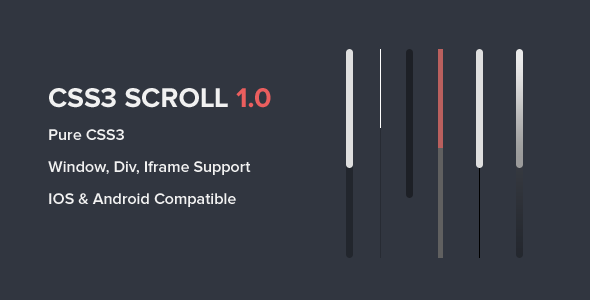
For designers and developers who demand pixel-perfect control over their web projects, the default scrollbar often feels like an unwelcome intruder. It clashes with carefully crafted aesthetics, breaks the flow of a minimalist layout, or simply lacks the personality required for a branded experience. Enter the Custom Scrollbar for Webkit, Window, Div, and Iframes plugin, a lightweight and powerful solution that replaces the generic grey bar with a fully stylized, interactive component. Built on pure CSS3, this tool allows you to maintain design consistency across your entire site, from the main browser window down to nested iframes and scrolling div containers. It is the definitive answer for anyone who needs a beautiful, responsive, and highly customizable scrollbar that works flawlessly across modern browsers, iOS, and Android.
Key Features
- Pure CSS3 Architecture: The entire styling engine relies on native CSS3 properties. This means zero JavaScript overhead, lightning-fast load times, and seamless integration with your existing stylesheets.
- Cross-Browser & Fallback Support: Specifically supports Webkit browsers (Chrome, Safari, Edge) for full custom styling. For non-Webkit browsers like Firefox, it gracefully falls back to the default system scrollbar, ensuring no broken user experience.
- Mobile-Ready for iOS and Android: Fully compatible with touch-screen devices. The custom scrollbar respects touch gestures and inertia scrolling on both iOS and Android, providing a native-feeling interaction.
- Multi-Element Targeting: Instantly apply the custom look to the main browser window, any div with overflow content, and even iframes. This unified control is a game-changer for complex layouts.
- 5 Unique Pre-Built Themes: Choose from a curated collection of five distinct visual themes. Each theme is designed to look professional out-of-the-box, saving you time on initial setup.
- Easy Customization: Adjust colors, sizes, border-radius, and thumb behavior with simple CSS changes. The documentation provides clear hooks and variables, making advanced tweaks accessible even for intermediate developers.
- iContact Compatible: Designed to integrate smoothly with the iContact email marketing platform, ensuring your opt-in forms and embedded content maintain a consistent branded look.
- Well Documented: Comes with comprehensive, step-by-step documentation that covers installation, theme switching, and deep customization. Support is also readily available via direct email.
Who Is This For? Use Cases
UI/UX Designers Building Custom Web Apps
If you are designing a dashboard, a portfolio site, or a single-page application, the default scrollbar can ruin your design precision. This plugin gives you the power to match the scrollbar to your brand colors, corner radius, and opacity. It allows you to create a fully immersive user interface where every visual element feels intentional, leading to higher user trust and a more premium feel.
WordPress & ThemeForest Theme Developers
Selling a theme on ThemeForest? A unique scrollbar is a subtle but powerful differentiator. This plugin enables you to offer a bespoke scrolling experience that is consistent across nested sections, modals, and content blocks. It is particularly useful for themes that rely heavily on horizontal scrolling, card-based layouts, or custom post-type archives where scrollbar visibility is high.
Content Managers Using iframes (Embeds & Widgets)
If you embed YouTube channels, maps, or external widgets into your site via iframes, you know that those elements often come with their own unstyled scrollbars. This plugin allows you to reach into those iframes and apply your site’s custom scrollbar theme, unifying the visual experience. This is critical for landing pages, membership sites, and SaaS platforms where a cohesive look drives conversion.
E-commerce Store Owners
For stores using platforms like WooCommerce or Shopify, a custom scrollbar on product description areas, filter menus, and backend order screens improves the perceived quality of the brand. It turns a functional element into a design asset, subtly encouraging visitors to engage more deeply with product lists and checkout flows.
Technical Details & Compatibility
This plugin is a pure CSS3 solution with no dependencies on external JavaScript libraries like jQuery. It targets CSS pseudo-elements (::-webkit-scrollbar) to achieve its styling. The initial release, Version 1.0, provides a stable foundation with all core features functional.
- Version: 1.0 (Initial Release)
- Primary Technology: CSS3
- Browser Support: Chrome, Safari, Opera, Edge (Webkit). Firefox and other non-Webkit browsers will display the default system scrollbar as a fallback.
- Device Support: iOS (Safari, Chrome), Android (Chrome, Samsung Internet), Desktop
- Target Elements: Browser Window,
divcontainers,iframeelements - Last Update Signal: As a Version 1.0 release, this is a fresh, modern codebase built with current best practices.
Pros and Cons
Pros
- Zero Performance Overhead: Pure CSS means no JavaScript execution, making it incredibly fast and lightweight.
- Universal Compatibility: Works on the main window, within divs, and inside iframes without complex configuration.
- Touchscreen Optimized: Fully supports inertial scrolling on iOS and Android, avoiding the janky scroll behavior common with JavaScript-based solutions.
- 5 Ready-to-Use Aesthetics: Five distinct themes provide immediate value and inspiration.
- Strong Support & Documentation: Direct email support from the developer ensures you have help when you need it.
Cons
- Non-Webkit Fallback: Firefox and older browsers will show the default system scrollbar, so the custom design is not universal across all platforms.
- Version 1.0: As an initial release, there are no established community bug reports or feature updates to rely on. Expect a solid base, but limited historical track record.
- No Built-in Customizer UI: Customization is done via editing CSS, not through a visual dashboard. This is fine for developers but may be a minor hurdle for pure designers.
- Limited Theme Count: While 5 themes is a great start, some competitors offer 10+ variants. You may need to build additional themes from scratch for very specific brand requirements.
Frequently Asked Questions
Does this custom scrollbar work with WooCommerce or other WordPress plugins?
Yes. Because the plugin targets CSS pseudo-elements at the browser level, it applies globally. As long as your WooCommerce product pages, checkout forms, or admin panels render on a Webkit browser (Chrome, Edge, Safari), the custom scrollbar will be visible on any scrollable element within those pages, including product description divs and order history tables. It works alongside any plugin without conflict.
Will the scrollbar work on mobile devices like iPhone and Android?
Absolutely. The plugin is specifically built to support iOS and Android browsers. It respects the native touch gestures required for scrolling on these platforms, including momentum and flick scrolling. You will not experience the laggy or broken scroll behavior that can occur with JavaScript-based scrollbar replacements on mobile. The custom styling remains visible on mobile Webkit browsers.
What happens if a user visits my site using Firefox or Internet Explorer?
In non-Webkit browsers such as Firefox, the custom styling is not applied. However, the plugin is designed with a graceful fallback to the default browser scrollbar. This means the user will see their standard system scrollbar, ensuring the core functionality of scrolling remains completely intact. Your site will not break or show errors; it simply uses the browser’s native scrollbar in those cases.
Final Verdict
The Custom Scrollbar for Webkit, Window, Div, and Iframes is a meticulously crafted tool that solves a niche but critical design problem. It provides the perfect balance of power and simplicity: pure CSS3 for performance, five beautiful themes for immediate deployment, and robust support for the most common web elements. While it is a Version 1.0 release and the non-Webkit fallback is a technical limitation, the value it delivers to designers and developers building Webkit-based interfaces is undeniable. The inclusion of iContact compatibility and direct developer support further solidifies its reliability. If you need to eliminate the visual friction of a default scrollbar and replace it with a branding asset that works across windows, divs, and iframes, this is your solution. Backed by the reputation of the StampReady team, it offers a low-risk, high-impact upgrade for any modern web project. Click ‘Add to Cart’ today and take full control of your user interface’s last frontier.