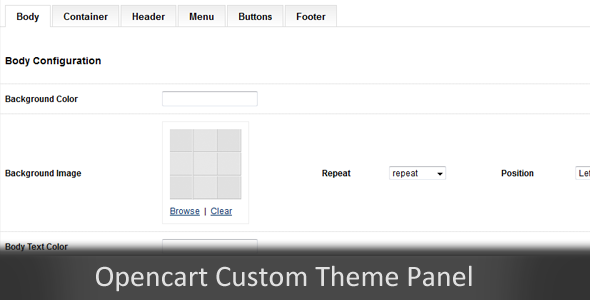
Administrators and theme developers working with OpenCart often face a common limitation: the need to modify core files just to change a color, font, or layout parameter. This creates maintenance headaches, increases the risk of breaking updates, and requires technical skill that not every site owner possesses. The Custom Theme Panel for OpenCart directly addresses this challenge by introducing a dedicated configuration interface within the admin dashboard. This module allows you to manage theme appearance settings, such as color schemes, from a centralized panel without touching a single line of code. Designed for both developers building custom themes and store owners who want more control over their site’s branding, this tool streamlines the theming workflow. By separating theme configuration from core files, it ensures that updates and customizations coexist without conflict. The result is a more maintainable, user-friendly, and professional approach to managing OpenCart store aesthetics.
Key Features
- Centralized Color Configuration: Manage all theme color settings from a single, intuitive admin panel interface. This eliminates the need to dig through CSS files or template code, allowing for rapid visual changes to your store’s branding.
- Simple Installation and Setup: The module is designed for quick deployment. After installing the extension, it integrates seamlessly into the existing OpenCart admin structure, ready for configuration with minimal effort.
- User-Friendly Admin Interface: The control panel is built with usability in mind. Navigating to Extensions → Modules and editing the Custom Theme Panel provides a straightforward form for inputting color values, making it accessible even for those with limited technical experience.
- Flexible Theme Integration: While the module works out of the box, it is primarily intended as a development tool for custom themes. Developers can easily map the panel’s configuration options to their own theme’s CSS variables or template logic, providing end-users with a powerful customization tool.
- Stable Performance on Supported Versions: The module has been tested and confirmed to work correctly on OpenCart version 1.5.5.1, ensuring reliable performance for users on that specific release.
Who Is This For? Use Cases
OpenCart Theme Developers
If you are a developer building custom OpenCart themes for clients, this module is an invaluable asset. Instead of hardcoding color values and other stylistic choices, you can integrate this admin panel into your theme. Your clients will appreciate the ability to independently adjust colors to match their brand guidelines, reducing your support requests and empowering them with self-service customization.
Store Owners with Limited Technical Skills
Owning an OpenCart store does not require coding expertise, but maintaining a unique brand identity often does. This module bridges that gap. A store owner who wants to change the header background or link color to match a seasonal marketing campaign can do so directly from the admin panel. No FTP access, no file editing, and no risk of breaking the site’s functionality. This accessibility makes the product perfect for entrepreneurs focused on their business, not their backend code.
Websites Requiring Frequent Visual Updates
Businesses that change their branding frequently or run multiple seasonal promotions need a flexible theming system. The Custom Theme Panel allows for rapid aesthetic adjustments. A store can test different color combinations for conversion optimization or quickly update its look for a holiday sale without needing developer intervention, saving both time and money.
Technical Details & Compatibility
The Custom Theme Panel for OpenCart is specifically designed for the OpenCart e-commerce platform. It is fully compatible with OpenCart versions 1.5.5.1, 1.5.5, 1.5.4.1, 1.5.4, 1.5.3.1, 1.5.3, 1.5.2.1, and all other 1.5.x releases. This broad compatibility within the 1.5.x series makes it a reliable choice for stores that have not yet migrated to newer major versions. It is important to note that the module was specifically tested and verified on OpenCart 1.5.5.1, ensuring a high degree of stability for users on that version. For proper operation, the module requires basic PHP knowledge for integration into a custom theme. It is not a standalone design solution but rather a powerful tool that must be wired into your theme’s output logic. The module operates entirely within the OpenCart admin framework, meaning it does not alter front-end performance. As a CodeCanyon product, it adheres to the platform’s standards for code quality and documentation.
Pros and Cons
Pros
- Empowers non-technical users to make significant design changes without coding.
- Simplifies theme maintenance by separating configuration from core code, making updates safer.
- Reduces developer workload by providing clients with a self-serve customization interface.
- Lightweight and focused on a single functionality: color and style configuration.
- Tested compatibility with a specific, stable OpenCart version (1.5.5.1).
Cons
- Requires initial development effort to integrate into a custom theme; not a plug-and-play visual editor for existing layouts.
- Limited to OpenCart 1.5.x versions, offering no support for the more modern 2.x or 3.x releases.
- Basic PHP knowledge is necessary for the developer to connect the module’s data to the theme’s front-end.
- No built-in preview functionality within the admin panel; changes must be saved and viewed on the live store.
Frequently Asked Questions
Does this module work with any OpenCart theme out of the box?
No, the Custom Theme Panel for OpenCart is a development tool, not a standalone theme. To use it, a theme developer must write code that reads the configuration values saved by this module and applies them to the theme’s CSS or templates. It provides the admin interface, but the theme itself must be built to consume that data.
Is this module compatible with OpenCart 2.x or 3.x?
The module is explicitly designed and tested for OpenCart 1.5.x series, with specific verification on version 1.5.5.1. It is not compatible with OpenCart 2.0 or later versions due to significant architectural changes in the platform. Users with newer OpenCart installations should look for equivalent extensions built for their specific version.
What happens to my custom colors when I update my OpenCart installation?
Because the Custom Theme Panel stores its configuration data in the database, not in core files, your color settings are preserved during standard OpenCart updates (within the same major version line). This separation is a key benefit, ensuring that your branding choices remain intact even when you apply security patches or bug fixes to the core system.
Final Verdict
The Custom Theme Panel for OpenCart effectively solves a persistent problem for developers and store owners on the 1.5.x platform: providing a clean, maintainable way to control theme colors and styles without hacking core code. It empowers non-technical users and gives developers a professional tool to include in their client builds. While its scope is limited to configuration and requires initial PHP integration, the value it provides in terms of usability and maintainability is significant. For any custom OpenCart 1.5 theme project, this module is a practical investment that pays for itself by reducing support tickets and empowering the end-user. If you are building a custom store or managing one that needs frequent branding updates, this no-fuss solution is exactly what you need. Streamline your workflow, give your clients control, and make your OpenCart site truly yours. Try the Custom Theme Panel today and experience the difference a dedicated admin interface can make.