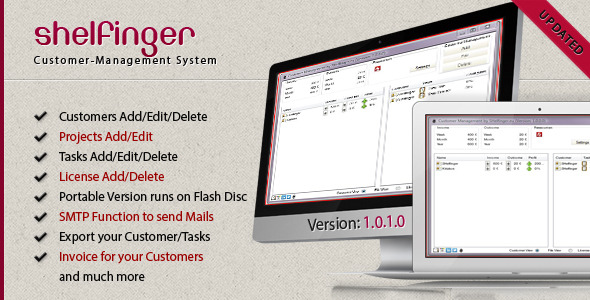
Running a web design or print design studio means juggling clients, projects, deadlines, files, and finances—often across multiple workstations. While project management tools abound, few are tailored specifically to the unique workflow of creative agencies, particularly those operating within the Envato ecosystem. Customer-Management by SHelfinger fills this gap. It is a specialized, portable software solution designed to organize customers, track projects and tasks, manage files, and even verify Envato licenses—all from a single desktop application. This tool replaces the fragmented approach of using spreadsheets and separate folders with a centralized, offline database that you can carry on a USB drive, ensuring your business data is always at your fingertips.
This article provides a comprehensive, human-centric review of Customer-Management. We will dissect its core features, identify who benefits most from its functionality, and offer a balanced look at its strengths and limitations. Whether you are a freelance designer overwhelmed with administrative work or a small agency owner seeking a simple client management database, this analysis will help you determine if this niche software is the right fit for your operations.
Key Features
Customer-Management is packed with tools aimed at simplifying the administrative side of a creative business. It moves beyond basic contact storage to offer a structured environment for every stage of the client relationship. Here are the cornerstone features that define its utility:
- Centralized Customer Database: This is the heart of the software. You can store essential details for every client, including company name, contact person, telephone, address, and email. This eliminates the need for scattered Excel sheets and Word documents, providing a single source of truth for your client information.
- Project & Task Management: The software allows you to create unlimited projects under each customer. Within each project, you can further break down the work into specific tasks. This hierarchical structure mirrors how real design workflows operate, offering clarity from the big picture down to individual deliverables.
- Task Progress Tracking: For ongoing projects, you can assign a completion percentage to each task. This visual indicator helps you monitor progress at a glance and keeps both you and your clients informed about the project’s status.
- Integrated Time Tracking: For hourly billing, Customer-Management includes a simple time tracker. You can log the start and stop times for specific tasks, allowing the software to calculate the difference—a practical feature for freelancers who need to accurately invoice based on time spent. This data is crucial for generating accurate income reports for clients.
- Portable File Management: A standout feature is the “Add File” option, which copies a selected file directly into the program’s folder. Because the software is portable, these files travel with your database on your flash drive. This ensures that project assets are always associated with the correct customer and project, making it easy to locate them later, even on a different computer.
- Envato License Check & Backup: For those who sell items on ThemeForest or CodeCanyon, this feature is unique. The software integrates with the Envato API to check the validity of customer licenses. You can save this license information within the customer’s profile, creating a secure backup that is verified and portable. This is invaluable for dispute resolution and maintaining accurate sales records.
- Income & Outcome Tracking: The software includes basic financial modules. You can log income generated from a specific project or customer and record outcomes (expenses). This built-in profit calculation helps you understand the financial performance of individual projects without needing to integrate with complex accounting software.
- Data Export & Printing: It offers an HTML export feature for your customer list, which can then be printed or saved as a web page. This is a straightforward way to create hard copies or share data in a universally readable format. The invoice template system was also updated in later versions to improve this functionality.
- Customizable Settings & Resources: The settings panel allows you to select your preferred language (English, German, and partial Chinese support). You can also configure up to 14 external programs (like FTP clients or specific editors) to be launched directly from the main window, streamlining your workflow by having your essential tools one click away.
Who Is This For? Use Cases
While any small business could theoretically use this software, its specific features make it particularly well-suited for certain types of users and workflows.
Freelance Web Designers
As a freelancer, you are the project manager, accountant, and designer all in one. Customer-Management helps you keep track of every client interaction. You can manage tasks for each design project, ensure you follow up on revisions, and track your billable hours. The portability feature means you can move seamlessly between your home office, a co-working space, or a client’s site, always having your client data with you. This software allows you to spend less time on admin and more time on the creative work that generates your income.
Small Print Design Agencies
For a small team, coordinating multiple projects across different clients can become chaotic. This software provides a central repository for customer information, project files, and task assignments. Team members can easily check the progress of a print job, access the source files stored in the program folder, and see the financial status of each account. The ability to track income and outcomes per project offers a clear view of which types of work are most profitable, informing future business decisions.
Envato Marketplace Authors
If you sell themes, plugins, or graphics on Envato Market, this tool has specific features tailored to your needs. The automated license check and storage system is a major time-saver. Instead of manually verifying license codes when a customer requests support, you can rely on Customer-Management to have that information pre-verified and backed up. This feature makes it an indispensable utility for authors who want to ensure they only provide support to legitimate buyers and resolve disputes based on solid, stored evidence.
Users Needing High Portability
This software is designed to run without installation. By placing it on a USB flash drive, you can use it on any Windows PC that meets the requirements. This is perfect for freelancers who work on multiple machines, consultants who travel frequently, or users who prefer not to install non-essential software on their primary workstation. It essentially turns your USB drive into a mobile office for client management.
Technical Details & Compatibility
Understanding the technical backbone of Customer-Management is crucial before integrating it into your workflow. This is a desktop application for the Windows operating system. The developer emphasizes its portable nature, meaning you can run the executable file directly from a USB drive without a traditional installation process. This requires users to have some basic familiarity with managing files and folders on a PC. This is a desktop application for the Windows operating system, focusing on a simple, no-frills interface.
Key requirements to note include a Pentium 4 processor or better, 758MB of memory, and at least 5MB of hard drive space for the initial software footprint (excluding the database, files, and media you add). An internet connection is necessary for the Envato API license checks. The software relies on the .NET Framework 2.0, which is included in the installation package, and SQLite3 for its database backend. The developer states that the software has been tested and designed for compatibility with various Windows systems, emphasizing the need to deactivate certain encryption options for older Windows 2000 and NT systems that lack AES support.
While the changelog dates back to 2013, indicating the core product has been stable for a long time, this also suggests that performance on the latest Windows versions is not officially guaranteed. The developer has noted that the encryption selection feature is deactivated to ensure compatibility across multiple systems. This makes it a somewhat static—but potentially very reliable—tool for users who value simplicity over cutting-edge updates.
Pros and Cons
To give you a well-rounded view, let’s break down the advantages and potential drawbacks of using Customer-Management. Being aware of the limitations is just as important as knowing the features when making a purchasing decision.
Pros
- Genuine Portability: The ability to run the entire software and its associated files from a USB stick is a unique and powerful advantage for multi-device users.
- Niche-Specific Features: The integration with Envato API for license checks and the concept of adding files to a portable folder are functions you won’t easily find in standard CRM tools.
- Simple and Focused: The interface is straightforward and non-distracting. It does exactly what it promises—manages customers, projects, and finances—without the bloat and steep learning curve of complex enterprise systems.
- All-in-One Client Hub: It successfully combines client contacts, project timelines, task tracking, and secure license backup in one place, eliminating the need to switch between multiple apps.
- No Vendor Lock-in: Because it operates on local files (SQLite database), you have full ownership and control over your data. There is no cloud dependency or subscription fees after the initial purchase.
Cons
- Aging Software: The last update listed in the changelog was many years ago. This raises concerns about long-term compatibility with the latest Windows operating systems and the security of the .NET 2.0 framework.
- Limited Language Support: While translation tools are available, the base software only offers full support for English and German. The Chinese translation was only 45% complete at the time of writing, limiting its accessibility for a broader global audience.
- Basic Reporting: While it tracks income and outcomes, the reporting is minimal. It lacks advanced financial reporting, invoicing customization, or taxation features found in dedicated accounting software.
- Dated User Interface: The GUI design reflects its 2012-2013 origins. While functional, it may feel clunky and unpolished to users accustomed to modern design aesthetics and more intuitive navigation.
- Limited Resources Program: The restriction of displaying only 14 programs in the main window might be limiting for users who regularly use a larger suite of design and development tools.
Frequently Asked Questions
Here are answers to some common questions potential buyers might search for regarding this software.
Is Customer-Management compatible with modern versions of Windows?
The software was developed for Windows and relies on the .NET Framework 2.0. While it may run on newer versions like Windows 10 or 11, it is not officially guaranteed or updated for these platforms. The developer deactivated certain encryption options to maintain compatibility across systems, which suggests a focus on stability but not on adapting to new OS features. It is advisable to check for user reviews regarding Windows 10/11 compatibility or run a trial version before purchasing if this is a concern.
Does Customer-Management require a monthly subscription or an internet connection?
No, this is a one-time purchase software. It is not a Software as a Service (SaaS) model. You download the files and own them permanently. An internet connection is only required for specific features such as checking a license via the Envato API or potentially sending emails. The core functions of managing customers, projects, and files are fully operational offline.
Can I import my existing customer data from an Excel file?
There is no mention of an import function for CSV or Excel files within the provided description or changelog. The software is designed for manual data entry. You would need to manually input your existing customer details into the system. The export feature is available to HTML and print formats, but the primary data entry method is manual, which can be a time-consuming initial setup if you have a large client base.
Final Verdict
Customer-Management presents a compelling niche value proposition. It is not a competitor to major CRM platforms like Salesforce or HubSpot; rather, it serves as a highly specialized utility for creative professionals, particularly those selling digital assets on Envato Market. Its portability is its strongest selling point, offering a level of flexibility that cloud-based options often fail to provide in terms of file access. The inclusion of the Envato license checker proves the developer intimately understands the specific pain points of their target audience and built a solution to address them directly.
However, the software’s age is its most significant weakness. The lack of recent updates suggests a stagnant development cycle, which may be a red flag for users concerned about security vulnerabilities or future OS compatibility. While it has its limitations in terms of modern UI and advanced reporting, its strengths lie in delivering a simple, focused, and highly portable management system. This is an honest, balanced tool that prioritizes functionality over flair and gives you complete ownership of your business data.
For the solo web designer, a small print shop, or an Envato author who is frustrated with messy spreadsheets and wants a consolidated, portable hub for client details, projects, and licenses, Customer-Management is a practical, budget-friendly solution. It trades modern aesthetics for niche capability and extreme portability, which, for the right user, is a worthwhile trade-off. If you want to declare independence from the complexity of generic project management tools and centralize your creative business operations on your own terms, consider purchasing the full version from CodeCanyon today.