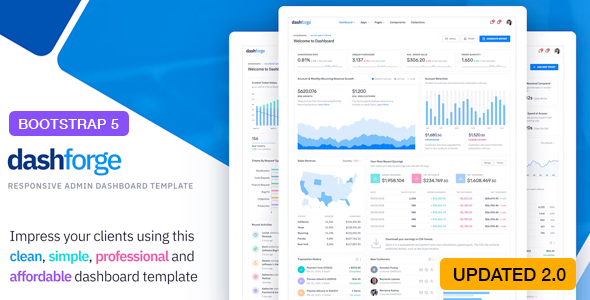
When you’re tasked with building a data-rich web application, an internal tool, or a complex SaaS dashboard, the foundation you choose determines how quickly you can launch and how polished the final product feels. The Dashforge – Responsive Admin Dashboard Template from ThemeForest is a purpose-built solution for developers and designers who need to skip the repetitive groundwork and jump straight into creating a professional, feature-complete admin interface. Built on the latest Bootstrap framework and packed with over 500 reusable components, this template is engineered to handle everything from simple analytics views to full-scale application backends. Whether you are a freelance developer juggling multiple client projects or an in-house team looking to standardize your product’s UI, Dashforge provides the structural integrity and visual flexibility required to deliver a premium user experience without the six-month build time.
Key Features
The Dashforge admin dashboard template is not just a collection of HTML pages; it is a comprehensive UI toolkit. The developer, themepixels, has compiled a feature set that addresses the most common—and complex—needs of modern web applications. Below is a breakdown of the core components that make this template a standout investment.
- Latest Bootstrap 5 Framework: Built on the most current version of Bootstrap, Dashforge ensures you are working with modern, standardized code. This guarantees better performance, improved browser compatibility, and access to the latest utility classes and components.
- Fully Responsive Layout: Every page, widget, and navigation element is meticulously crafted to adapt to any screen size. From mobile phones to widescreen monitors, the dashboard maintains its usability and aesthetic integrity.
- SASS Powered: For developers who require granular control, the template includes SASS source files. You can easily customize variables, create themes, and compile your own CSS without fighting the framework.
- Horizontal and Vertical Navigation Layouts: Choose between a classic left sidebar or a modern top navigation bar. This flexibility allows you to match the template to your specific application structure and user expectations.
- 4 Pre-built Dashboard Templates: Start with a fully designed dashboard, sales analytics view, or a specialized layout. These are not just placeholders; they are production-ready examples that can be repurposed instantly.
- 1000+ Font Icons: A massive icon library is included, ensuring you never have to search for the perfect glyph. These icons are integrated seamlessly and are easy to implement.
- 500+ Reusable Components: This is the core value proposition. The template includes a vast library of buttons, cards, forms, modals, alerts, and advanced UI elements that are enhanced for admin use cases.
- 3 Navigation Skins & Skin Customizer: Personalize the look and feel with multiple navigation themes. The built-in skin customizer allows users or developers to switch styles on the fly, which is perfect for white-label solutions.
- Pre-built Apps (Mailbox, Chat, Contacts, File Manager, Calendar): Instead of building these complex modules from scratch, Dashforge includes functional layouts for them. This is a massive time-saver for collaboration tools or enterprise dashboards.
- Pre-built Pages (Signin, Signup, Error Pages): Authentication flows and error states are often overlooked. This template covers them with polished, user-friendly designs that match the rest of the system.
- Creative Charting Options (Flot, Morris, Chart.js, Sparkline, Peity): Data visualization is critical for admin panels. The integration of multiple charting libraries gives you the freedom to choose the best tool for your data rendering needs.
- Form Validation & Wizards: Complex forms are made easy with integrated validation logic and multi-step wizard layouts. This is essential for settings pages, onboarding flows, and checkout processes.
- WYSIWYG Editor: A rich text editor is included, allowing users to format content directly within the application—perfect for CMS backends or support ticket systems.
- Tables and DataTables: Manage large datasets efficiently with styled tables and advanced DataTables configurations for sorting, searching, and pagination.
- Google Maps, Leaflet Maps, jQVMap: Whether you need location tracking or geographic analytics, the template supports multiple mapping libraries to suit your preference.
Who Is This For? Use Cases
The Dashforge – Responsive Admin Dashboard Template is a versatile asset, but it shines brightest for specific types of projects and professionals. Its depth ensures that it scales from a simple project to a complex enterprise system.
Web Developers and Freelancers
If you are a freelancer who builds websites or web apps for clients, time is your most valuable currency. Instead of charging clients for 40 hours of UI development, you can deliver a superior product using Dashforge. The 500+ components and pre-built apps allow you to assemble a custom admin panel in days, not months. This template allows you to take on more projects and increase your profit margin while delivering a high-end aesthetic that justifies premium pricing.
SaaS Startups and Product Teams
For startups launching a new Software-as-a-Service product, the dashboard is the face of the user experience. Dashforge provides the polished, professional look that instills user confidence. The inclusion of pre-built apps like Chat and File Manager means you can prototype new features quickly or even launch them as part of your MVP. The SASS structure allows your team to implement your brand colors and typography instantly, ensuring the dashboard feels like a native part of your product.
Data Analysts and Backend Managers
Applications that handle heavy data need interfaces that are dense but readable. The creative charting options (Chart.js, Flot, Morris) integrated into Dashforge allow analysts to visualize trends without needing a separate BI tool. The DataTables integration ensures that large CSV exports or database queries are displayed in a user-friendly, sortable format. This makes the template ideal for internal management systems, logistics tracking, and financial reporting tools.
UI/UX Designers
Designers who need to move from static mockups to interactive prototypes will find Dashforge invaluable. The Skin Customizer and multiple navigation layouts allow you to present different design directions to stakeholders in a live environment. You can quickly test how a vertical sidebar performs versus a horizontal navigation without writing a single line of custom CSS.
Technical Details & Compatibility
Understanding the technical stack is crucial before committing to a template. Dashforge is built with a modern, maintainable architecture that aligns with current web standards.
- Core Framework: Built on Bootstrap 5 (as updated in v2.0.0). This ensures you are using the latest stable release with no legacy bloat.
- Scripting: jQuery is used for enhanced UI interactions, making it accessible for developers who are not yet fully versed in vanilla JavaScript frameworks.
- Preprocessing: SASS is used for CSS, allowing for variable-driven theming and efficient code management.
- Build Tools: Includes GULP for task automation, making it easy to compile assets and streamline your workflow.
- Icons: Includes Remixicon (added in v2.0.0) alongside other icon fonts, providing a modern and consistent icon set.
- Version History: The template has a clear changelog, showing updates from v1.0.0 to v2.0.0, with significant upgrades such as the transition to Bootstrap 5 and the addition of a Dark version in v1.1.0.
- Dark Version: A dark mode is available, offering an alternative aesthetic that is popular for developer tools and night-time usage.
This stack ensures that the template is lightweight, fast to load, and easy to integrate into any PHP, Ruby, Python, or Node.js backend environment.
Pros and Cons
No product is perfect for everyone. Here is an honest assessment of the strengths and potential limitations of Dashforge to help you make an informed decision.
Pros
- Exceptional Value for Money: At just $14.00, the sheer volume of components, apps, and pages included is staggering. This is a one-time payment for a resource that would cost thousands in development hours.
- Rapid Development: The pre-built apps (Mailbox, Chat, Calendar) are ready to be wired to your backend, drastically reducing the time to market for new features.
- Flexibility in Design: With vertical and horizontal navigation, 3 skins, a skin customizer, and a dark mode, you have significant control over the final look without touching code.
- Comprehensive Documentation & Structure: The use of SASS and GULP indicates a professional code structure that is easy to maintain and extend.
- Trusted Developer: themepixels is an established author on ThemeForest, and the sales volume (2,451 sales) indicates a proven track record of quality and customer satisfaction.
Cons
- jQuery Dependency: While jQuery is still widely used, modern developers often prefer vanilla JS or frameworks like React/Vue. If you are building a React app, this template requires more adaptation than a React-native admin kit.
- Demo Images Not Included: As noted in the description, the stock images used in the demo are not part of the download. You will need to source your own images for testing or production.
- Learning Curve for Customization: While the skin customizer is great, deep customization via SASS requires a working knowledge of the build system (GULP) and the Bootstrap variable structure.
Frequently Asked Questions
Before you click the “Buy Now” button, here are answers to the most common questions potential buyers have about this admin template.
Is Dashforge compatible with the latest version of Bootstrap?
Yes. The template was updated to version 2.0.0 specifically to integrate Bootstrap 5. This means you are getting the most modern version of the framework, which includes better performance, improved form controls, and the removal of the jQuery dependency for Bootstrap’s core JavaScript (though the template itself still uses jQuery for its specific plugins).
Does this template include support for a dark mode?
Absolutely. The v1.1.0 changelog specifically notes the addition of a Dark version. This is not just a CSS filter; it is a fully designed alternative skin that maintains the professional aesthetic of the light mode, making it perfect for applications that require a night-time or low-light user interface.
Can I use this template to build a SaaS application with a chat feature?
Yes, that is one of its primary use cases. The template includes a pre-built Chat app layout. This provides the UI structure for a messaging interface, including contact lists, conversation threads, and message input areas. You would need to connect this front-end to your backend services (like WebSockets or Firebase) to make it functional, but the hard part of the UI design is already done.
Final Verdict
The Dashforge – Responsive Admin Dashboard Template stands out in a crowded market because it goes beyond simple “pages” and offers a complete application framework. With over 2,400 sales, it has clearly proven its reliability and quality to a wide audience of developers. The combination of Bootstrap 5, SASS, and 500+ components makes it a powerful tool for anyone serious about building professional web applications efficiently. The inclusion of pre-built apps and a dark mode further solidifies its position as a top-tier choice for 2024 and beyond.
If you are ready to eliminate the grunt work of dashboard development and focus on the unique features of your product, this template is a smart investment. For a one-time fee of $14.00, you are not just buying a template; you are buying hours of your life back and gaining a competitive edge in your project delivery. Don’t start your next admin panel from a blank canvas—build it on the solid foundation of Dashforge. Click here to download Dashforge and transform your development workflow today.